Simrad GC80/85 Compact MK2 Gyro Compass
988-12718-003 56
Activating external/internal reset of external/internal
buzzer alarm
In some installations, it is required to have the Gyro system connected to
an external alarm panel (central bridge alarm panel). To be able to have
the right handshake available from GC80/85 systems some DIP switches
must be set.
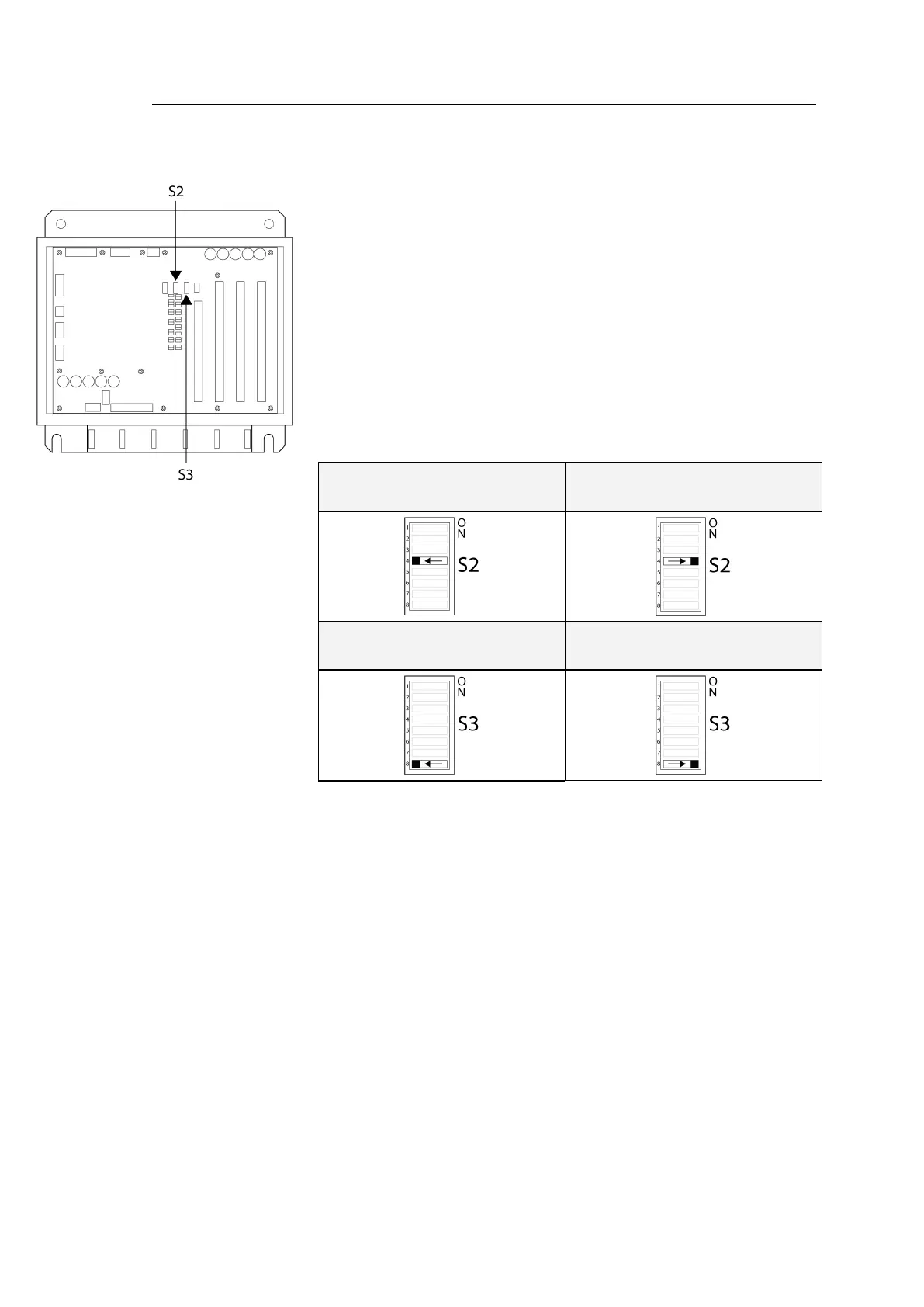
The external buzzer reset uses the same input as pendulum function. That
means the pendulum function must be disabled. DIP switch no.4 on S2 on
the ICNT board has to be set to OFF to activate the EXTERNAL BUZZER
STOP input.
The external buzzer stop output is the same as RUNNING CONTACT (Gyro
1) output. To use output as external buzzer stop to external alarm panel,
DIP switch no.8 on S3 on the ICNT board must be set to ON to activate
EXTERNAL BUZZER STOP output function.
External buzzer stop enabled
(Pendulum switch disabled)
Pendulum switch enabled
External buzzer stop disabled
(Gyro Running cont. enabled)
External buzzer stop enabled
For a complete list of DIP switch settings, refer
DIP SWITCH SETTINGS
,
page 101 onwards.



 To Next Page