Simrad GC80/85 Compact MK2 Gyro Compass
988-12718-003 48
2 Disconnect the cable’s grounding wires (labelled FG) from the
Control panel and from the ICNT board.
3 Disconnect the plugs and remove the Control panel’s cable(s).
4 Loosen the 4 nuts holding the Control panel and remove the panel.
These nuts are to be re-used when fastening the Control panel to
the flush mounting panel.
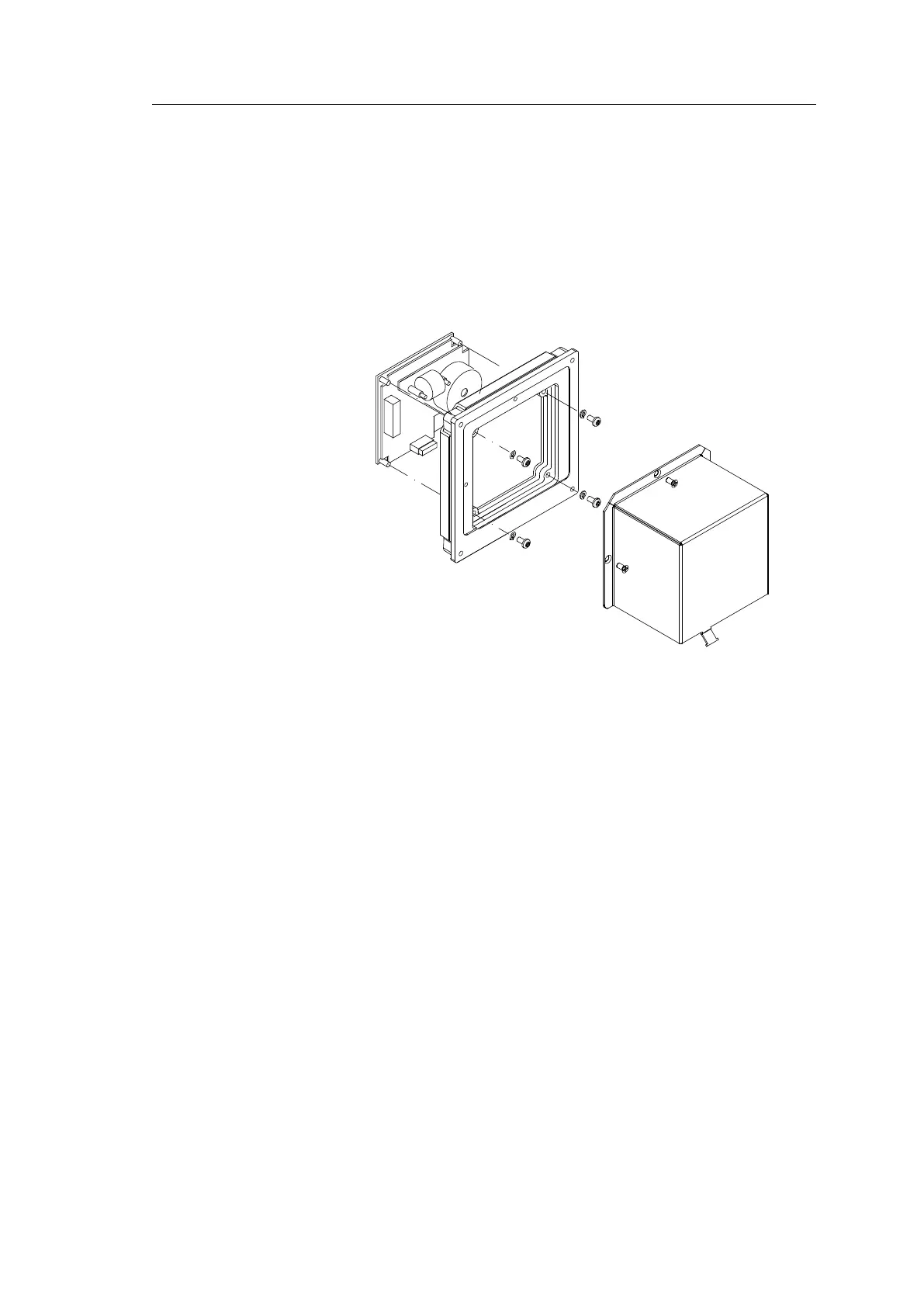
5 Insert the Control panel in the flush-mounting kit from the front as
shown in the figure. Fasten the panel using the 4 nuts.
6 Insert the plug(s) on the optional Control panel cable(s) and
connect the grounding wire.
7 Mount the cover on the back side.
8 Fasten the cable(s) to the cover using a wire strip.
9 Slide the Control panel cable through the cable inlet, insert the
plug(s) in the ICNT board and connect the grounding wire. Secure
the cable(s) to the Control unit using a wire strip.
10 Insert the blind cover in the Control unit by using the 4 bolts
included in the kit.



 To Next Page