•
•
•
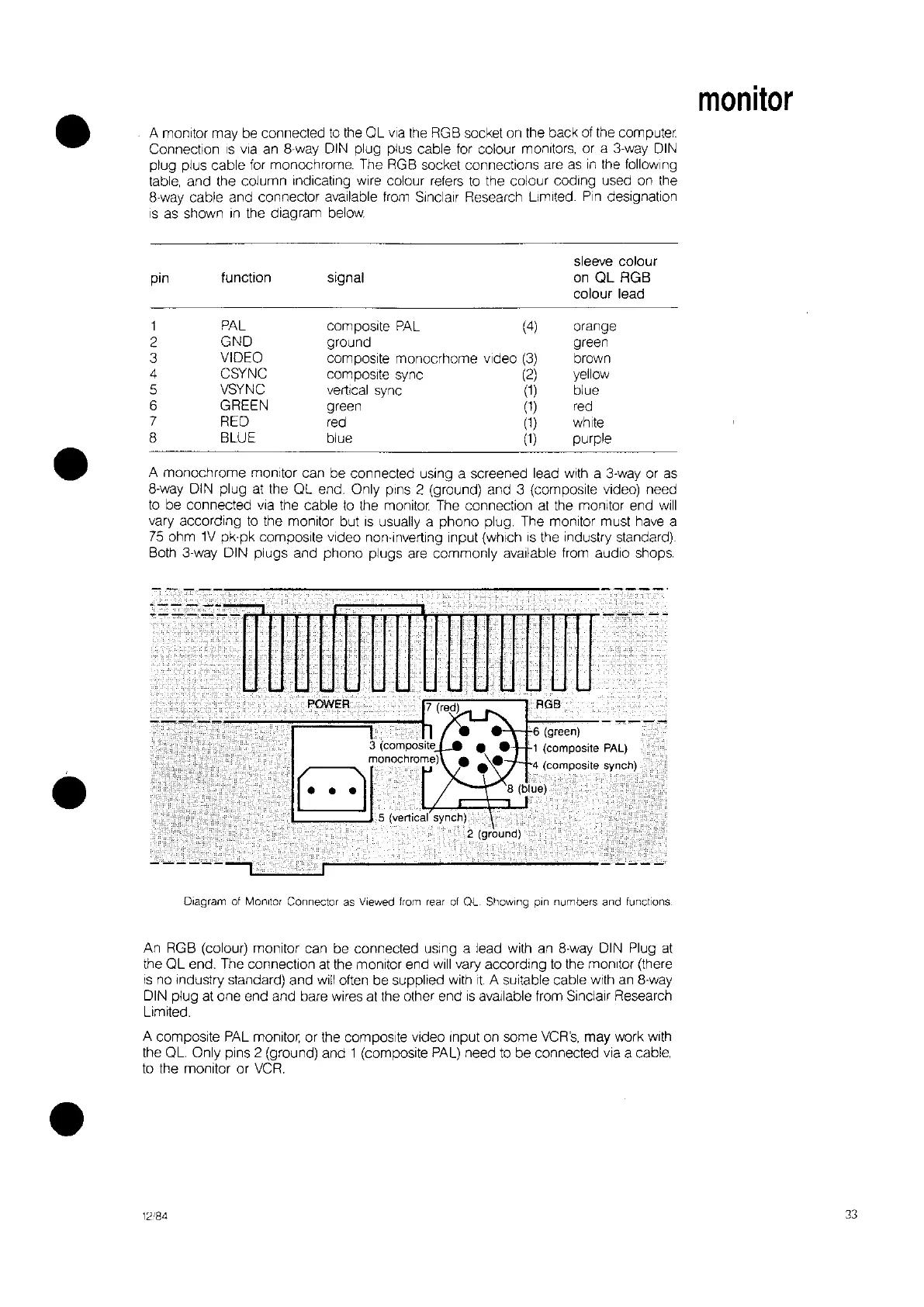
A monitor may be connected
to
the OL
via
the
RGB socket
on
the back
of
the computer.
Connection
IS
via an
8way
DIN
plug plus cable for colour monitors, or a 3-way
DIN
plug plus cable
for
monochrome. The RGB socket connections are
as
in
the following
table, and the column Indicating
wire colour refers
to
the colour coding used
on
the
8-way cable and connector available
from
Sinclair Research limited.
Pin
deSignation
IS
as shown
In
the diagram
below.
sleeve colour
pin
function signal
on
QL
RGB
colour lead
1
PAL
composite
PAL
(4)
orange
2
GND
ground green
3
VIDEO
composite monocrhome video
(3)
brown
4
CSYNC
composite sync
(2)
yellow
5
VSYNC
vertical sync
(1)
blue
6 GREEN
green
(1)
red
7
RED red
(1
) white
8 BLUE blue
(1)
purple
A monochrome monitor can be connected using a screened lead with a
3-way
or
as
8-way DIN plug
at
the OL end. Only pins 2 (ground) and 3
(compOSIte
video) need
to
be connected via the cable
to
the
monitor.
The connection
at
the monitor end
will
vary according
to
the monitor but
IS
usually a phono plug. The monitor must have a
75
ohm
1V
pk·pk composite video non-inverting Input (which
IS
the Industry standard)
Both 3-way DIN plugs and phono plugs are commonly available from audio shops.
Diagram
of
Monitor
Connector
as
Viewed
from
rear
of
OL Showing
pin
numbers and
functions
An RGB (colour) monitor can be connected
uSing
a lead with an 8·way DIN Plug
at
the
QL
end. The connection at the monitor end
will
vary according
to
the monitor (there
is
no Industry standard) and
will
often be supplied with
It.
A suitable cable with
an
8-way
DIN plug at one end and bare wires at the other end
is
available from Sinclair Research
limited.
A composite
PAL
monitor, or the composite video Input
on
some
VCR's,
may work with
the OL. Only pins 2 (ground) and 1 (composite
PAL)
need
to
be connected via a cable,
to
the monitor or
VCR.
12"84
monitor
33


 To Next Page