7:3
BROWSE FILE MANAGER
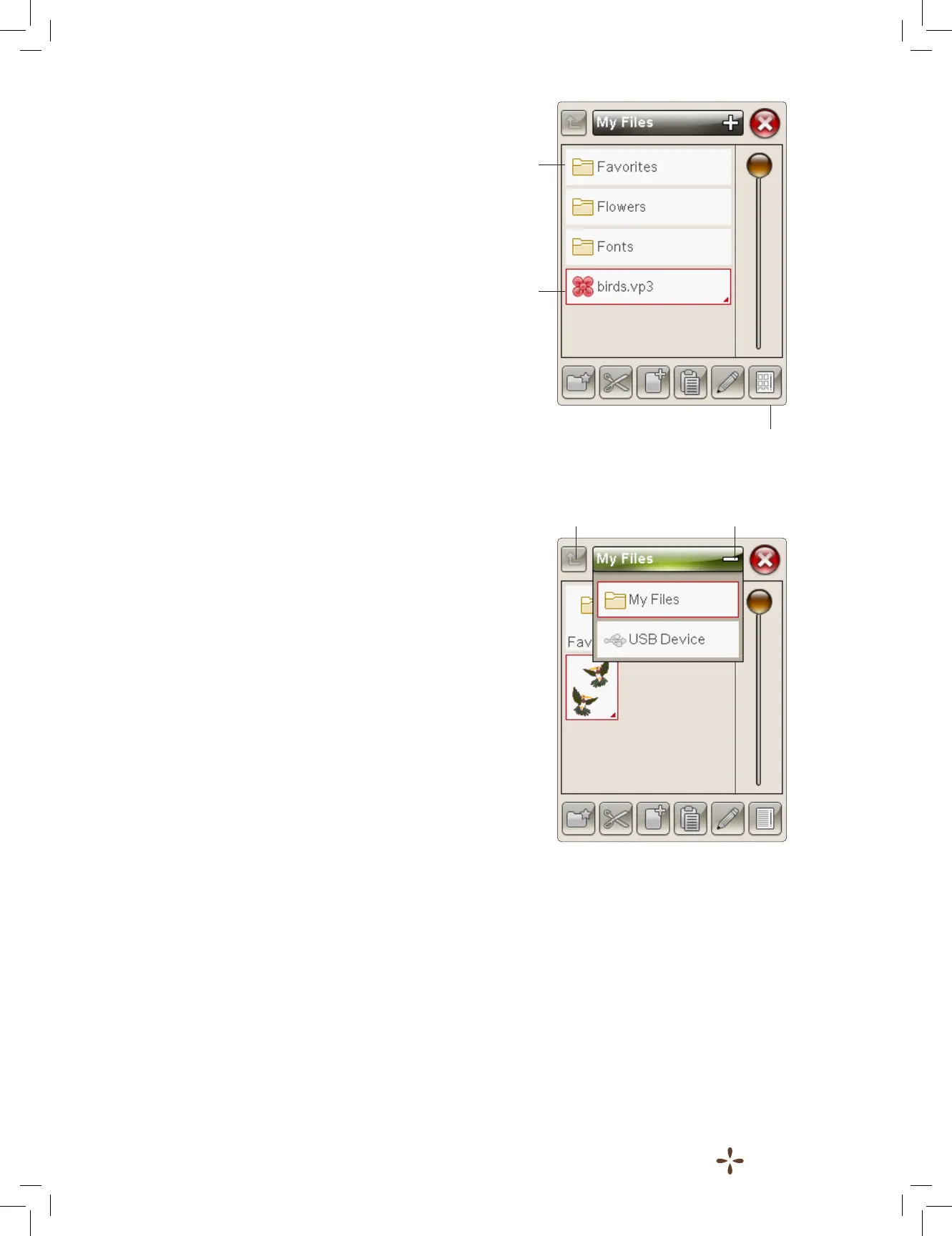
When File Manager is open you can reach your My Files folder
and your USB stick (if you have one connected).
Touch any of these icons to display their contents in the
selection area.
LIST VIEW/THUMBNAIL VIEW
Touch the List/Thumbnail view icon to show the les in the
current folder listed in alphabetical order. For each le, le
name and type will be displayed. Touch the List/Thumbnail
view icon again to switch back to Thumbnail view.
MY FILES
Fill My Files with designs, your customized designs, or fonts.
Create folders to keep your les organized.
This chapter will discuss how to arrange My Files so that you
can nd your favorites easily.
USB
The USB icon is only active when a device is connected to the
machine USB port.
OPEN A FOLDER
Touch & Hold on the folder to open it. The contents of the
folder will be shown in the selection area.
OPEN A FILE
Touch & Hold on the le to open it. Use the scroll bar or the
arrows to scroll down in your File Manager. You can only open
one le at a time.
MOVE UP ONE FOLDER LEVEL
Use the Move up one folder level icon to step up through the
levels of folders. You can step up all the way to the rst level.
In the selection area you will see the les and folders for each
level as you step through.
List/Thumbnail view
Move up one
folder level
Drop Down
Menu
Folder
Design le











 To Next Page