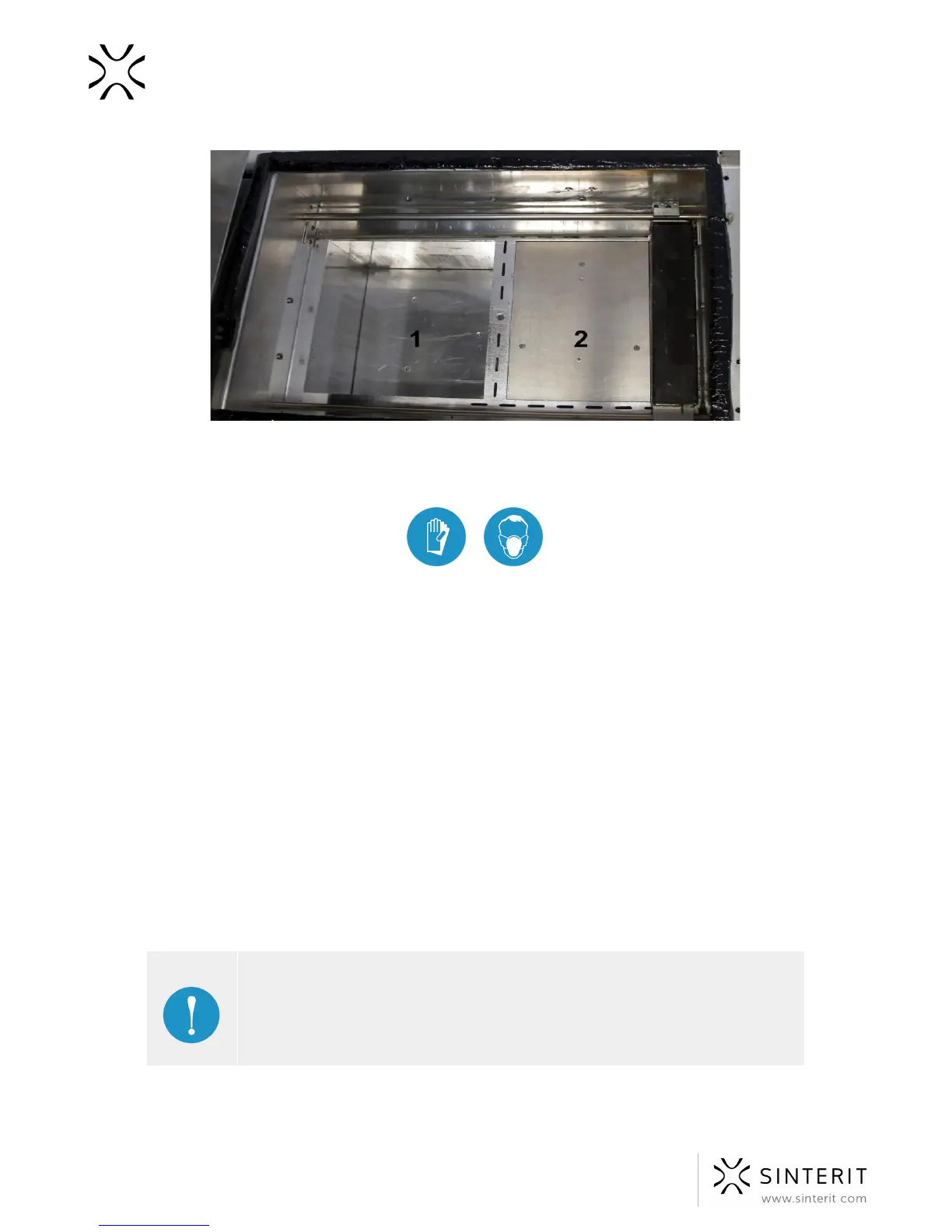
Image. Positioned Beds, ready to be filled with powder and the base position for the Recoater.
3. Put on the protective clothing included in the set (gloves, mask, glasses).
4. Add the PA12 Smooth Print Ready Powder (container no. 2) to the Source Bed
(number 1 in the image above), 6[L] of powder maximum. Make a little pile of the
powder and press it gently, but firmly (using powder trowel f.ex). Act carefully in order
for the powder not to go airborne (it is recommended to use a spatula for adding the
powder).
5. It is also recommended to add a little bit of the Print Ready Powder on the surface of
the Print Bed (number 2 in the picture above). This will make creating the first layer
during positioning faster.
6. Clean the infrared heaters (white and red ones) by gently blowing on them with clean
compressed air. Use an alcohol wipe to carefully clean the vision windows of the
camera and pyrometers, as well as the laser’s protection glass.
7. In order to precisely cover the Print Bed with powder and even out the layers, go to
the MECHANICS tab and press START LEVELING. The process will last until the
Recoater processes approximately 25 layers of powder.
8. The operation may be finished quicker: when the powder covers the surface of the
Print Bed uniformly we can press STOP LEVELING.
IMPORTANT!
Remember: The right side of the printer (above the Overflow Bin) is the base
position for the Recoater. That is why it is possible for it to move above the
Beds to its base position despite pressing the STOP LEVELING button.



 To Next Page