8. Check whether the Print Bed is levelled in reference to the case (preparing initial
layers). If necessary, press MECHANICS//PRINT//▲ to level out.
9. Lift the Source to about 1 layer (MECHANICS//SOURCE ▲).
10. Move the Recoater to the right (MECHANICS//RECOATER//►). It will transfer the
powder to the Print Bed, slowly covering the surface.
11. Move the Recoater to the left (MECHANICS//RECOATER//◄).
12. Repeat steps 8-10 until the powder covers the entire surface of the Print Bed.
13. After the Beds are leveled and the powder covering processes is complete, close the
lid and press ►START in the PRINT tab.
C. Information and tasks while printing
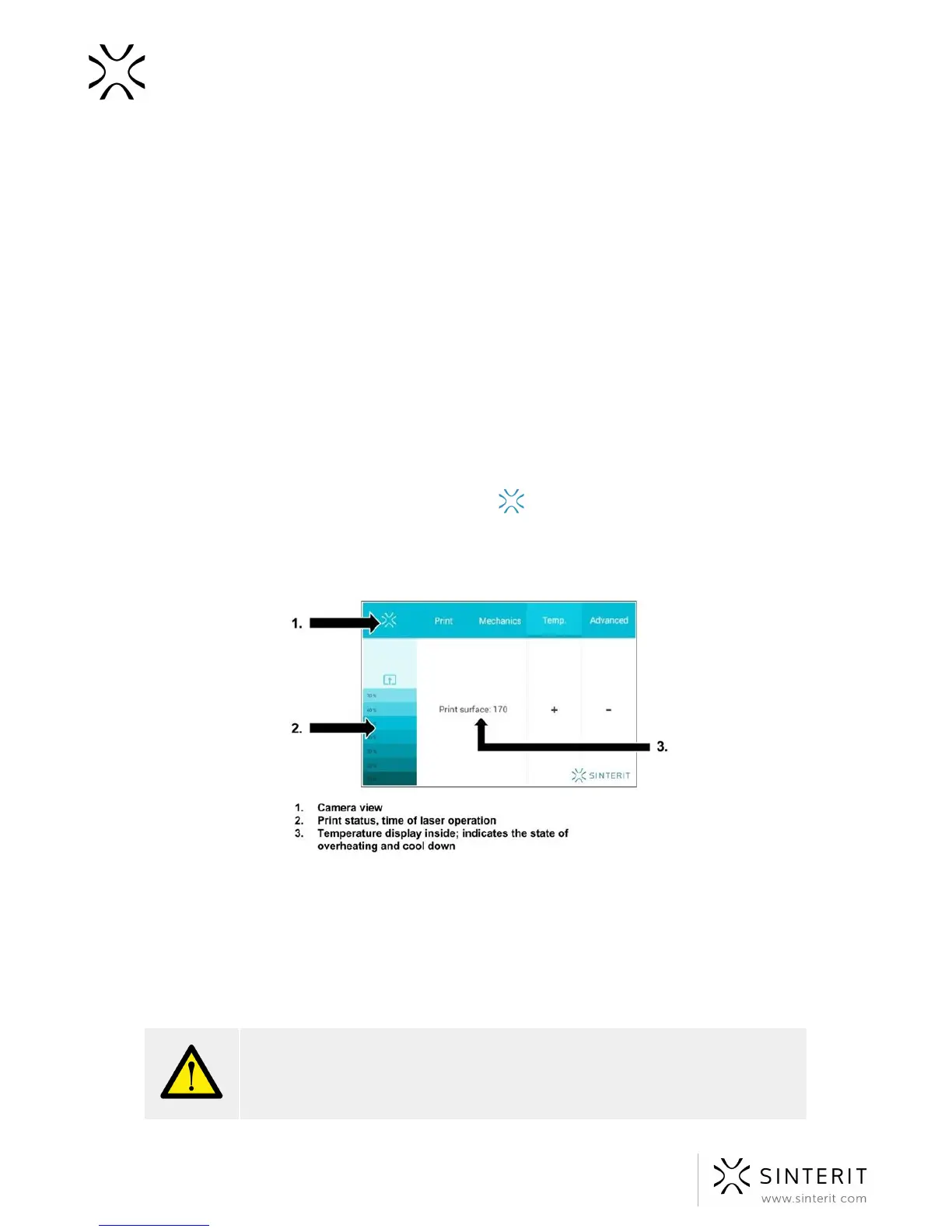
1. The main screen of the graphical user interface displays (in real time) the status of the
print (left side of the screen), current temperature of the Beds, warming and cooling
states (tab TEMP, see image) and the remaining time of laser sintering.
2. Clicking on the SINTERIT logo on the screen (upper left corner, see image)
activates the internal camera view, which will be displayed for 10 seconds. After that the
display will return to the main screen.
Image. The main screen during printing.
3. During printing, if visible problems appear (surface changes), observed by the internal
camera or the top visor window, the user can fine tune the temperature (TEMP +/- 5 [
o
C]).
4. While the printer is working do not touch other elements besides: LCD, safety button,
USB port and power switch.



 To Next Page