5. To install the panel, perform the above actions in reverse order.
D. Replacement of infrared heating units placed around the
protecting glass.
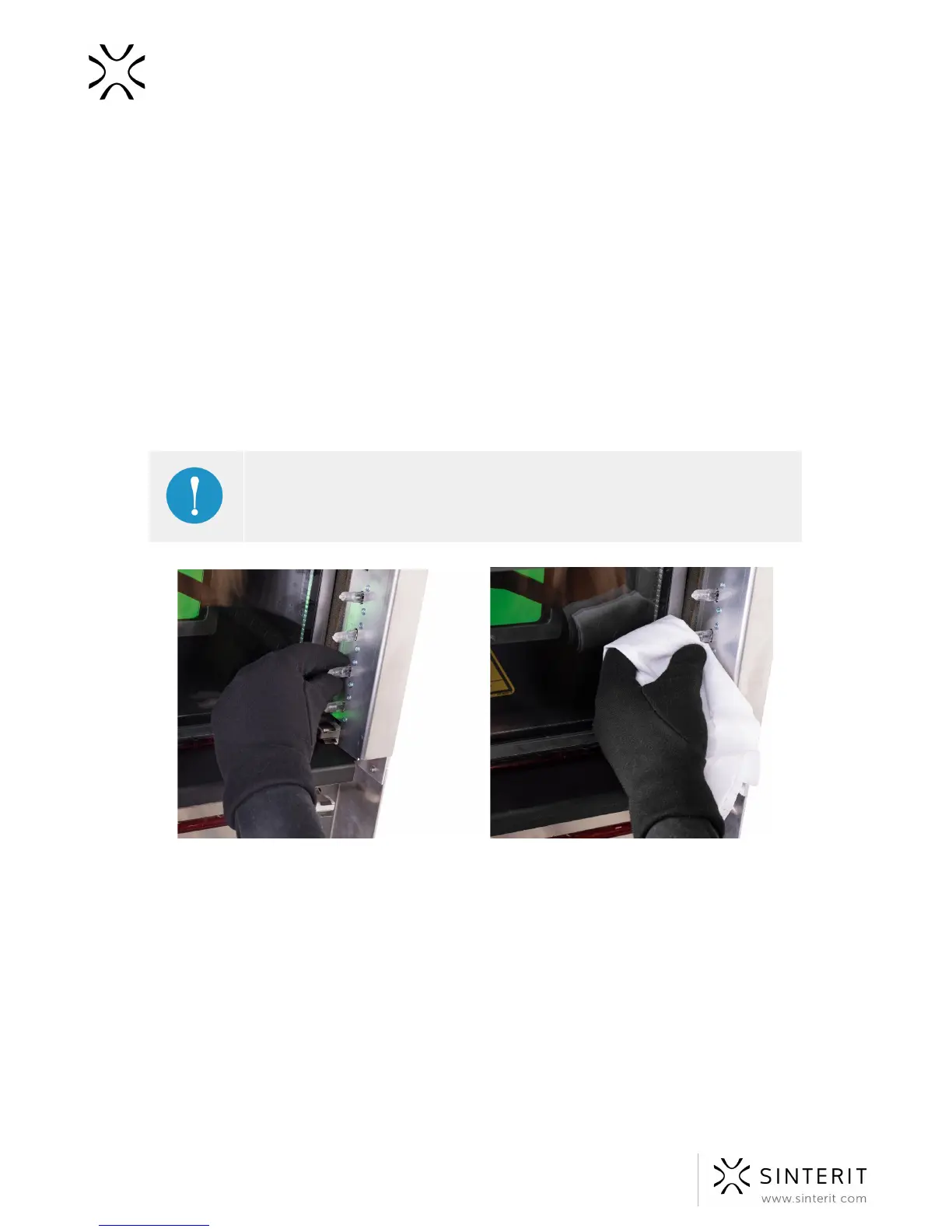
1. Wear protective gloves or use a clean cloth/paper towel while replacing the heating
unit. Do not touch the heaters with your hands.
2. Make sure the heaters are not hot. Carry the operation out when the device is cold
and switched off.
3. Gently grab the heater with your fingers and remove it by moving it parallelly to its
slots. Do not twist it in any direction, it may cause damage to the heater's slots.
4. Insert the new heater to the slot.
IMPORTANT!
If you will touch heater by your hand, remove it, clean it and install one more
time, using gloves or a clean cloth.
Image. Correct removal of the old and installing the new infrared heaters.
E. Changing the Recoater wire
1. Clean the printer’s chambers (Source Bed and Print Bed).
2. Go to ADVANCED MODE - see chapter 10.
3. Move the Recoater left to the position of the Source Bed
(MECHANICS//RECOATER//◄) in order to have access to the screws holding the
Recoater’s cover (on the right side of the Recoater).
4. Dismantle the casing (the black element on the Recoater):
a. clean any possible remains of the powder from the insides of the screws
(for example using the chisel included in the set or some other sharp tool),
66 Sinterit Lisa USER MANUAL



 To Next Page