64 57 498 D3543
D3543.201.01.05.02 08.2016
289
Sirona Dental Systems GmbH 5Care, cleaning and maintenance by the practice team
Operating Instructions INTEGO 5.6Sanitizing
båÖäáëÜ
Displays in case of incomplete sanitation
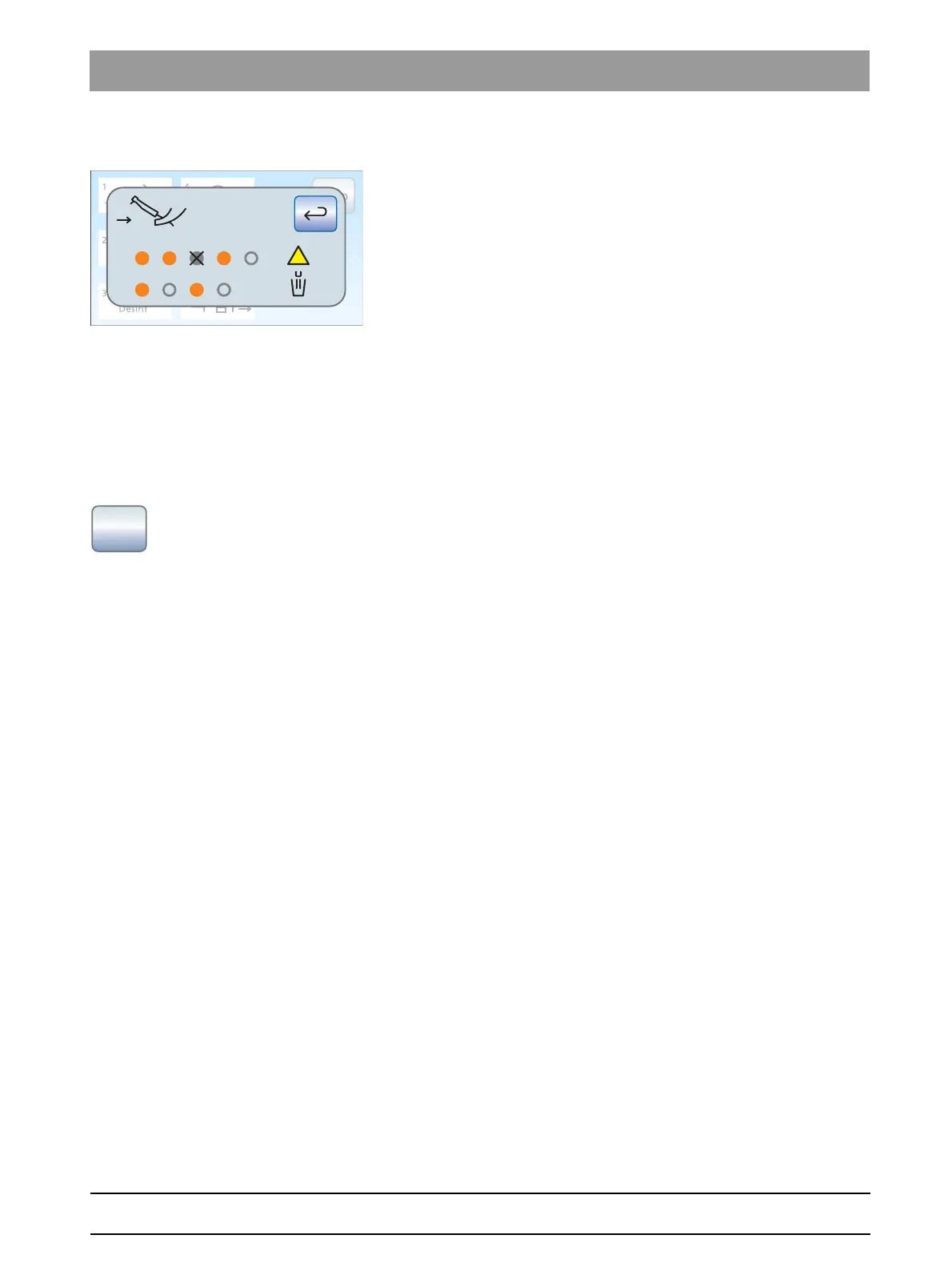
The sanitation dialog detects whether the sanitation of all instruments and
the tumbler filling was completed. Errors that occurred during sanitation
will be displayed on the touchscreen as follows:
● Crossed-out, solid gray circle: The instrument was excluded from
sanitation before it had been filled with DENTOSEPT P disinfectant
● Orange circle with warning triangle: The instrument or tumbler filling
was not (sufficiently) rinsed; the water lines still contain disinfectant
➢ In the latter case, rinse the affected instruments and tumbler filling
manually after sanitation.
Canceling the sanitizing process
Sanitation can be canceled during some sanitation phases, e.g. if the
treatment center must be switched back on before the 24 hours have
expired. The
Stop
key shows whether cancellation is possible.
✔ The sanitizing process has started.
➢ Touch the
Stop
key on the touchscreen.
The sanitation process is canceled. If the water lines have not yet
been treated with DENTOSEPT P disinfectant (prior to sanitation
phase 3), the treatment center automatically proceeds directly to
sanitation phase 6. If the sanitation process is canceled during
the reaction time, the water lines are initially rinsed with water
(sanitation phase 5).
Cleaning the suction hoses
After sanitization, all suction hoses should also be chemically cleaned:
● If the treatment center is not equipped with the chemical suction hose
cleaning option, see "Cleaning suction system using cleaning
adapters in the cuspidor or an external container" [ → 242].
● If the treatment center is equipped with the chemical suction hose
cleaning option, see "Suction hose cleaning on the Comfort water
unit" [ → 237].















 To Next Page