SMART Board User’s Guide
3
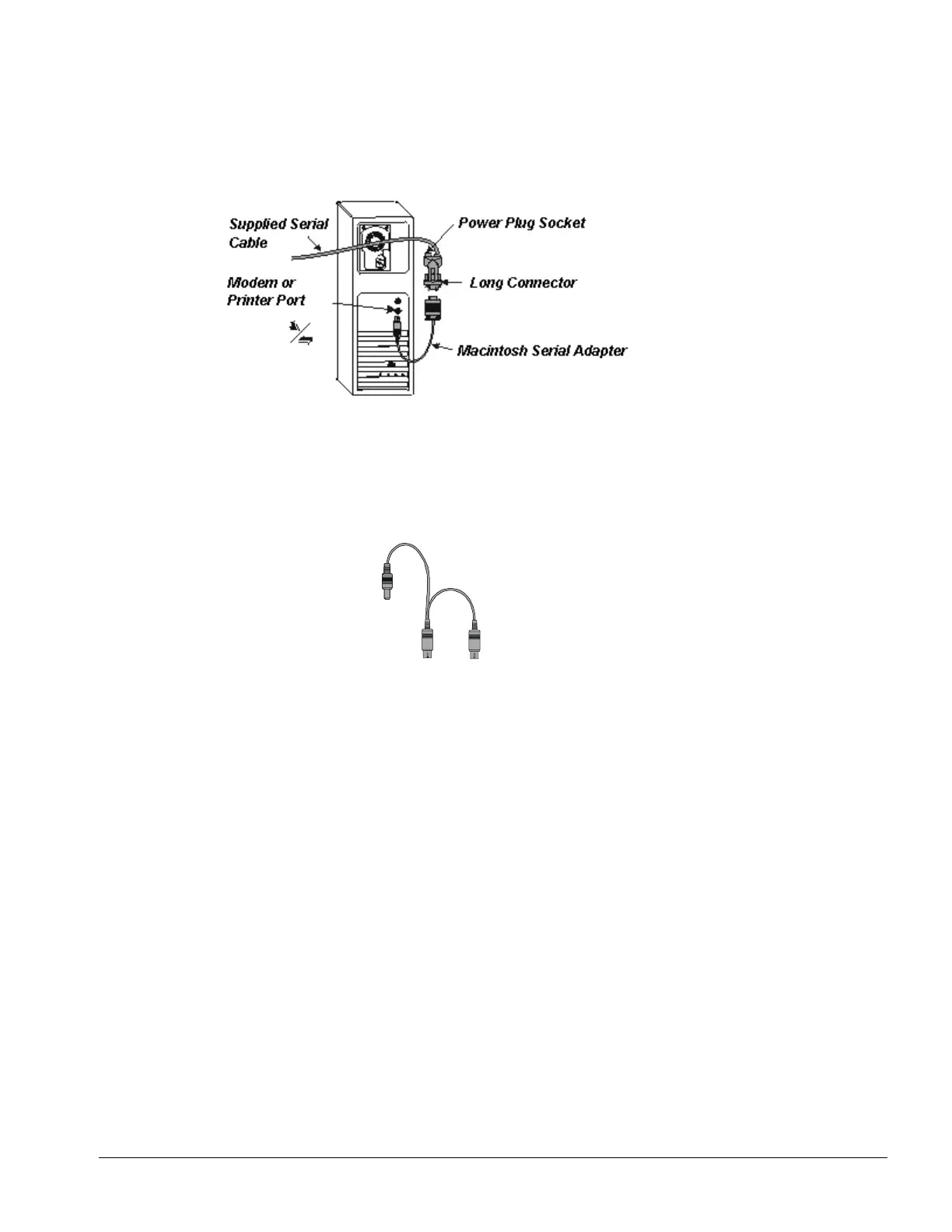
Macintosh Computer Serial Cable Setup
1 Connect the short DB9 end of the supplied serial cable to the nine-pin serial port on the underside of
the interactive whiteboard (see the figure on page 1).
2 Attach your Macintosh computer serial adapter to the long DB9 end of the serial cable and then insert
the barrel-shaped end of the adapter into the modem or printer port on your Macintosh computer.
3 With your Macintosh computer turned off, unplug the keyboard cable from the keyboard port.
4 Connect the power plug end of the SMART Keyboard Adapter to the power plug on the long DB9
connector.
5 Connect the other end to the vacated keyboard port.
6 Connect the keyboard connector to the SMART Keyboard Adapter.
SMART Keyboard Adapter
NOTE: If your Macintosh computer isn’t equipped with a keyboard port, connect an external power
supply to the power plug socket on the long DB9 connector. This external power supply must have
the following characteristics:
• 2.1 mm inner diameter — positive center post
• 5.5 mm outer diameter — negative outer barrel
• 6V DC to 12V DC output
• minimum 200 mA output



 To Next Page