Basic Operation
smart CX01 107
5.8.4 Recall
¾ Press the key to go to the last viewed channel.
5.8.5 EPG
The Electronic Program Guide is a comfortable tool, replacing a printed TV guide.
5.8.5.1 Single EPG
¾ Press the SEPP key of the remote
control.
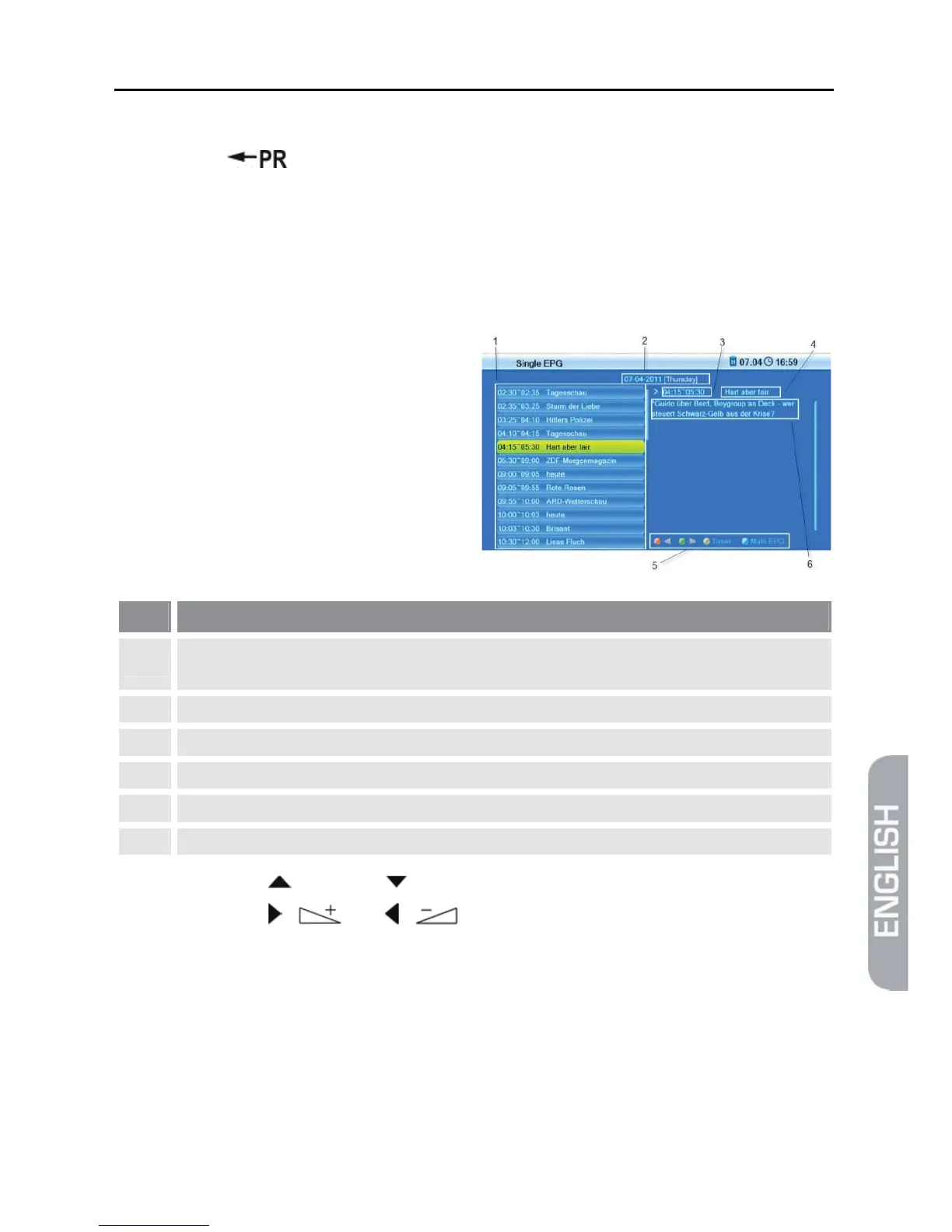
The window Single EPG
(information on one channel) will
open.
No. Description
1
All programs during a day, with start and end time; the selected program is color-
marked.
2 Date of day to which display applies.
3 Duration of current program (start time ~ end time).
4 Name of current program.
5 Illustration of the colored function keys and their functions.
6 Detailed information on the current program.
¾ Press the keys / PR+ and / PR- to display a later or earlier program (1).
¾ Press the keys / and / to page forward/back respectively one day
(2).
¾ Press the green function key to scroll down in the information section (6).
¾ Press the red function key to scroll up in the function area (6).
¾ Press the yellow function key to include channel, date, switch-on time and
duration of the marked program into a timer. The Timer Mode is set to Once by
default; Timer Service is set to Channel. You may change settings as described
in section 7.3.2, page 129.



 To Next Page