Basic Operation
108 smart CX01
¾ Press the blue function key to go to the window EPG.
¾ Press the EXIT key to close the window Single EPG and return to TV operation.
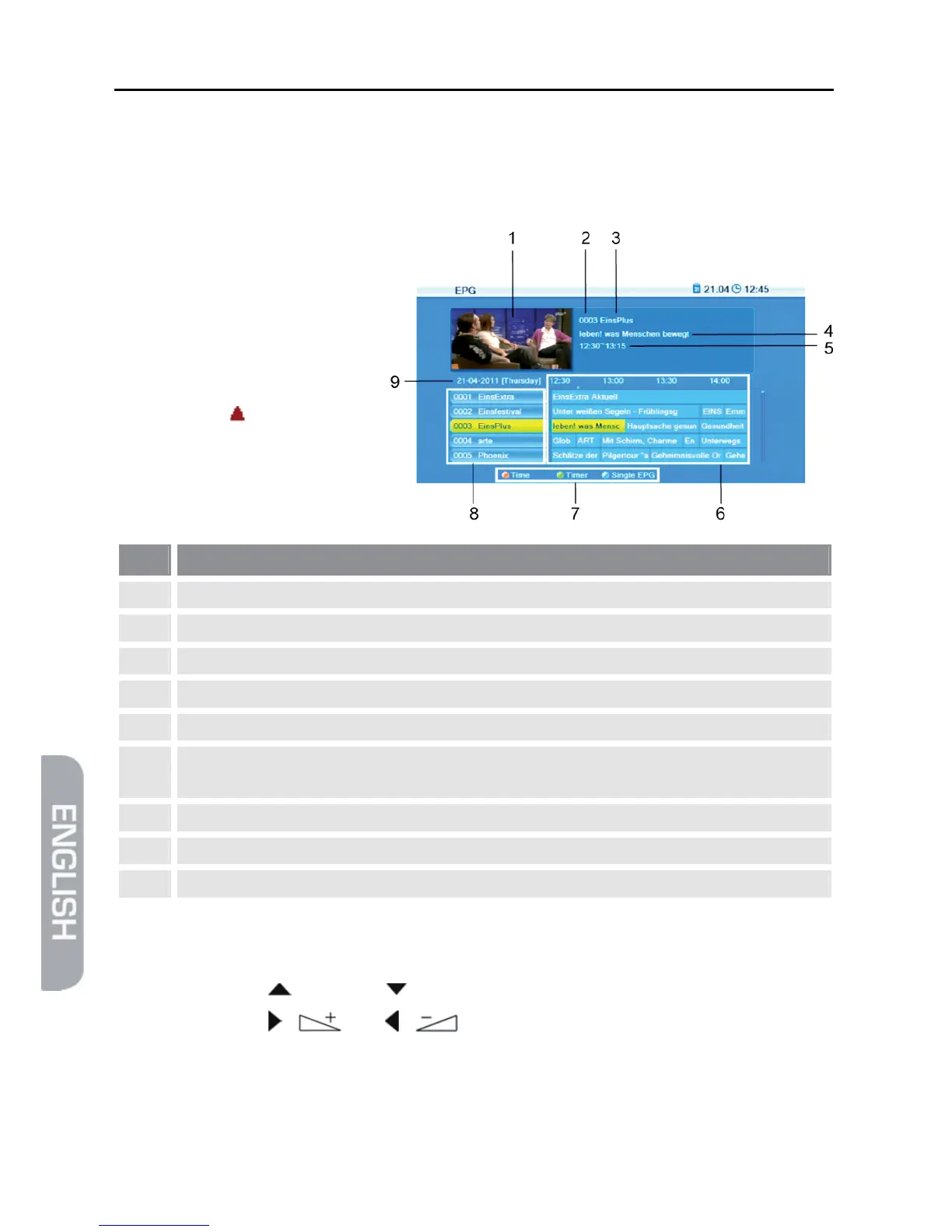
5.8.5.2 EPG
After pressing the blue func-
tion key in the window Sin-
gle EPG you will access the
window EPG with the follow-
ing display:
The current program is
marked with .
No. Description
1 Thumbnail of selected channel.
2 Channel number of selected channel.
3 Name of selected channel.
4 Name of selected program.
5 Start time and end time of selected program.
6
Current and next program with a timeframe of approx. 1.5 hours for the marked
channel.
7 Illustration of the colored function keys and their functions.
8 All channels included in the current channel list.
9 Day to which the displayed data apply.
¾ Press OK to open a window with detailed information on the selected program.
Press the OK key, the red function key or the EXIT key to close such window.
¾ Press the keys / PR+ and / PR- to flip through all available channels.
¾ Press the keys / and / to page back and forward respectively one
program within a channel.



 To Next Page