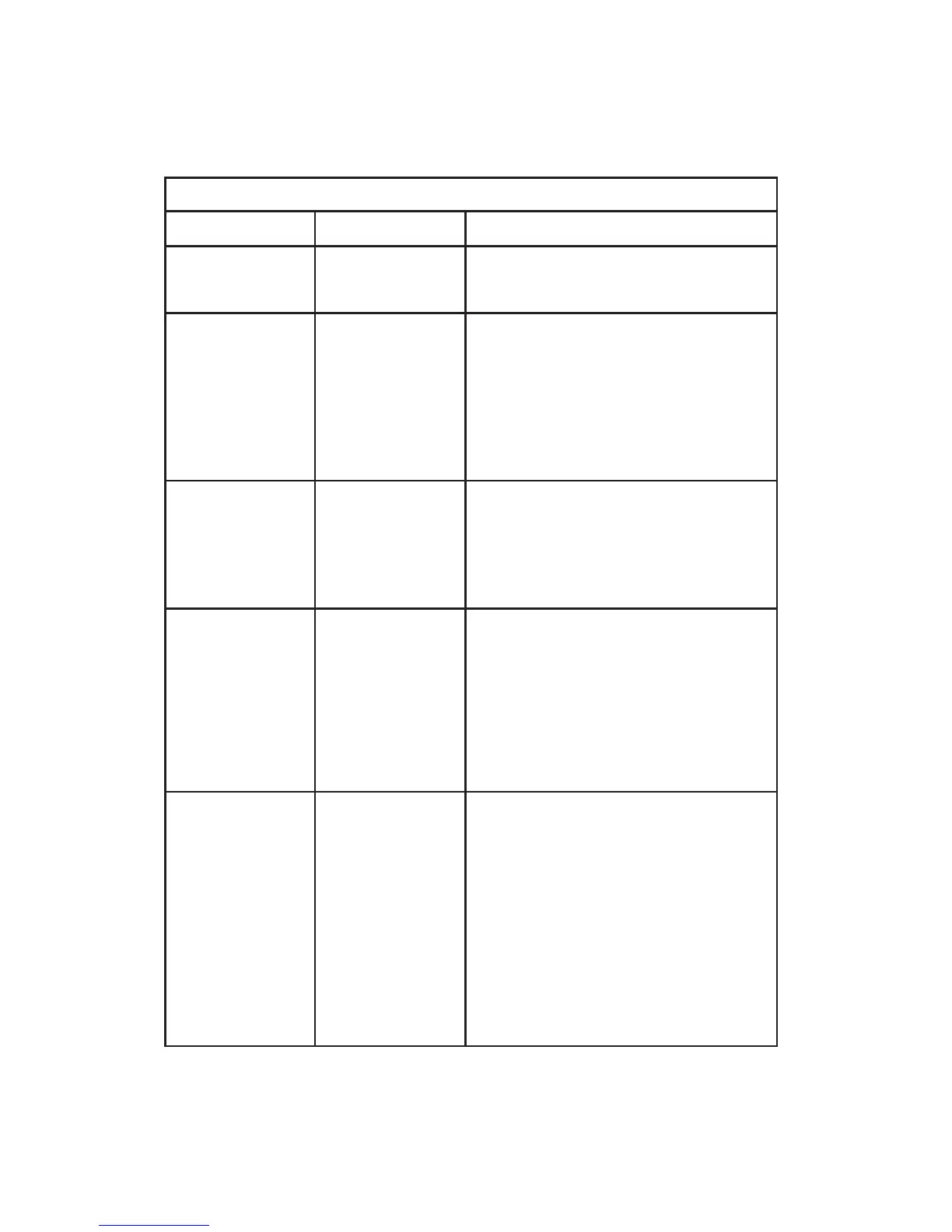
The function of these LEDs is summarized in the table below:
Note: With some network adapters, the Port Status LED will light only
after the board has been initialized with the appropriate driver soft-
ware (e.g., after IPX has been loaded in a NetWare environment).
TROUBLESHOOTING
40
Front Panel LEDs
LED Condition Status
Power Off No AC power
Green AC power on
NMM Off NMM not installed
Blinking Green Power-on diagnostics being
performed on NMM
Green NMM has passed power-on
diagnostics
Blinking Yellow NMM failed power-on diagnostics
Collision Off No collisions detected
(one per segment) Blinking Yellow A collision has been detected on
the network (i.e., the hub is
receiving data from two or more
nodes at the same time)
Segment Off Repeater group is connected to the
(one per segment) stack
Yellow Repeater group is segmented
(i.e., isolated from rest of stack)
Green Repeater group is combined with
other groups within the hub
(Models 3312TA and 3326TA)
Port Status Off Port not connected or wiring is
(one per port) faulty
Green:
RJ-45 / ST Link between hub and attached
device is good
BNC / AUI Loopback function is working
Blinking Green Packet data is originating from
(Source) this port
Yellow Port is partitioned
(Partition)








 To Next Page