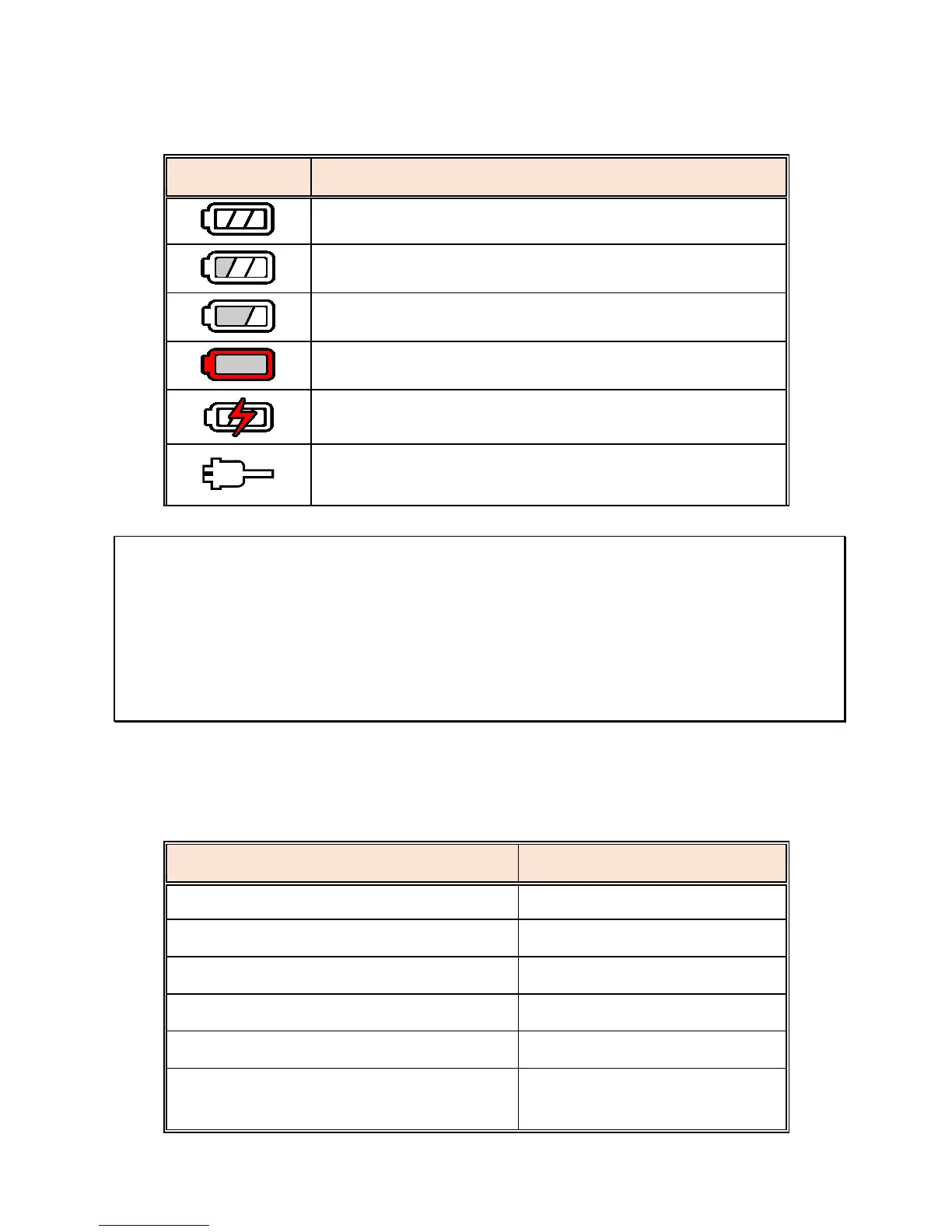
2.5.1 Battery Status Indicator
Full battery power.
2/3 battery power.
1/3 battery power.
Out of battery power.
Battery is charging.
Connect the car adapter to charge the battery,
until the battery is fully charged.
Note:
1. To avoid equipment overheating and possible catastrophic damage to the battery,
please only use the supplied car adapter. Do not use any other brand of car adapter,
any damage caused by using any other adapter than the one supplied will void your
products warranty.
2. Please note, if the environmental temperature reaches 45°C or above, the car adapter
can still supply power to device, but it will not charge the Lithium-ion battery. This is a
characteristic of Li-polymer and is not a malfunction.
2.6 LED Ind
icator
Power off, battery charging
Power off, battery full charged
Power on, battery charging
Power on, battery full charged
Standby / Standby with screen off
Recording/ Recording with screen
off
DVR-4/5 HD Gen2 V1.2 EN 04/18



 To Next Page