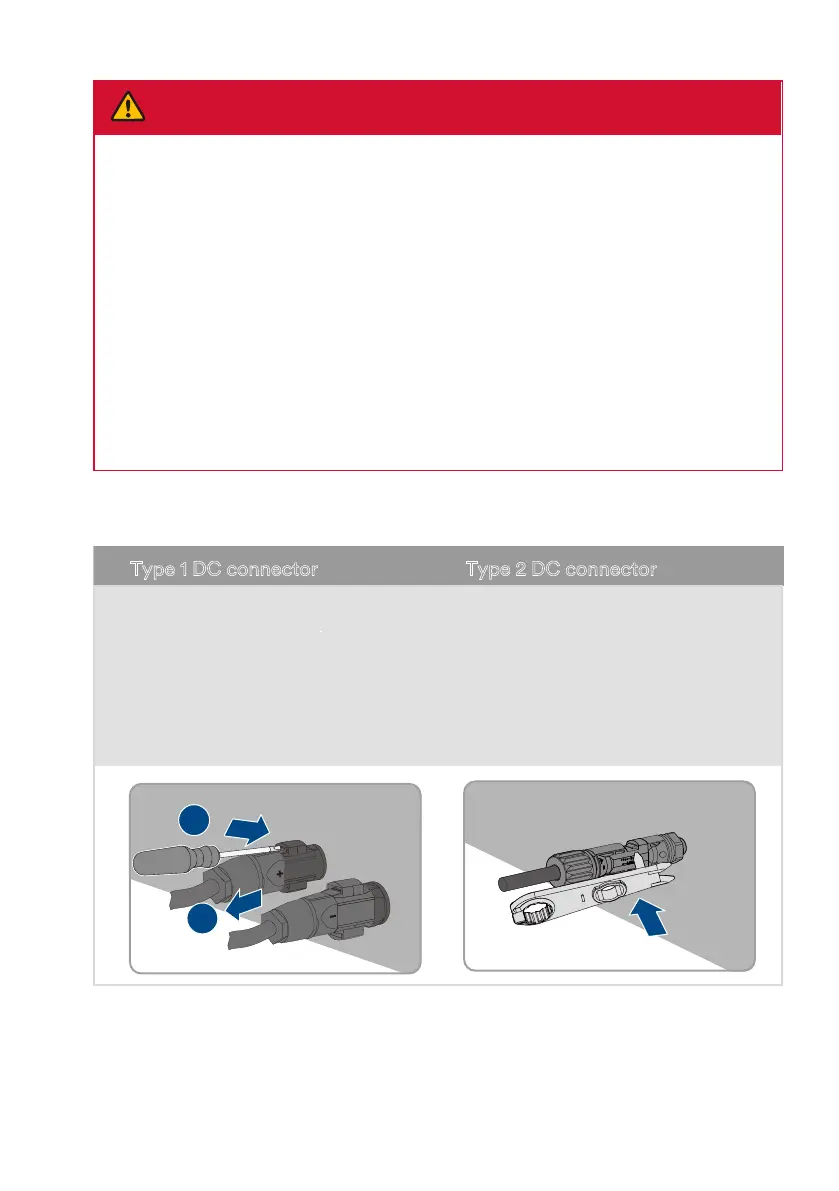
Step 5:Loosen and remove the DC connector.
1
2
Type 1 DC connector Type 2 DC connector
Release and remove the DC connectors.
To do so, insert a atblade screwdriver
or an angled screwdriver (blade width:
3.5mm) into one of the side slots and pull
the DC connectors out.
To remove DC plug connectors, insert a
wrench tool into the slots and press the
wrench tool with an appropriate force.
DANGER
!
Danger to life due to electric shock when touching exposed
DC conductors or DC plug contacts if the DC connectors are
damaged or loose!
The DC connectors can break or become damaged, become free of the DC cables, or no
longer be connected correctly if the DC connectors are released and disconnected incorrect-
ly. This can result in the DC conductors or DC plug contacts being exposed. Touching live DC
conductors or DC plug connectors will result in death or serious injury due to electric shock.
• Wear insulated gloves and use insulated tools when working on the DC connectors.
• Ensure that the DC connectors are in perfect condition and that none of the DC conductors or DC
plug contacts are exposed.
• Carefully release and remove the DC connectors as described in the following.
UM0035_ASW05-12kH-T2-T3_EN_V01_0523





 To Next Page