17
EN
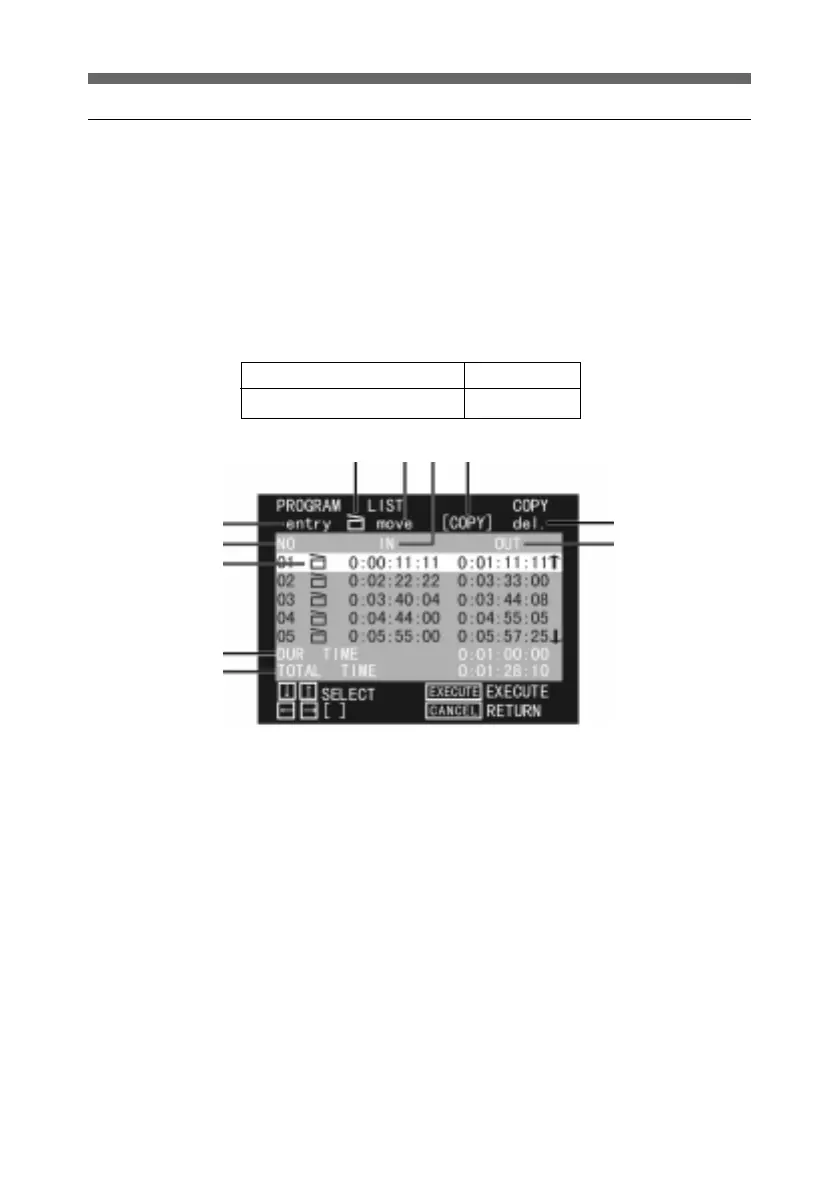
PROGRAM LIST menu
In the PROGRAM LIST menu, you can check the cut edits, or
add or amend cuts.
Use the up and down arrow buttons to select the cut you wish
to edit.
Then press the horizontal arrow buttons to select ENTRY,
Clapper board, MOVE, COPY, or DEL.
The timecode indication is different in non-drop-frame (NDF)
mode and drop-frame (DF) mode as follows.
1 ENTRY
Edit the cut.
2 Clapper board
Attach this symbol to indicate
whether or not to use the cut.
3 MOVE
Move the cut.
4 IN
This shows the IN point.
5 COPY
Copy the cut.
6 DEL
Delete the cut.
1
7
9
0
!¡
234
5
6
8
NDF(Non-drop-frame) -:--:--:--
DF(Drop-frame) -:--.--:--
7 NO
This is the cut number.
8 OUT
This shows the OUT point.
9 Clapper board
This is attached to a cut which is
used.
0 DUR(Duration) TIME
This shows the duration of the cut.
!¡ TOTAL TIME
This shows the total duration of the
cuts used.



 To Next Page