21
EN
Editing in REC ORIGINAL TIME CODE mode
If the recorder is a DVCAM Video Walkman, by using the
REC ORIGINAL TIME CODE mode, you can copy the
timecode unchanged from the player.
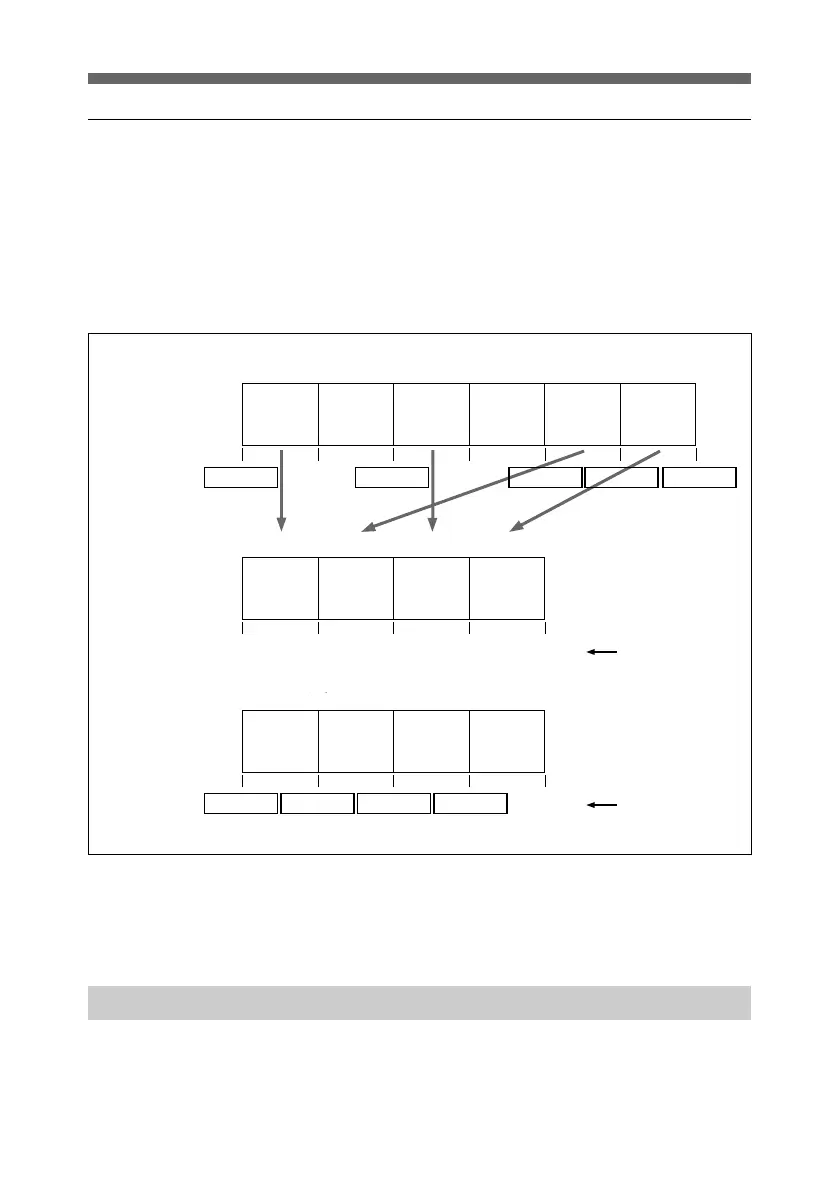
In REC ORIGINAL TIME CODE mode editing you can edit
with the original timecode unchanged. The resulting timecode
is therefore as shown in the following figure. This is
convenient when you wish to preserve the original timecode.
To carry out editing in REC ORIGINAL TIME CODE mode,
refer to the operating instructions for the DVCAM Video
Walkman.
Preparations for Video Editing
Before beginning video editing, check that the recorder and
player are ready.
If connections still need to be made, make them, referring to
page 9.
Regular mode
REC ORIGINAL
TIME CODE
mode
New
timecode
Original
timecode
unchanged
Coupure 1 Coupure 2 Coupure 3 Coupure 4 Coupure 5 Coupure 6
0:00:00:00 0:10:00:00 0:20:00:00 0:30:00:00 0:40:00:00 0:50:00:00 1:00:00:00
Coupure 1 Coupure 5 Coupure 3 Coupure 6
0:00:00:00 0:10:00:00 0:20:00:00 0:30:00:00
Coupure 1 Coupure 5 Coupure 3 Coupure 6
0:00:00:00 0:40:00:00 0:20:00:00 0:50:00:00
Cut No.1 Cut No.2 Cut No.3 Cut No.4 Cut No.5 Cut No.6
Cut No.1 Cut No.5 Cut No.3 Cut No.6
Cut No.1 Cut No.5 Cut No.3 Cut No.6



 To Next Page