40
EN
Care of the unit
Keep the case and panel clean by wiping lightly with a dry soft
cloth. In the case of severe soiling, wipe with a cloth steeped in
a mild detergent. Do not apply alcohol, thinners, insecticides,
or other volatile organic compounds, as these may cause the
case to deform or spoil the finish.
Shipping
Take care to pack the unit carefully in the original packaging or
an equivalent, to protect it from shocks.
Replacing the lithium battery
This unit contains a lithium battery for backup purposes.
The lifetime of the lithium battery is approximately 1 years.
If error message 11 (see page 42) appears, the lithium battery
has reached the end of its life. In this case, replace the battery
with a Sony CR2032 lithium battery. Use of another battery
may present a risk of fire or explosion.
If you replace the battery while the recorder Video Walkman is
powered on, saved programs will not be lost.
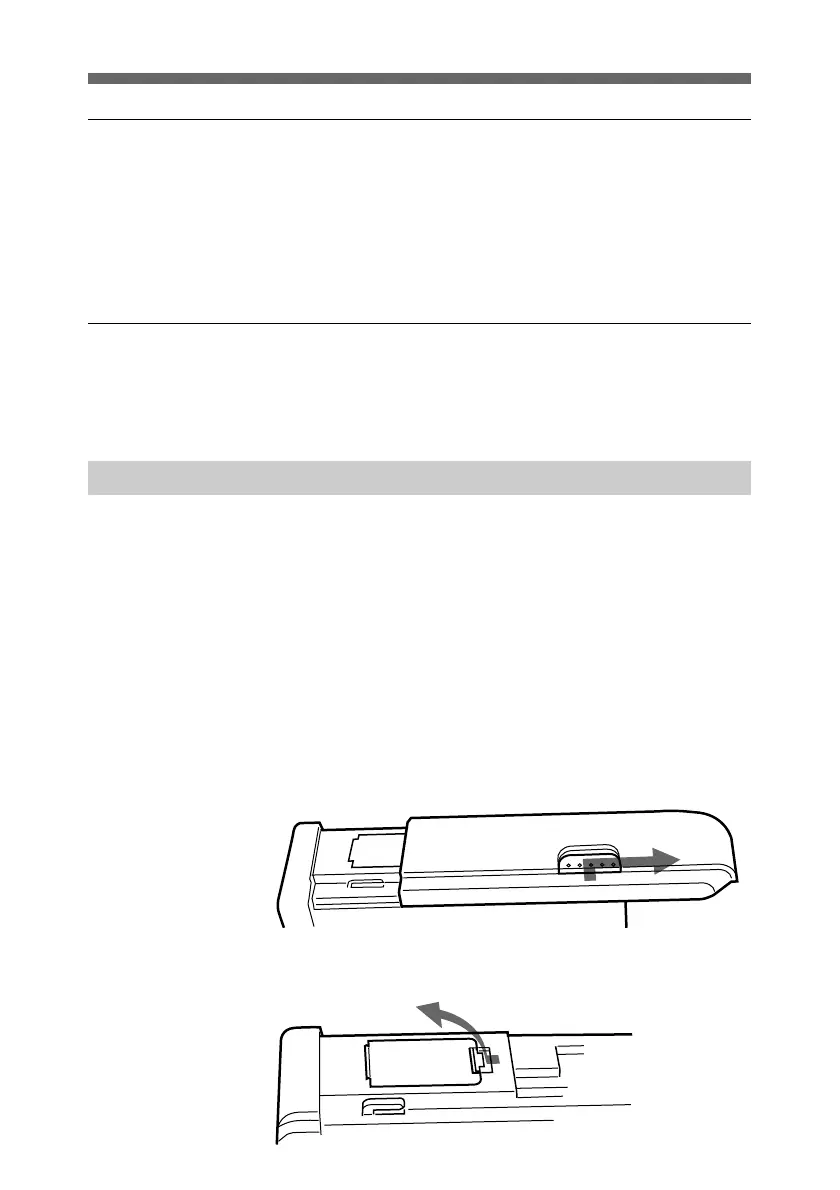
1 Remove the cover.
Press down the release button, and pull toward you.
2 Open the lid of the lithium battery compartment.
Appendix



 To Next Page