25
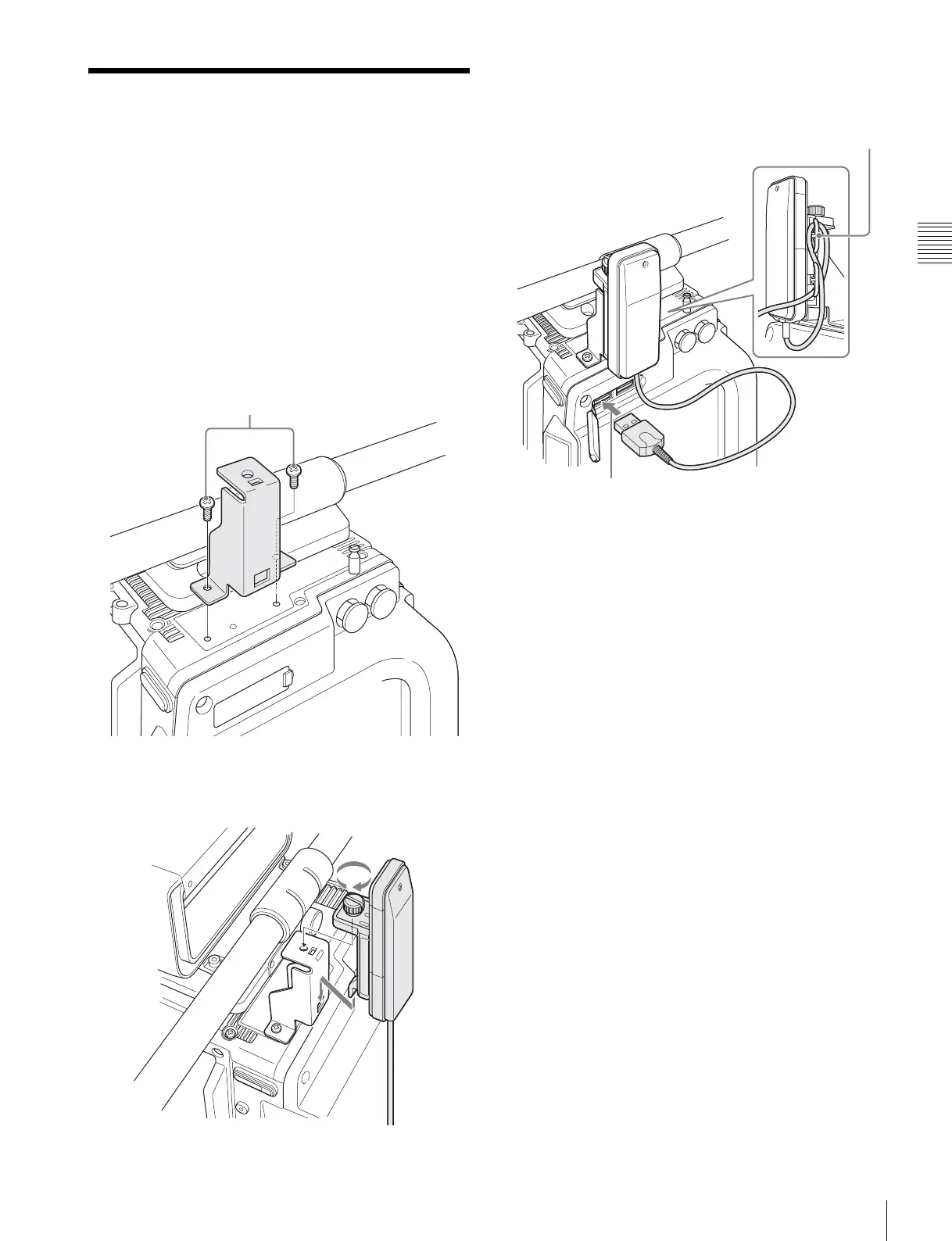
Mounting the CBK-WA01
Chapter 2 Installation and Preparations
2-7 Mounting the
CBK-WA01
A CBK-WA01 Wi-Fi Adapter can be mounted on the
camera using an optional Wi-Fi mounting bracket (part
number: 4-418-596-01) for connecting Wi-Fi capable
devices to the camera.
For information about obtaining the Wi-Fi mounting
bracket, consult your local Sony representative.
1
Attach the Wi-Fi mounting bracket onto the camera
using the supplied +B3 × 5 screws.
2
Place the protrusions on the rear of the CBK-WA01
into the holes in the mounting bracket, and fasten the
screw to secure the CBK-WA01 to the bracket.
3
Connect the CBK-WA01 cable to a USB connector on
the camera. Wrap excess cable length around the cable
holder.
M3 × 5 (+B3 × 5 screws) (supplied)
Cable holder



 To Next Page