62
VF Menu List
Chapter 4 Menu Configuration and Detailed Settings
a) When a User LUT is used, the signal level that is output on the SDI OUT1 connector is scaled to 100% level.
4-2-3 Display Info Menu
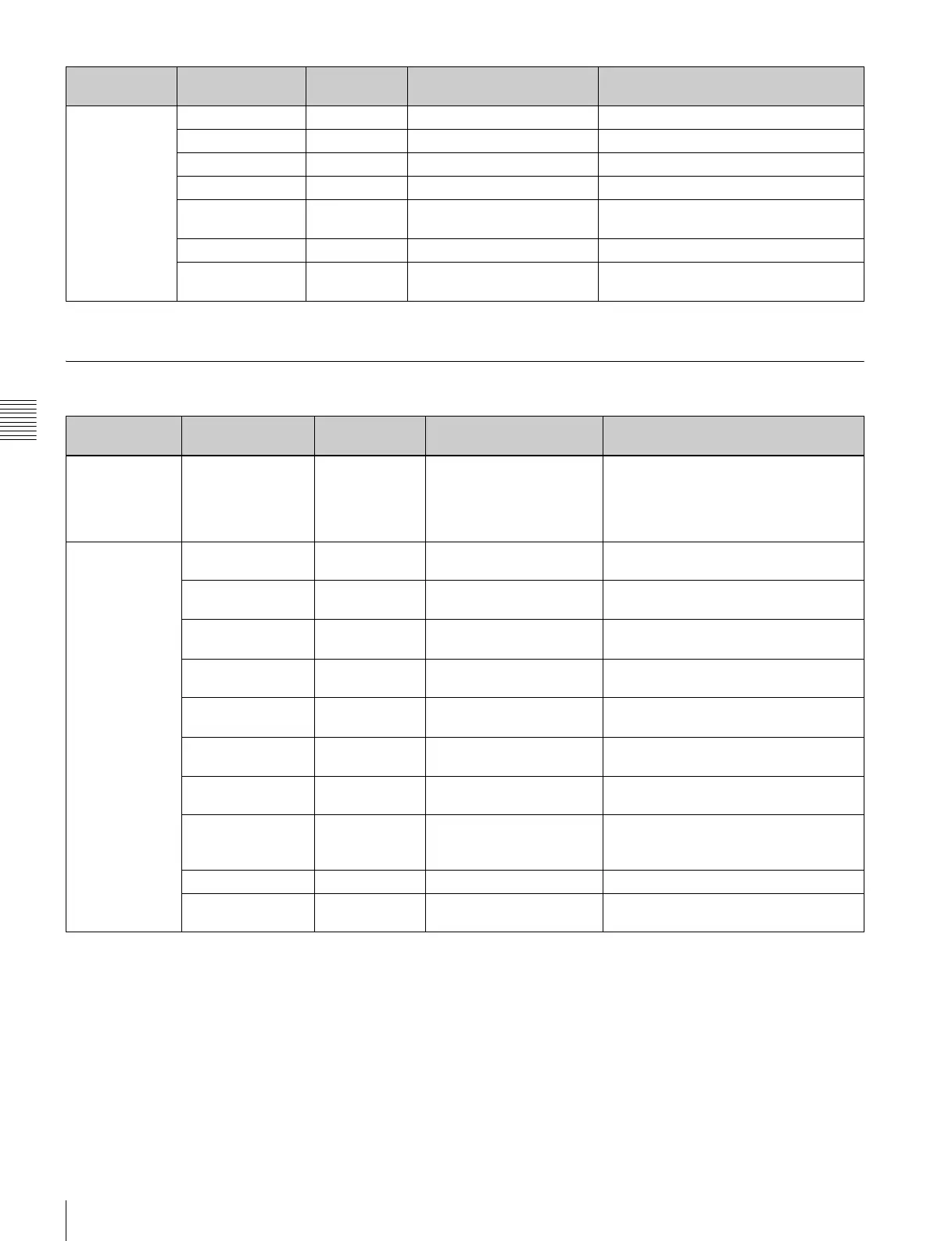
<Digital VF
Picture>
Output signal
settings for
DVF-EL100
Color 0 –99 to 0 to +99 Adjusts the color saturation of the image.
Contrast 0 –99 to 0 to +99 Adjusts the contrast of the image.
Brightness 0 –99 to 0 to +99 Adjusts the brightness of the image.
Peaking On On, Off Enables/disables the peaking function.
Frequency High Normal, High Selects whether to use the standard or
high peaking frequency.
Level 50 0 to 99 Sets the peaking level.
Spare Assign Hi/Lo Key Off, Hi/Lo Key, Peaking, Mag
Position, Highlight Clip Ind.
Assigns camera functions to the Spare
button.
Page Configuration
item
Default Settings Remarks
<Exposure
Assist>
Exposure
assistant
function settings
Highlight Clip
Indicator(SDI2)
On On, Off Applies false colors to areas of specific
brightness.
<Mix>
Status, marker
display settings
[Status/Menu]
VF/HD-Y
On On, Off Displays the status/menu in the
viewfinder.
SDI-OUT1 On On, Off Displays the status/menu on the image
output on the SDI OUT1 connector.
SDI-OUT2 On On, Off Displays the status/menu on the image
output on the SDI OUT2 connector.
Brightness 3 1 to 4 Sets the brightness of the status
information and menu displays.
[Marker]
VF/HD-Y
On On, Off Displays markers in the viewfinder.
SDI-OUT1 On On, Off Displays markers on the image output
on the SDI OUT1 connector.
SDI-OUT2 On On, Off Displays markers on the image output
on the SDI OUT2 connector.
Color White White, Yellow, Cyan,
Green, Magenta, Red,
Blue
Sets the display color of markers.
Edge On On, Off Sets the edge display of markers.
Brightness 7 1 to 10 Adjusts the brightness of the marker
display.
Page Configuration
item
Default Settings Remarks



 To Next Page