45
Viewing and Setting the Viewfinder Display
Chapter 3 Basic Adjustments and Settings
3-7-2 Setting the Marker Display
Various markers can be displayed in the viewfinder and on
the monitor.
Turning status/marker display On/Off for
each output
You can set whether to display status information and
markers in the signal output from the VF and SDI OUT
connectors on the <Mix> page in the Display Info menu
(page 62).
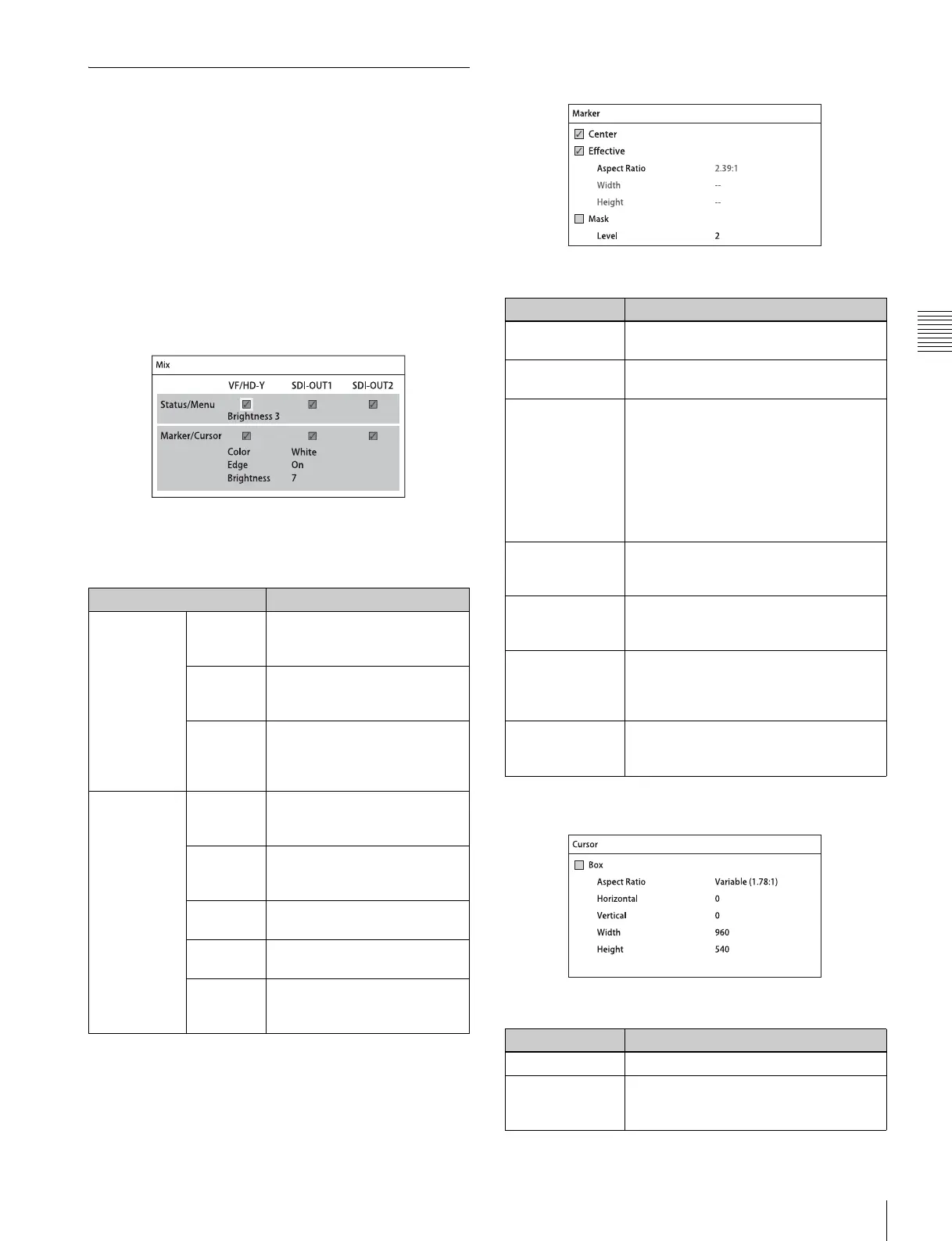
<Mix> page
The default setting is to display status information and
markers in the signals from the VF and SDI OUT
connectors.
Specifying the markers and cursors to display
When the marker display is turned On on the <Mix> page,
you select the markers and cursors for display on the
<Marker> page and <Cursor> page in the Display Info
menu.
<Marker> page
The default setting for all markers is “Off.”
<Cursor> page
The default setting for cursor display is “Off.”
Item Setting
[Status/Menu] VF/HD-Y Sets whether to display status
information in the VF connector
signal.
SDI OUT1
SDI OUT2
Sets whether to display status
information in the SDI OUT
connector signal.
Brightness Sets the brightness of the
status information and menu
displays within a range from 1
to 4 (maximum brightness is 4).
[Marker/
Cursor]
VF/HD-Y Sets whether to display
markers in the VF connector
signal.
SDI OUT1
SDI OUT2
Sets whether to display
markers in the SDI OUT
connector signal.
Color Sets the display color of
markers.
Edge Sets whether to display the
edges of the markers.
Brightness Sets the marker display
brightness in the range 1 to 10
(maximum brightness is 10).
Item Setting
Center Sets whether to display the center
marker.
Effective Sets whether to display the effective
pixel area.
Aspect Ratio Selects the aspect ratio when Effective
is set to On. The following options are
available.
2.39:1, 2.35:1, 1.90:1, 1.85:1, 1.78:1,
1.66:1, 1.33:1, Variable*
a)When Variable is selected, the displayed
aspect ratio is determined by the Width and
Height settings.
Example: Variable (1.78:1).
Width Specifies the width of the effective pixel
area (960 to 1920 pixels) when Aspect
Ratio is set to Variable.
Height Specifies the height of the effective pixel
area (540 to 1080 pixels) when Aspect
Ratio is set to Variable.
Mask Selects whether to enable/disable
darkening of the image outside the
selected Aspect Marker. When selected,
the outer area color is displayed in B&W.
Level Sets the darkness level (0 to 4) of the
image outside the selected Aspect
Marker.
Item Setting
Box Sets whether to display the box cursor.
Aspect Ratio Displays the aspect ratio based on the
specified Width and Height when Box is
set to On. Example: Variable (1.78:1)



 To Next Page