57
VF Menu List
Chapter 4 Menu Configuration and Detailed Settings
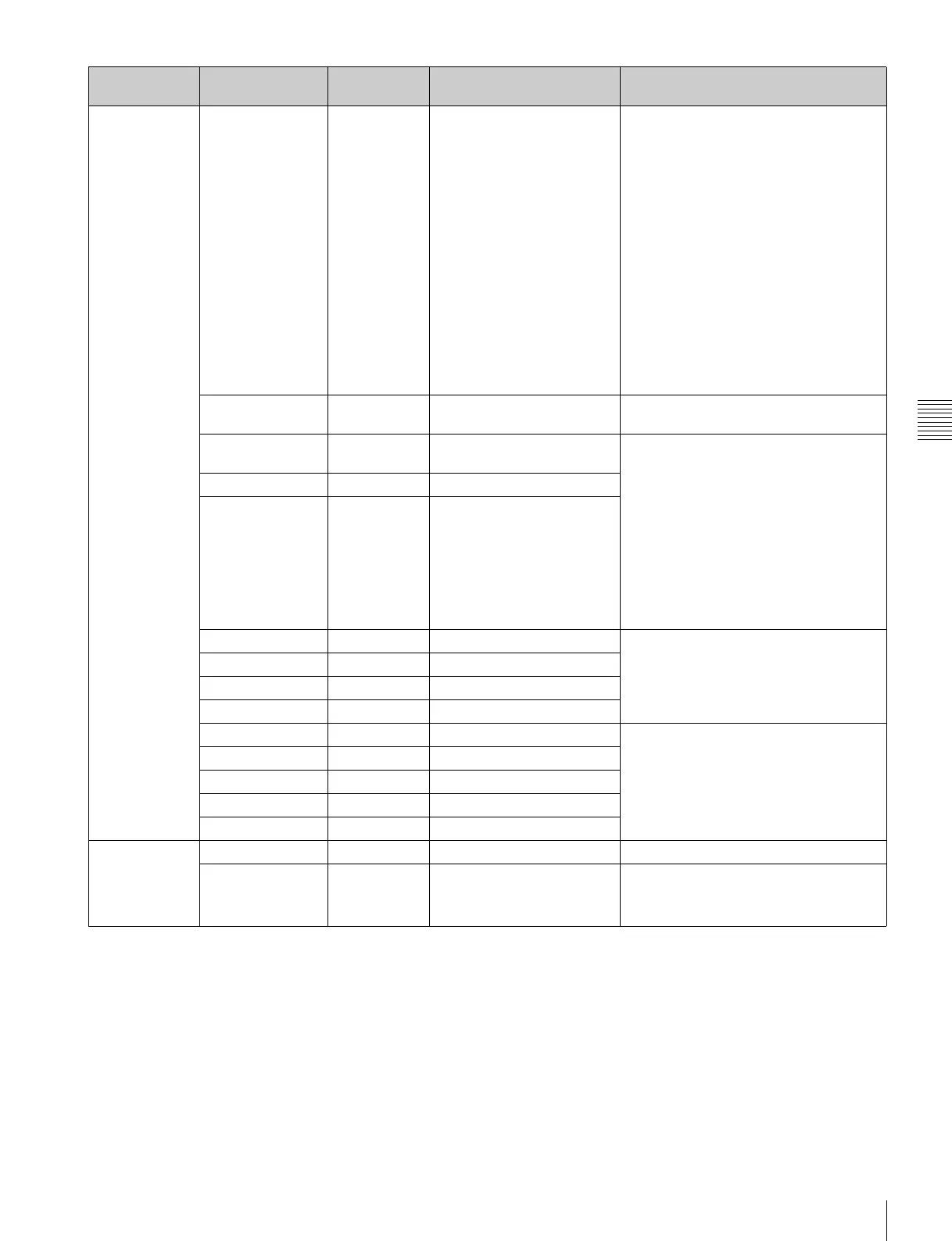
<Video Setting>
Video settings
Master Gain 0dB When Gamma is set to S-
Log2 in F65RAW, F65RAW-
HFR, or HD mode:
–6dB (5.0E), –3dB (5.5E),
0dB (6.0E), +3dB (6.0E),
+6dB (6.0E), +9dB (6.0E),
+12dB (6.0E)
When Gamma is set to
HG8009G40 or HG8009G33
in HD mode:
–6dB (5.0E), –3dB (5.3E),
0dB (5.3E), +3dB (5.3E),
+6dB (5.3E), +9dB (5.3E),
+12dB (5.3E)
When Gamma is set to
User1 to User5 in HD mode:
–6dB, –3dB, 0dB, +3dB,
+6dB, +9dB, +12dB
Sets the sensitivity using dB values
(Custom mode only).
Gamma Category Special Hyper, Special, User Selects the gamma category (HD mode
only).
Hyper 7:HG8009G40 7:HG8009G40
8:HG8009G33
Specifies the specific table for the
selected gamma category (HD mode
only).
Hyper category is available in Custom
mode only.
For User category, imported, F65 gamma
can be selected. The “1:709(800%)” table
is overwritten if a user-defined table is
imported.
When S-Gamut3 or S-Gamut3.Cine is
selected for Color Space in Base Setting,
this is fixed at 4:S-Log3.
Special 3:S-Log2 3:S-Log2, 4:S-Log3
User 1:709(800%) 1:709(800%)
White -- -- Adjusts the gain of the main line signal
(Custom mode only).
R 0 –256 to 255
G 0 –256 to 255
B 0 –256 to 255
Black -- -- Adjusts the black level of the main line
signal (Custom mode only).
Master 0 –256 to 255
R 0 –256 to 255
G 0 –256 to 255
B 0 –256 to 255
<Bars/Test
Signal>
Color bar and
test signal
settings
Color Bar Off On, Off Turns the output of color bars On/Off.
Test Signal Off Off, Saw, Step Sets the test waveform output.
Page Configuration
item
Default Settings Remarks



 To Next Page