30
GB
• When your TV does not have an HDMI jack and you want to use the TV and other components with this system,
connect the components’ video jacks to the TV’s video jacks directly and the components’ audio jacks to the
subwoofer’s audio jacks. However, in this case, you cannot use the GUI menu on the TV. Set up the system using
the front panel display of the subwoofer (page 95).
• Do not turn off the system when video of the playback component is being output to the TV. If the system is not
turned on, audio of the playback component is not output from the speaker.
• To output TV sound from the speaker connected to the subwoofer, be sure to
– connect the audio output jacks of the TV to the OPTICAL TV IN jacks or TV ASSIGNABLE AUDIO IN jacks
of the subwoofer.
– turn off the TV’s volume.
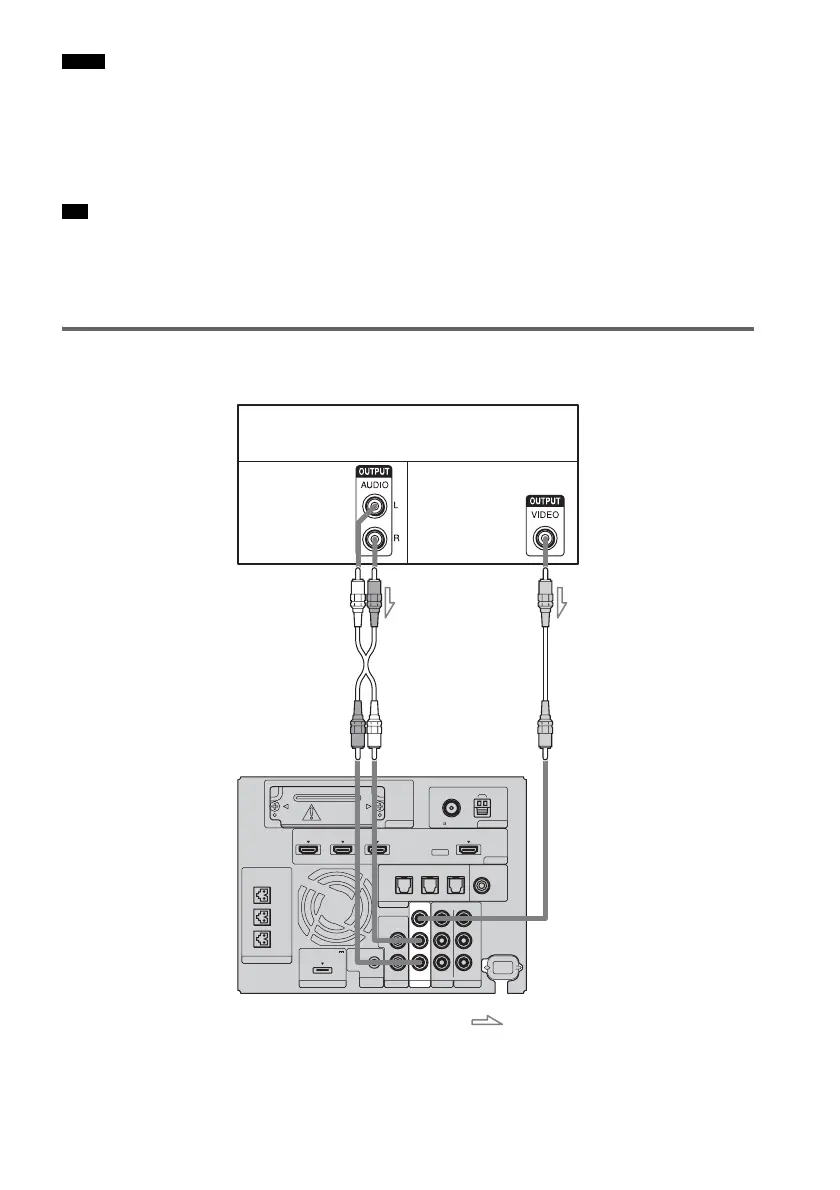
Connecting a component to the VIDEO 1 jacks
The following illustration shows how to connect a component that has analog jacks.
Notes
Tip
EZW-T100 ANTENNA
HDMI
SPEAKER
TV OUTSAT/CATV INDVD IN
CENTER
ONLY FOR SS-CT500
ASSIGNABLE
AUDI O IN
L
R
AUDI O IN
VIDEO IN COMPONENT VIDEO IN
R
L
Y
R
L
BD IN
AM
FM
75 COAXIAL
DMPORT TV
REMOTE
CTRL
VIDEO 1
DC 5V
0.7A MAX
ONLY FOR
SS-CT500
VIDEO 2 VIDEO 3
PB/
C
B
PR/
C
R
OPTICAL
TV IN
COAXIAL
VIDEO 2 IN VIDEO 3 IN VIDEO 3 IN
DIGITAL
DVD player (recorder), “PlayStation 2,”
satellite/cable television tuner, etc.
A
A Audio cord (not supplied)
B Video cord (not supplied)
Video signal
: Signal flow
B
Audio signal
Rear of the
subwoofer



 To Next Page