32
GB
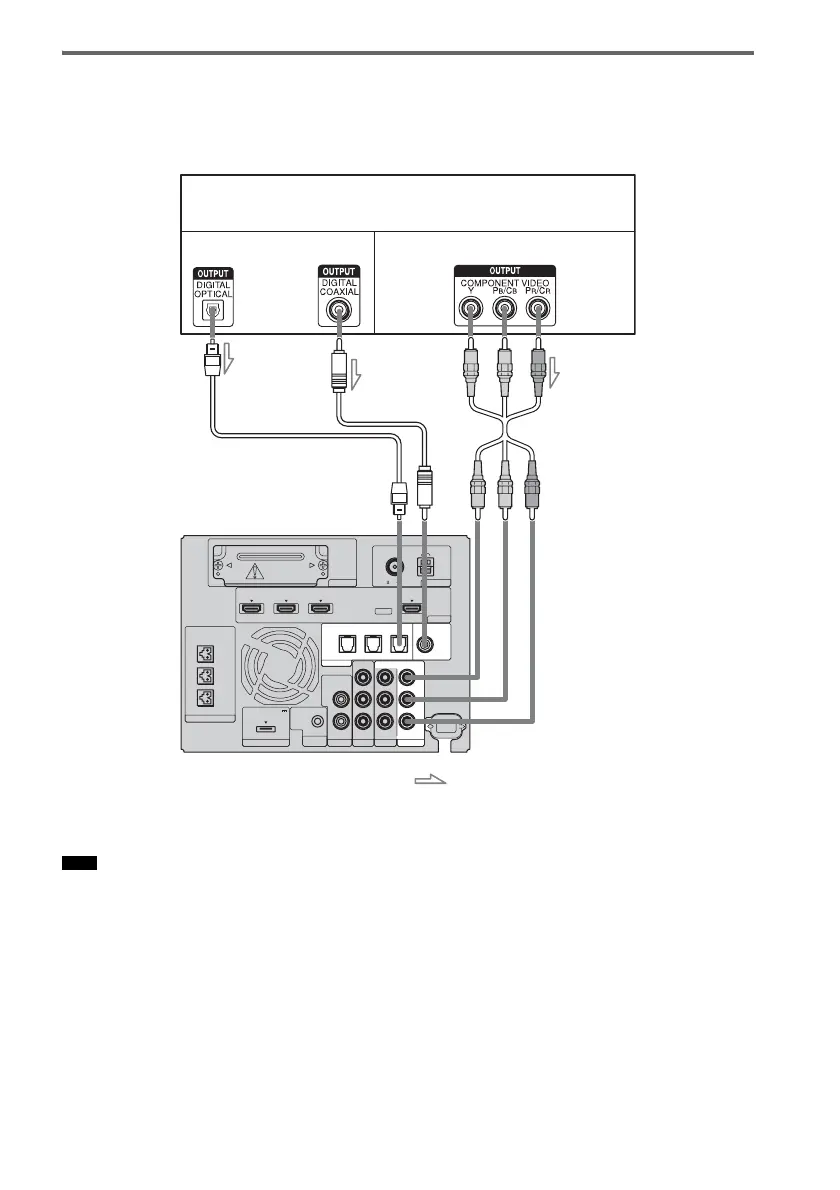
Connecting a component to the VIDEO 3 IN jacks
The following illustration shows how to connect a component to the VIDEO 3 IN jacks.
If the satellite tuner or cable television tuner, etc., does not have an OPTICAL OUT jack, connect the
system using the COAXIAL VIDEO 3 IN jack.
• The DIGITAL COAXIAL IN jack has priority over the DIGITAL OPTICAL IN jacks when you connect a
component to the system using both jacks.
Note
EZW-T100 ANTENNA
HDMI
SPEAKER
TV OUTSAT/CATV INDVD IN
CENTER
ONLY FOR SS-CT500
ASSIGNABLE
AUDI O IN
L
R
AUDI O IN
VIDEO IN COMPONENT VIDEO IN
R
L
Y
R
L
BD IN
AM
FM
75 COAXIAL
DMPORT TV
REMOTE
CTRL
VIDEO 1
DC 5V
0.7A MAX
ONLY FOR
SS-CT500
VIDEO 3
PB/
C
B
PR/
C
R
OPTICAL
TV IN
COAXIAL
VIDEO 2 IN VIDEO 3 IN VIDEO 3 IN
DIGITAL
VIDEO 2
DVD player (recorder), “PlayStation 2,”
satellite/cable television tuner, etc.
C
A Digital optical cord (not supplied)
B Digital coaxial cord (not supplied)
C Component video cable (not supplied)
Video signal
: Signal flow
B
Audio signal
or
A
Rear of the
subwoofer



 To Next Page