Maintenance
244
Chapter 9 Maintenance
6 Set the F-RUN/SET/R-RUN switch to
F-RUN, and check that the timecode
indication starts changing again and
continues to change even when you
restart recording and stop recording
again.
7 Set the DISPLAY switch to U-BIT, and
check that the user bit data that was set
is displayed.
Use a dust blower to clean the CRT screen and
mirror inside the viewfinder barrel.
Clean the lens and protecting filter with a
commercially available lens cleaner.
Caution
Never use organic solvents such as thinners.
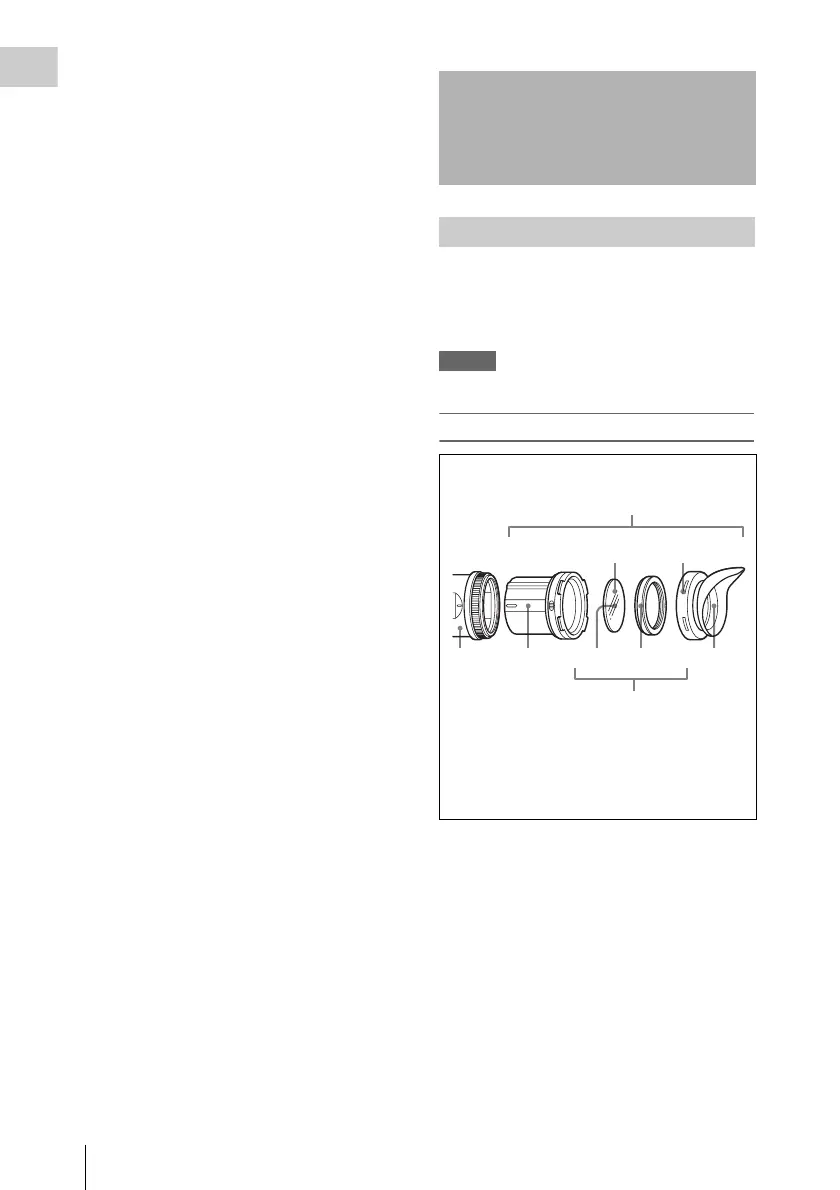
Disassembling the eyepiece for cleaning
1 Detach the eyepiece from the viewfinder
barrel.
For the detaching procedure, see “Detaching
the eyepiece” on page 37.
2 Remove the eyecup from the eyecup
holder.
3 Remove the protecting filter, together
with the packing ring, from inside the
eyecup holder.
4 Detach the protecting filter from the
packing ring.
Maintenance
Cleaning the viewfinder
21345
3
42
1
1 Viewfinder barrel
2 Eyecup holder
3 Protecting filter
4 Packing ring
5 Eyecup



 To Next Page