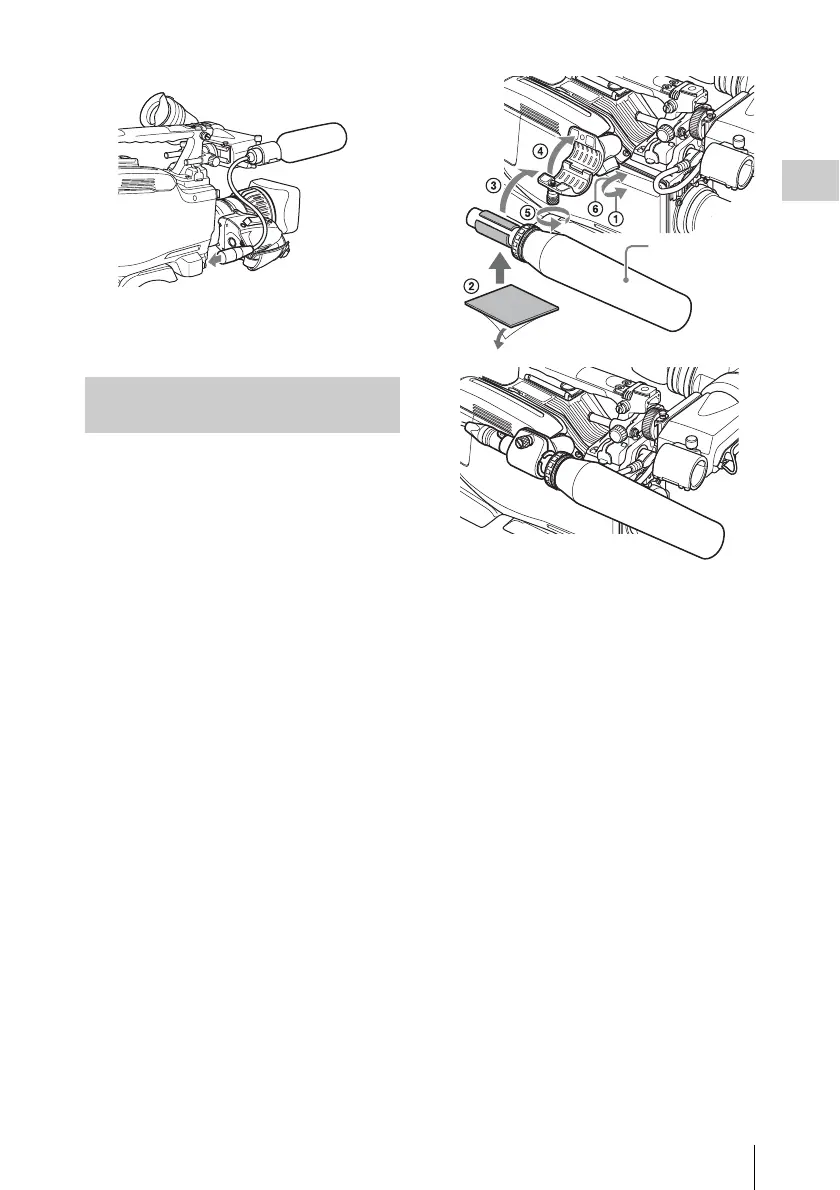
Preparing the Audio Input System
43
Chapter 2 Preparations
4 Secure the microphone cable with the
cable clamps.
You can connect up to two monaural
microphones to the AUDIO IN CH1/CH2
connectors, using a CAC-12 Microphone Holder
(not supplied).
The following is the procedure for attaching an
electret condenser microphone such as the ECM-
674/678.
On how to attach the CAC-12, refer to the operation
manual for the CAC-12.
1 Attach the electret condenser
microphone.
1 Loosen the ball joint lock lever.
2 Wind the microphone spacer (sheet
type, supplied with the microphone)
around the microphone, while peeling
off the protective sheets on both sides
of the microphone spacer.
3 Place the microphone in the holder so
that “UP” is at the top.
4 Close the microphone holder.
5 Tighten the screw.
6 Position so that the microphone does
not interfere with the viewfinder and
tighten the ball joint lock lever.
When attaching the ECM-674/678, use the
microphone adaptor supplied with the CAC-
12 Microphone Holder.
2 Connect the microphone cable to the
AUDIO IN CH1 or CH2 connector.
3 Set the switches as follows.
Set the LINE / AES/EBU / MIC selector to
MIC.
• Set the +48V/OFF switch indicated below,
depending on the power supply type of the
microphone.
Internal power supply: Set the +48V/OFF
switch to OFF.
External power supply: Set the +48V/
OFF switch to +48V.
• Set the AUDIO IN (CH-1/CH-2/CH-3/CH-
4) switch for the channel to which the
microphone is connected to REAR (for
CH-1/CH-2) or R (for CH-3/CH-4).
Connecting microphones to the
AUDIO IN connectors
Microphone



 To Next Page