Adjusting the Audio Level
66
Chapter 3 Adjustments and Settings for Shooting
To automatically select the same audio as on
channels 1 and 2
On the AUDIO-1 page of the MAINTENANCE
menu, set the AUDIO CH3/4 MODE item to “CH
1/2”.
Note
When the LINE / AES/EBU / MIC selector is set to LINE
or MIC, the audio signals recorded on audio channels 3
and 4 are not affected by the XLR automatic detection
function. They are determined by the settings of the
AUDIO IN CH-3 and CH-4 switches.
Adjusting the audio recording levels
To adjust automatically
Set AU CH34 AGC MODE on the AUDIO-2 page of the
MAINTENANCE menu to STREO or MONO.
To adjust manually
1 Set AU CH34 AGC MODE on the
AUDIO-2 page of the MAINTENANCE
menu to OFF.
2 Set AUDIO CH3 LEVEL (for audio
channel 3) and AUDIO CH4 LEVEL
(for audio channel 4) on the AUDIO-3
page of the MAINTENANCE menu to
FRONT.
The levels of audio channels 3 and 4 can now
be adjusted with the MIC LEVEL control.
To set to a fixed value
In step 2 of the previous procedure “To adjust
manually”, set the menu items to FIX.
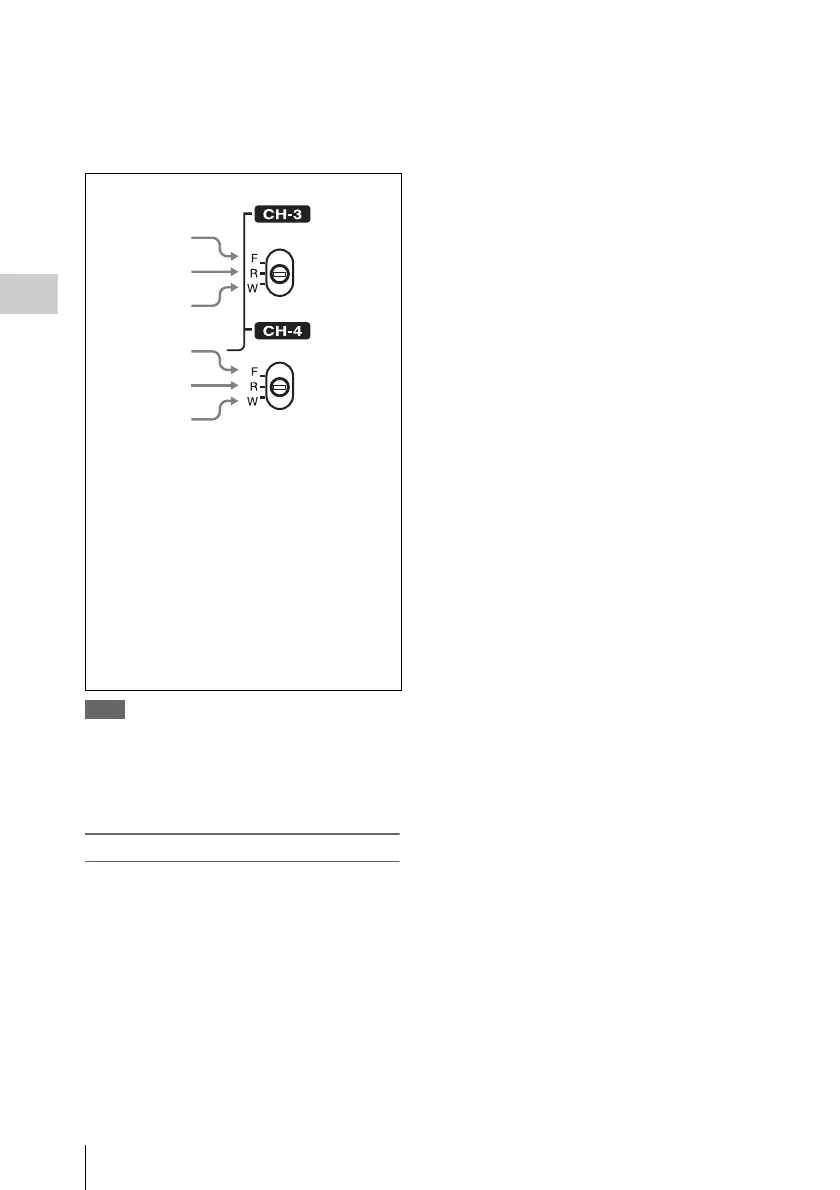
1
2
3
4
5
6
CH-3 switch
1 F: The audio signal from the front
microphone is recorded.
2 R: The audio signal input to the AUDIO IN
CH1 connector is recorded.
3 W: The audio signal of the wireless
microphone is recorded.
CH-4 switch
4 F: Same as with the CH3 switch.
5 R: The audio signal input to the AUDIO IN
CH2 connector is recorded.
6 W: Same as with the CH3 switch.












 To Next Page