HT-S350/SD35
16
Sony CONFIDENTIAL
For Authorized Servicer
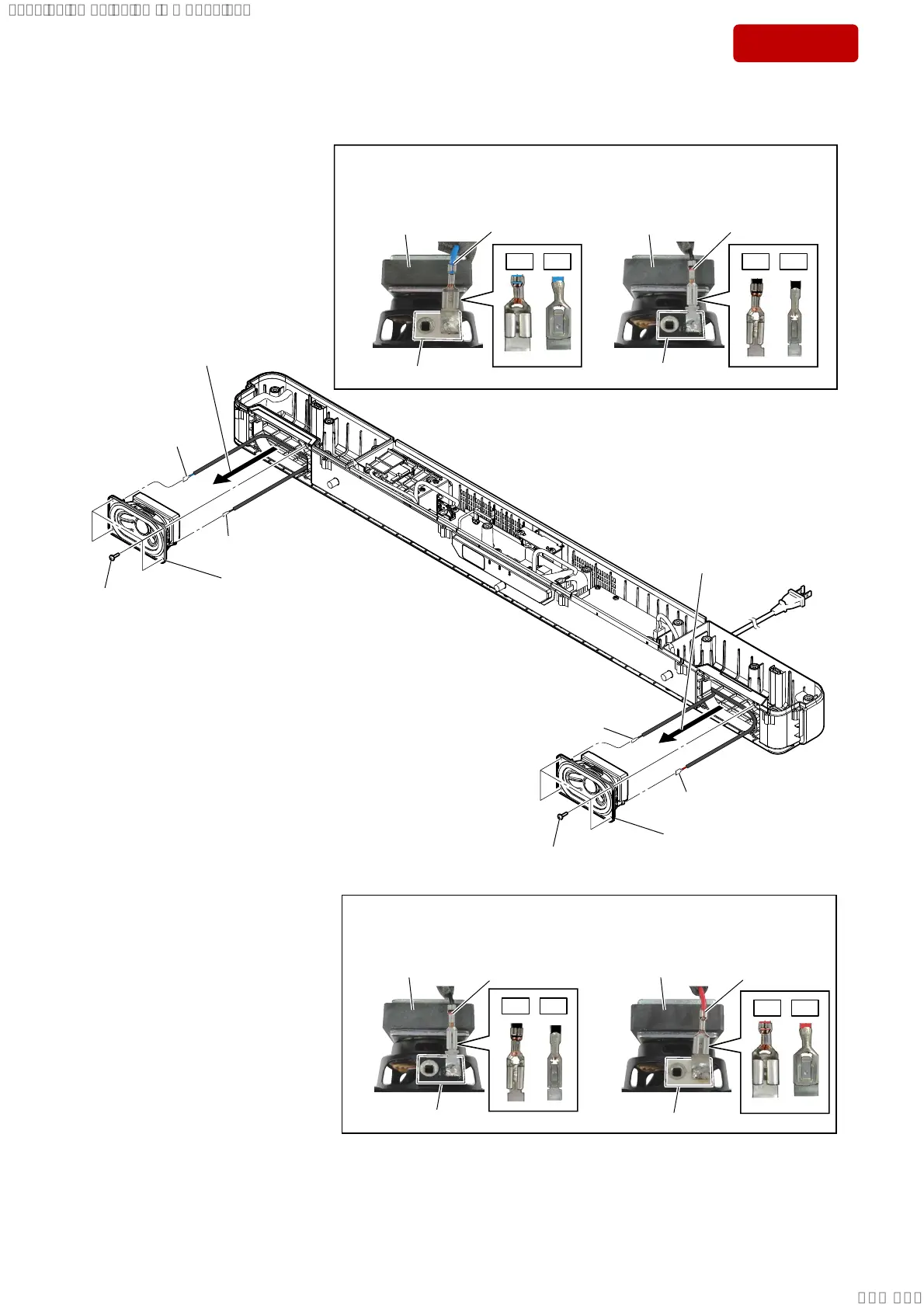
2-9. SPEAKER UNIT
OK NG OK NG
,QVWDOODWLRQGLUHFWLRQIRUWKHWHUPLQDORIVSHDNHUFDEOHIRU/FK
terminal (wide)
[blue]
terminal [black]
terminal [white]
Note:
When connecting the terminals of the speaker cable to the speaker unit (for L-ch),
be careful of the direction of the terminals.
terminal (narrow)
[black]
speaker unit (for L-ch)speaker unit (for L-ch)
,QVWDOODWLRQGLUHFWLRQIRUWKHWHUPLQDORIVSHDNHUFDEOHIRU5FK
terminal (wide)
[red]
terminal [black]
terminal [white]
Note:
When connecting the terminals of the speaker cable to the speaker unit (for R-ch),
be careful of the direction of the terminals.
terminal (narrow)
[black]
speaker unit (for R-ch)speaker unit (for R-ch)
1 four screws
(BTP3 u 10)
2
Pull out the speaker unit (for L-ch)
in the direction of the arrow.
3 terminal (wide)
[red]
4 speaker unit
(for L-ch)
1 four screws
(BTP3 u 10)
2
Pull out the speaker unit (for R-ch)
in the direction of the arrow.
3 terminal (wide)
[blue]
3 terminal (narrow)
[black]
4 speaker unit
(for R-ch)
3 terminal (narrow)
[black]
OK NG
OK NG
SYSSET
2019/02/1301:27:25(GMT+09:00)



 To Next Page