SA-WS350/WSD35
15
Sony CONFIDENTIAL
For Authorized Servicer
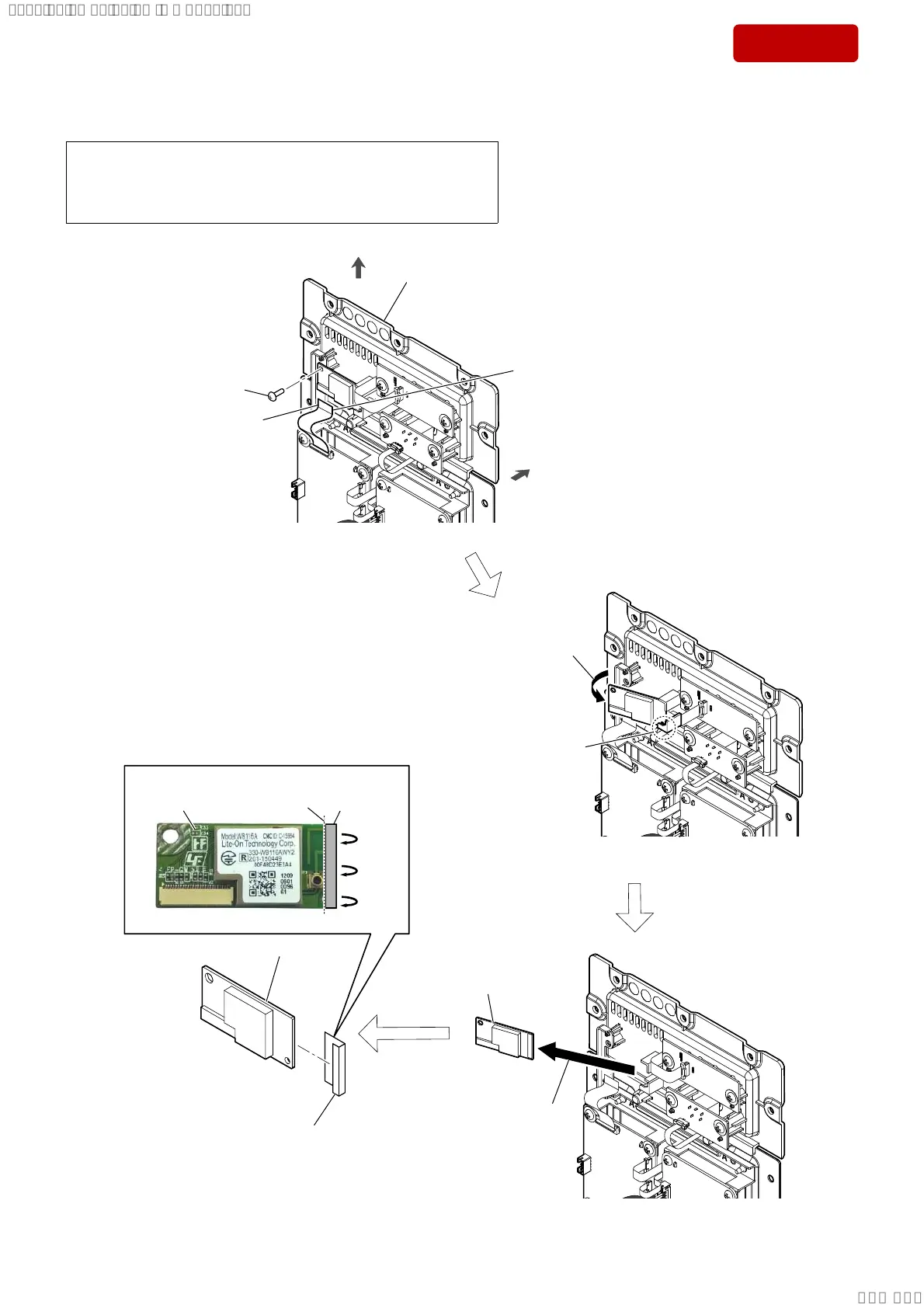
2-8. BT MODULE (SW)
terminal side
1 FFC cable (26 core)
(L = 60 mm)
(J2)
2 screw
(BVTP3 u 8)
3 Lift up the BT module (SW) block
in the direction of the arrow.
5 cushion EVA
6 BT module (SW) (See Note)
3DVWLQJSRVLWLRQRIWKHFXVKLRQ(9$
rear side
top side
AMP block
hook
guide line
cushion EVA
4 Remove the BT module (SW) block
in the direction of the arrow.
–)URQWYLHZ–
BT module (SW)
BT module (SW) block
Note: If BT module (SW) is replaced with a new part, refer to “RESET METHOD”
on page 5, be sure to perform the reset.
Also, after completing the reset, refer to “WIRELESS CONNECTION
(LINK) WORK OF THE BAR SPEAKER AND THE SUBWOOFER” on
page 6, perform the wireless connection of bar speaker and subwoofer.
SYSSET
2019/02/1301:37:00(GMT+09:00)



 To Next Page