SA-WS350/WSD35
13
Sony CONFIDENTIAL
For Authorized Servicer
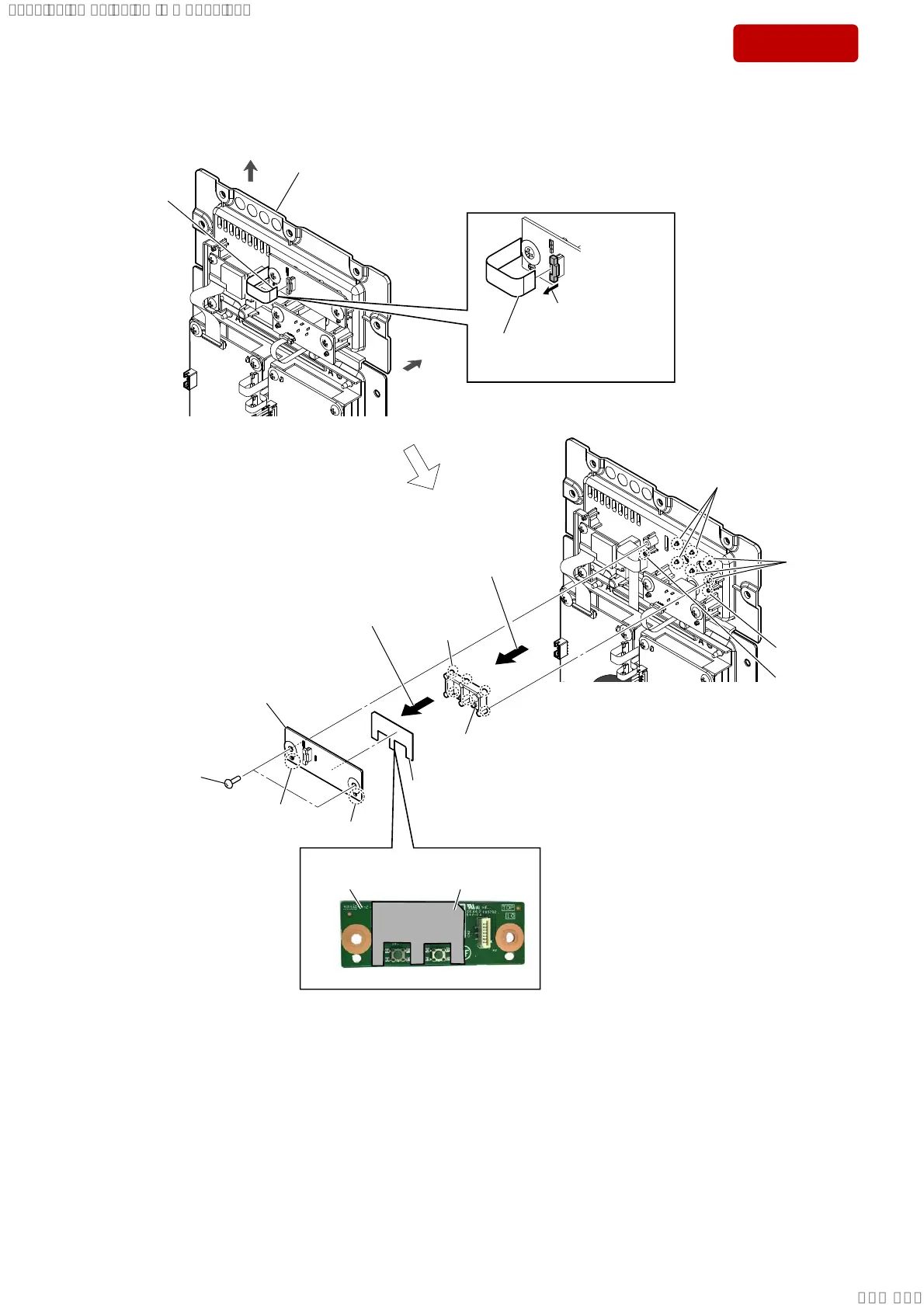
2-6. KEY BOARD, BUTTON
cushion EVA
KEY board
4 Remove the KEY board block
in the direction of the arrow.
5 cushion EVA
6 KEY board
Note 1:
When installing the KEY board, align
the two bosses and two holes.
7 Remove the button in the
direction of the arrow.
8 button
Note 2:
When installing the button, align
the six bosses and six holes.
3DVWLQJSRVLWLRQRIWKHFXVKLRQ(9$
terminal side
3 two screws
(BVTP3 u 8)
hole
hole
total six holes
boss
boss
three bosses
three
bosses
–5HDUYLHZ–
rear side
top side
AMP block
1 Unlock the connector
(CN1).
2 FFC cable (12 core)
(L = 204.5 mm)
(CN1)
SYSSET
2019/02/1301:37:00(GMT+09:00)



 To Next Page