EasyManua.ls Logo

Sony SLV-686HF - Antenna Setup Procedures; Attaching External Antenna Connector; Setting the RF Unit

Sony SLV-686HF
67 pages
Print Icon
To Next Page IconTo Next Page
To Previous Page IconTo Previous Page
Loading...
How
to
Attach
the
External
Antenna
Ofer
atat=rea
col
am
(=10]
9)
ei
1-10)
woeemnnmin
tee
E.
4
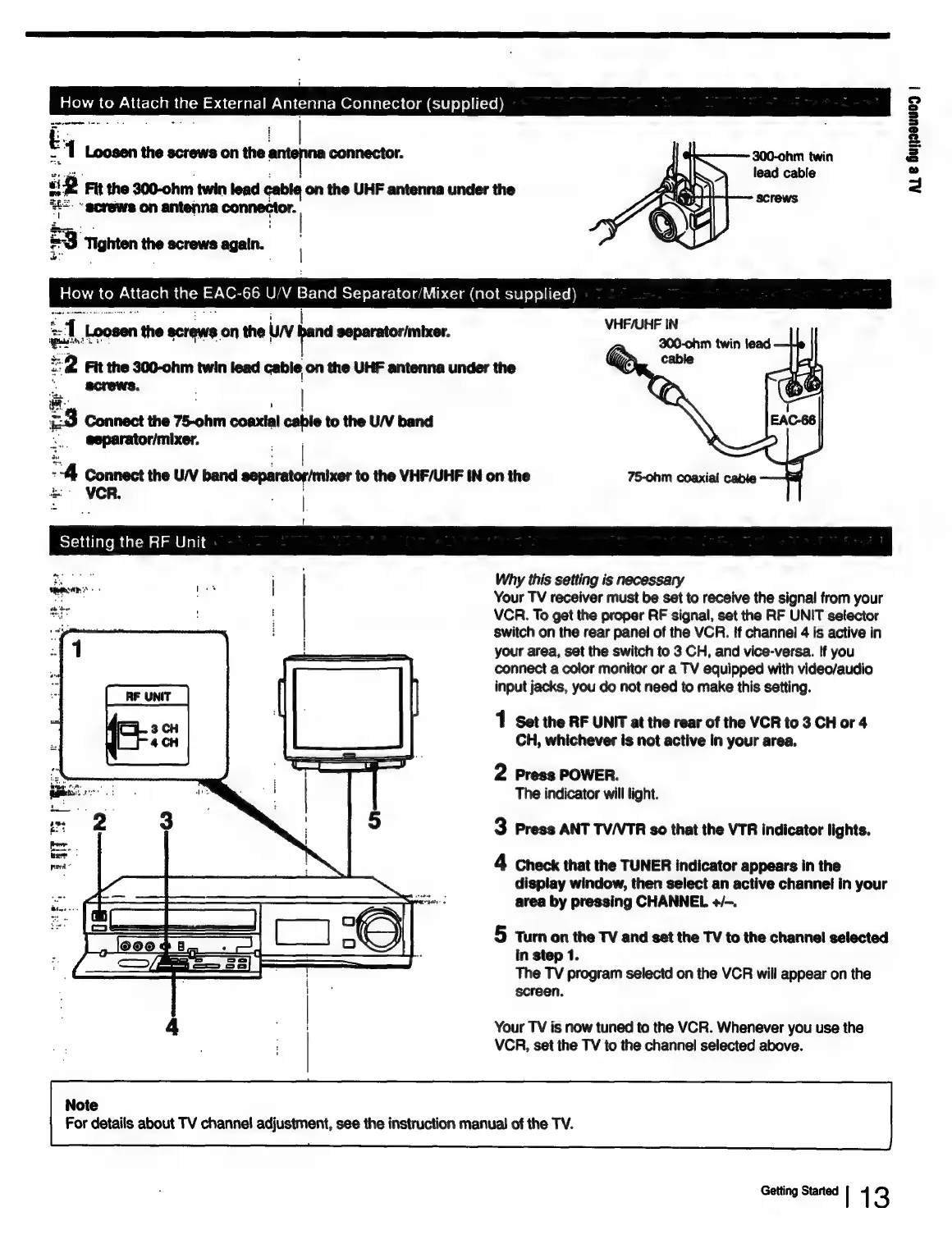
Loosen
the
screws
on
the
antonio
connector.
300-ohm
twin
lead
cable
ip
Fit
the
300-ohm
twin
lead
cable
on
the
UHF
antenna
under
the
ee
ahe
==.
-
screws
on
antenna
conmecier:
|
a
toh
Ce)
enacn
the
EAC-66
U/V
_—
Separator/Mixer
(not
supplied)
3
Tighten
~~
screws
again.
VHF/UHF
IN
300-ohm
twin
lead
Loosen
the
ecrews
on
the
uw
pee
separator/mixer.
Fit
the
300-ohm
twin
lead
cable
on
the
UHF
antenna
under
the
ee
:
£3
Connect
the
75-ohm
coaxial
cable
to
the
U/V
band
5.
@eparator/mixer.
|
“A
Connect
the
UV
band
eeparatorhnixer
to
the
VHF/UHF
IN
on
the
VCR.
is
ir
Setting
the
RF
Unit
ee
he
Why
this
setting
is
necessary
ina
ti
Your
TV
receiver
must
be
set
to
receive
the
signal
from
your
weit
|
VCR.
To
get
the
proper
RF
signal,
set
the
RF
UNIT
sefector
switch
on
the
rear
panel
of
the
VCR.
If
channel
4
is
active
in
your
area,
set
the
switch
to
3
CH,
and
vice-versa.
If
you
connect
a
color
monitor
or
a
TV
equipped
with
video/audio
input
jacks,
you
do
not
need
to
make
this
setting.
1
Set
the
RF
UNIT
at
the
rear
of
the
VCR
to
3
CH
or
4
CH,
whichever
is
not
active
in
your
area.
2
Press
POWER.
The
indicator
will
light.
3
Press
ANT
TV/VTR
so
that
the
VTR
indicator
lights.
4
Check
that
the
TUNER
indicator
appears
in
the
display
window,
then
select
an
active
channel
in
your
varie:
area
by
pressing
CHANNEL
+/-.
—
—
5
turn
on
the
TV
and
set
the
TV
to
the
channel
selected
am
eh
ede
=
==
The
TV
program
selectd
on
the
VCR
will
appear
on
the
screen.
|
Your
TV
is
now
tuned
to
the
VCR.
Whenever
you
use
the
|
VCR,
set
the
TV
to
the
channel
selected
above.
Note
For
details
about
TV
channel
adjustment,
see
the
instruction
manual
of
the
TV.
Getting
Started
l
{
3
AL
e
Gujgeuueg
|

Table of Contents