EasyManua.ls Logo

Sony SLV-686HF - Fine-tuning; FINE TUNING Indicator

Sony SLV-686HF
67 pages
Print Icon
To Next Page IconTo Next Page
To Previous Page IconTo Previous Page
Loading...
Presetting
the
Active
Channels
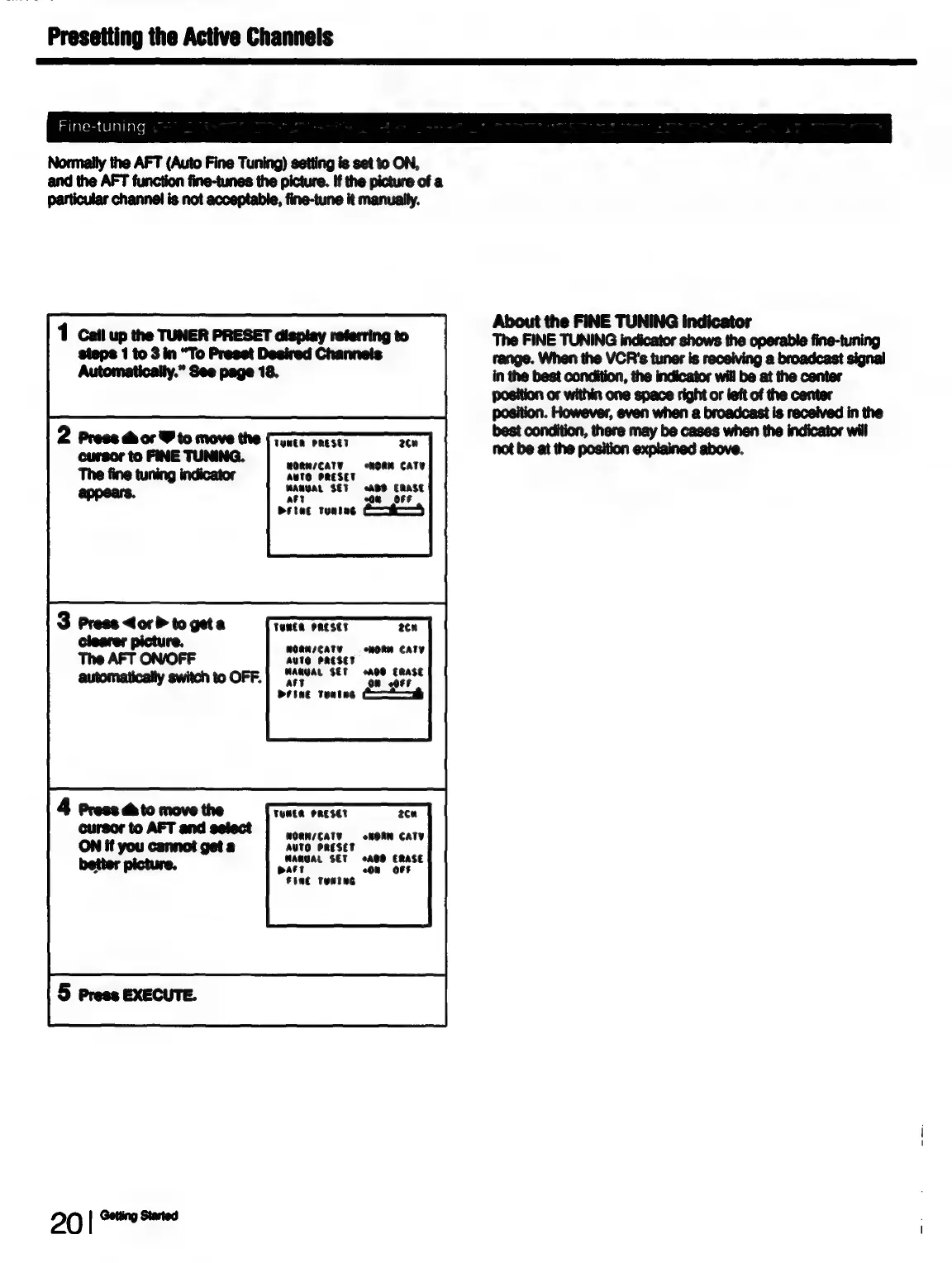
Fine-tuning
Normaily
the AFT
(Auto
Fine
Tuning)
setting
is
set
to
ON,
and
the
AFT
function
fine-tunes
the
picture.
if
the
picture
of
a
particular
channel
is
not
acceptable,
fine-tune
it
manually.
1
Call
up
the
TUNER
PRESET
display
referring
to
steps
1
to
3
in
“To
Preset
Desired
Channels
Automatically.”
See
page
18.
2
Press
chor
Y
to
move
the
TUNER
PRESET
cursor
to
FINE
TUNING.
2cu
wORNsCATY
moan
CaTY
AUTO
PRESET
WANUAL
SET
ABD
ERASE
ary
a
OFF
Prine
tuning
3
Press
<or
>
to
get
a
TUNER
PRESET
2cn
Onn
MORNICATY
«=
oHORM
CATY
peal
bit
nie
to
OFF.
MARUAL
SET
oA00
ERase
°
¢F
att
On
Prine
toning
C—*——h
TUNER
PRESET
2ca
MORNICATY
AUTO
PRESET
MANGAL
SET
eAOO
ERASE
Ar
°0N
«OFF
WORN
CaTY
t
Fine
Tuntug
20
|
SFE
About
the
FINE
TUNING
indicator
The
FINE
TUNING
indicator
shows
the
operable
fine-tuning
range.
When
the
VCR's
tuner
is
receiving
a
broadcast
signal
in
the
best
condition,
the
indicator
will
be at
the
center
position
or
within
one
space
right
or
left
of
the
center
position.
However,
even
when
a
broadcast
is
received
in
the
best
condition,
there
may
be
cases
when
the
indicator
will
not
be at
the
position
explained
above.

Table of Contents