EasyManua.ls Logo

Sony SLV-686HF - Quick Timer Recording

Sony SLV-686HF
67 pages
Print Icon
To Next Page IconTo Next Page
To Previous Page IconTo Previous Page
Loading...
Quick
Timer
Recording
This
function
is
convenient
when,
for
example,
you
want
to
Before
you
begin,
check
the
following
points.
set
the
VCR
to
start
recording
immediately
without
going
through
the
whole
timer
setting
procedure.
¢
Press
TIMER
REC
(ON/OFF)
if
the
TIMER
indicator
is
However,
the
quick
timer
recording
function
only
provides
a
turned
on.
very
rough
setting
for
the
desired
program.
©
If
you
are
currently
recording,
perform
step
6
only.
Quick
Timer
Recording
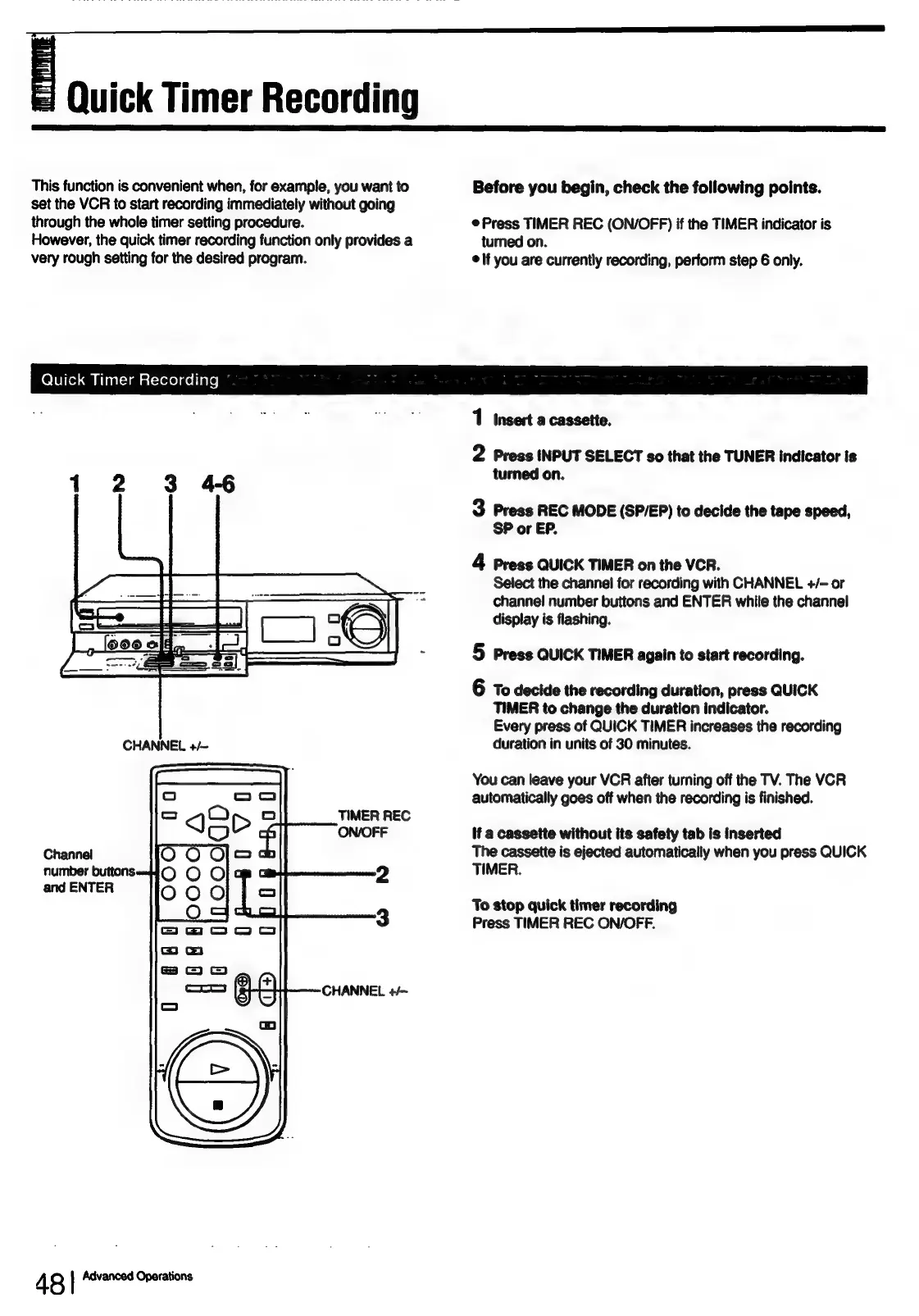
1
insert
a
cassette.
2
Press
INPUT
SELECT
so
that
the
TUNER
indicator
is
turned
on.
3
Press
REC
MODE
(SP/EP)
to
decide
the
tape
speed,
SP
or
EP.
4
Press
QUICK
TIMER
on
the
VCR.
Select
the
channel
for
recording
with
CHANNEL
+/-
or
channel
number
buttons
and
ENTER
while
the
channel
display
is
flashing.
5
Press
QUICK
TIMER
again
to
start
recording.
6
To
decide
the
recording
duration,
press
QUICK
TIMER
to
change
the
duration
indicator.
Every
press
of
QUICK
TIMER
increases
the
recording
duration
in
units
of
30
minutes.
You
can
leave
your
VCR
after
turning
off
the
TV.
The
VCR
automatically
goes
off
when
the
recording
is
finished.
TIMER
REC
ON/OFF
if
a
cassette
without
its
safety
tab
is
inserted
The
cassette
is
ejected
automatically
when
you
press
QUICK
2
TIMER.
and
ENTER
To
stop
quick
timer
recording
3
Press
TIMER
REC
ON/OFF.
48
|
Advanced
Operations

Table of Contents

Related product manuals