EasyManua.ls Logo

Sony SLV-686HF - Chanmeis

Sony SLV-686HF
67 pages
Print Icon
To Next Page IconTo Next Page
To Previous Page IconTo Previous Page
Loading...
5
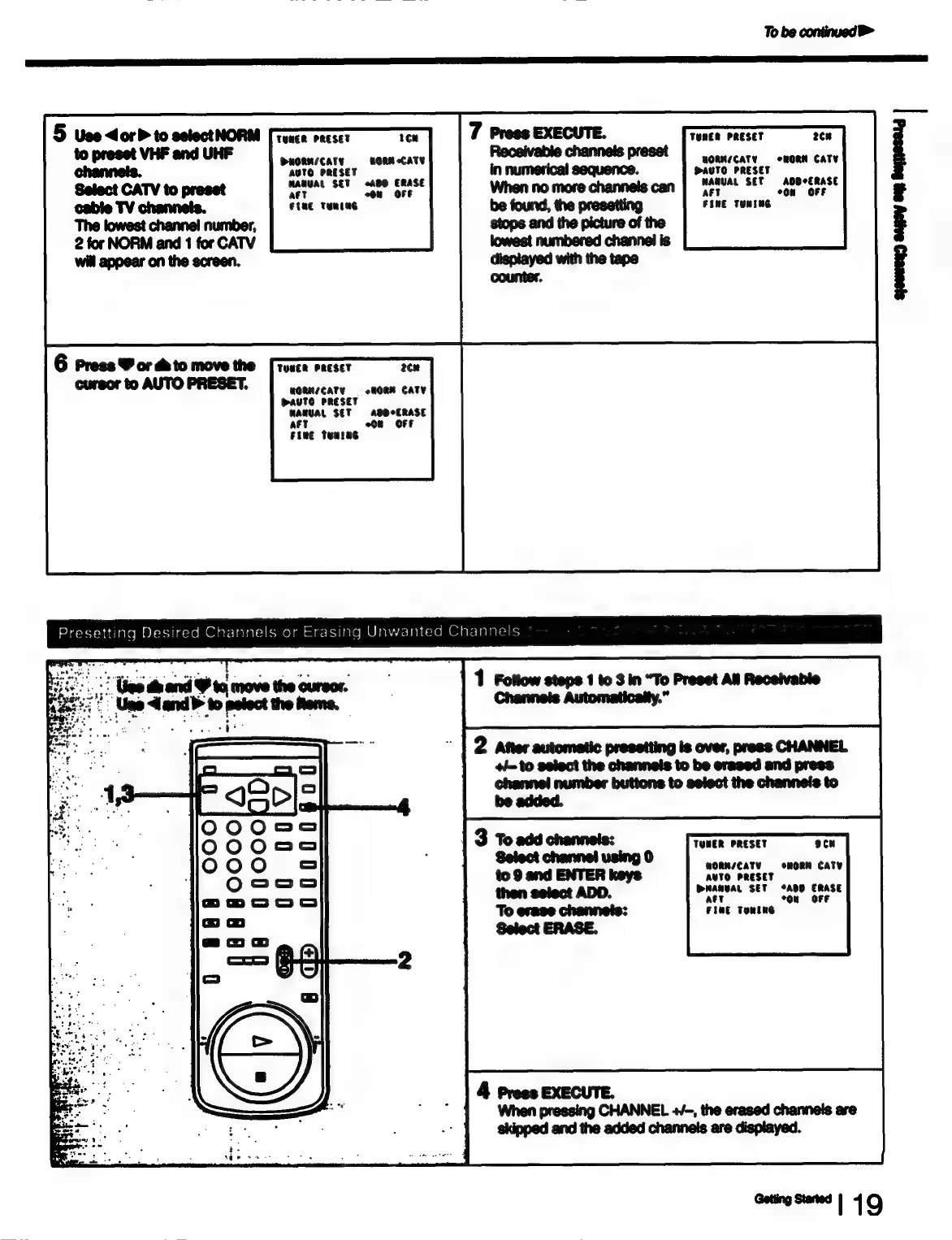
Use
dor
to
selectNORM
TUNER
PRESET
tow
to
preset
VHF
and
UHF
channels.
Select
CATV
to
preset
cable
TV
channeis.
The
lowest
channel
number,
2
for
NORM
and
1
for
CATV
will
appear
on
the
screen.
PuORN/CaTy
AUTO
PRESET
rere
SET
Ad0
or
a
WORK
CATY
tine
TERENG
6
Press
W
or
to
move
the
[roses
racset
2¢n
cursor
to
AUTO
PRESET.
WORMNICATY
=
HORM
CATY
WAUTO
PRESET
MANUAL
SET
ADDCERASE
On
«OFF
aft
Fine
tunsne
To
be
continued
>
TemER
PRESET
2ce
WORMICATY
=
oRORM
CATV
PaUTO
PRESET
WAMUAL
SET
AODCERASE
aft
oon
OFF
FINE
TUNENG
ere
etl
Presetting
Desired
Channels
or
Erasing
Unwanted
Channels
2
Yes
dh
and
H
to,
move
the
o
:
Ugo
land’
to
potoct
the
ome,
1
Follow
steps
1
to
3
in
“To
Preset
All
Receivable
Channels
Automatically.”
2
After
automatic
presetting
is
over,
press
CHANNEL
+=
to
select
the
channels
to
be
erased
and
press
channel
number
buttons
to
select
the
channels
to
be
added.
TUMER
PRESET
9cw
MORMN/CATVY
oRORM
CATY
AUTO
PRESET
DMANVAL
SET
“AOD
ERASE
att
ou
«(OFF
FIME
Tomine
4
Press
EXECUTE.
When
pressing
CHANNEL
+/-,
the
erased
channels
are
skipped
and
the
added
channels
are
displayed.
onmgoums
|
19

Table of Contents