EasyManua.ls Logo

Sony SLV-686HF - Synchronized Editing

Sony SLV-686HF
67 pages
Print Icon
To Next Page IconTo Next Page
To Previous Page IconTo Previous Page
Loading...
To
be
continued
>
SM
aelalgelaly4:tom=te
li
(lave
meralcom-Vale)tal-1
me
aera]
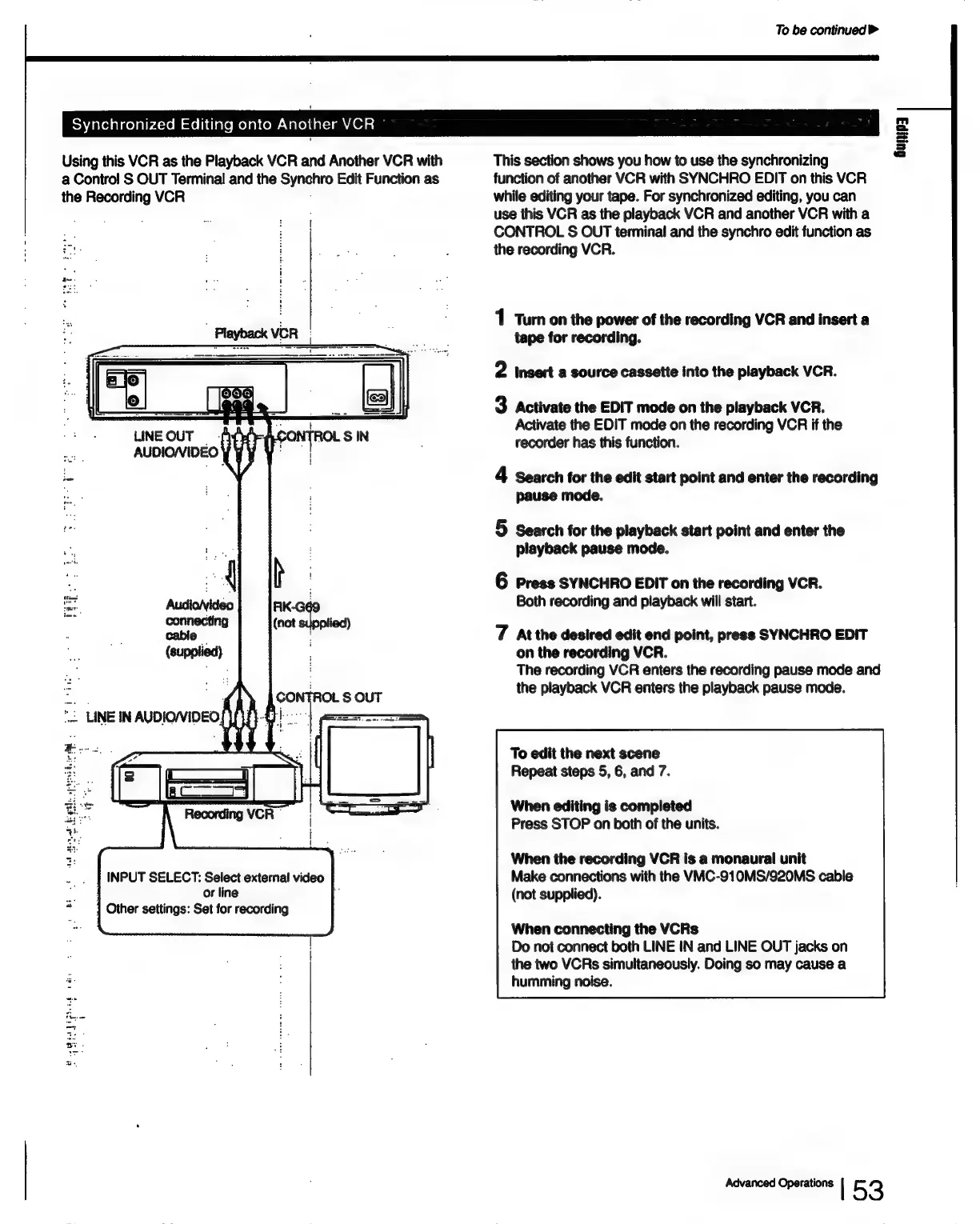
Using
this
VCR
as
the
Playback
VCR
and
Another
VCR
with
a
Control
S
OUT
Terminal
and
the
Synchro
Edit
Function
as
the
Recording
VCR
INPUT
SELECT:
Select
external
video
/
or
line
7
]
Other
settings:
Set
for
recording
This
section
shows
you
how
to
use
the
synchronizing
function
of
another
VCR
with
SYNCHRO
EDIT
on
this
VCR
while
editing
your
tape.
For
synchronized
editing,
you
can
use
this
VCR
as
the
playback
VCR
and
another
VCR
with
a
CONTROL
S
OUT
terminal
and
the
synchro
edit
function
as
the
recording
VCR.
1
Turn
on
the
power
of
the
recording
VCR
and
insert
a
tape
for
recording.
2
insert
a
source
cassette
into
the
playback
VCR.
3
Activate
the
EDIT
mode
on
the
playback
VCR.
Activate
the
EDIT
mode
on
the
recording
VCR
if
the
recorder
has
this
function.
4
Search
for
the
edit
start
point
and
enter
the
recording
pause
mode.
5
Search
for
the
playback
start
point
and
enter
the
playback
pause
mode.
6
Press
SYNCHRO
EDIT
on
the
recording
VCR.
Both
recording
and
playback
will
start.
7
At
the
desired
edit
end
point,
press
SYNCHRO
EDIT
on
the
recording
VCR.
The
recording
VCR
enters
the
recording
pause
mode
and
the
playback
VCR
enters
the
playback
pause
mode.
To
edit
the
next
scene
Repeat
steps
5,
6,
and
7.
When
editing
is
completed
Press
STOP
on
both
of
the
units.
When
the
recording
VCR
is
a
monaural
unit
Make
connections
with
the
VMC-910MS/920MS
cable
(not
supplied).
When
connecting
the
VCRs
Do
not
connect
both
LINE
IN
and
LINE
OUT
jacks
on
the
two
VCRs
simultaneously.
Doing
so
may
cause
a
humming
noise.
Advanced
Operations
|
53

Table of Contents

Related product manuals