EasyManua.ls Logo

Sony SLV-686HF - Quick Timer Recording Details; Recording Duration Indicator; Operable Buttons During Quick Timer

Sony SLV-686HF
67 pages
Print Icon
To Next Page IconTo Next Page
To Previous Page IconTo Previous Page
Loading...
sicrole}aeliaremOlelechirelam
lace
ller-lcels
siUh
ecolat-melel-iecleli-melelaiaremeleite]
amiletlcimat-rerelceliale|
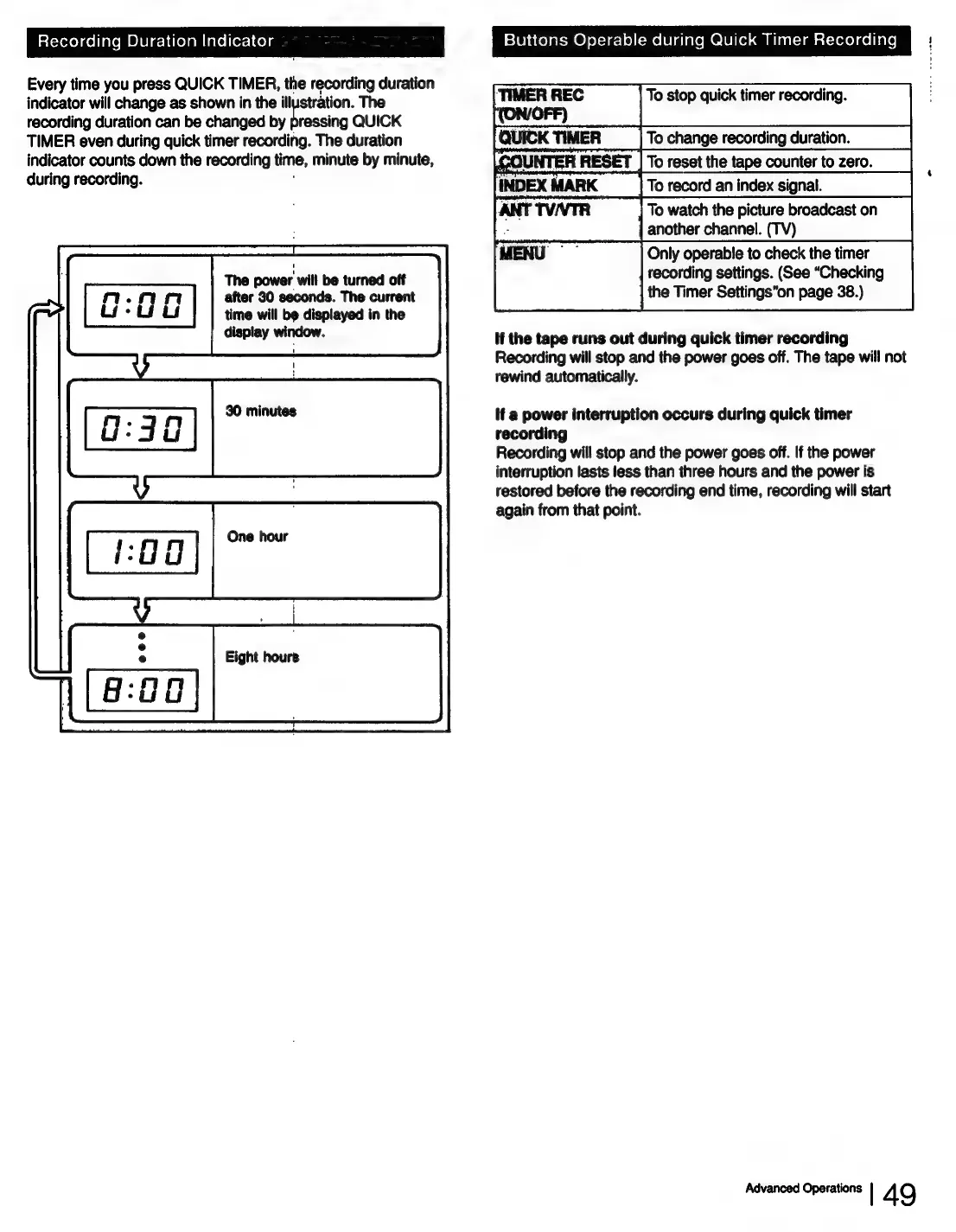
Every
time
you
press
QUICK
TIMER,
the
recording
duration
——
indicator
will
change
as
shown
in
the
illustration.
The
To
stop
quick
timer
recording.
recording
duration
can
be
changed
by
pressing
QUICK
TIMER
even
during
quick
timer
recording.
The
duration
(QUICK
TIMER
_|
To
change
recording
duration.
indicator
counts
down
the
recording
time,
minute
by
minute,
co
atl
aoe
To
reset
the
tape
counter
to
zero.
during
recording.
To
record
an
index
signal.
To
watch
the
picture
broadcast
on
another
channel.
(TV)
Only
operable
to
check
the
timer
recording
settings.
(See
“Checking
the
Timer
Settings’on
page
38.)
The
power
will
be
turned
off
after
30
seconds.
The
current
time
will
be
displayed
in
the
display
window.
If
the
tape
runs
out
during
quick
timer
recording
Recording
will
stop
and
the
power
goes
off.
The
tape
will
not
rewind
automatically.
80
minutes
if
a
power
interruption
occurs
during
quick
timer
recording
Recording
will
stop
and
the
power
goes
off.
If
the
power
interruption
lasts
less
than
three
hours
and
the
power
is
restored
before
the
recording
end
time,
recording
will
start
again
from
that
point.
One
hour
Eight
hours
Advanced
Operations
|
49

Table of Contents

Related product manuals