EasyManua.ls Logo

Sony SLV-686HF - Presetting Active Channels; Automatic Channel Presetting

Sony SLV-686HF
67 pages
Print Icon
To Next Page IconTo Next Page
To Previous Page IconTo Previous Page
Loading...
Presetting
the
Active
Channels
This
VCR
is
capable
of
receiving
VHF
channels
2
to
13,
UHF
channets
14
to
69,
or
CATV
channels
1
to
125.
These
channels
can
be
preset
using
the
Commander
and
the
TUNER
PRESET
display.
First,
we
recommend
that
you
preset
the
active
channels
in
your area
using
the
automatic
preset
mode.
Then,
if
there
are any
unwanted
channeis,
delete
them
manually.
If
you've
already
decided
which
channels
you
wish
to
preset
on
the
VCR,
set
them
directly
by
using
the
channel
number
buttons.
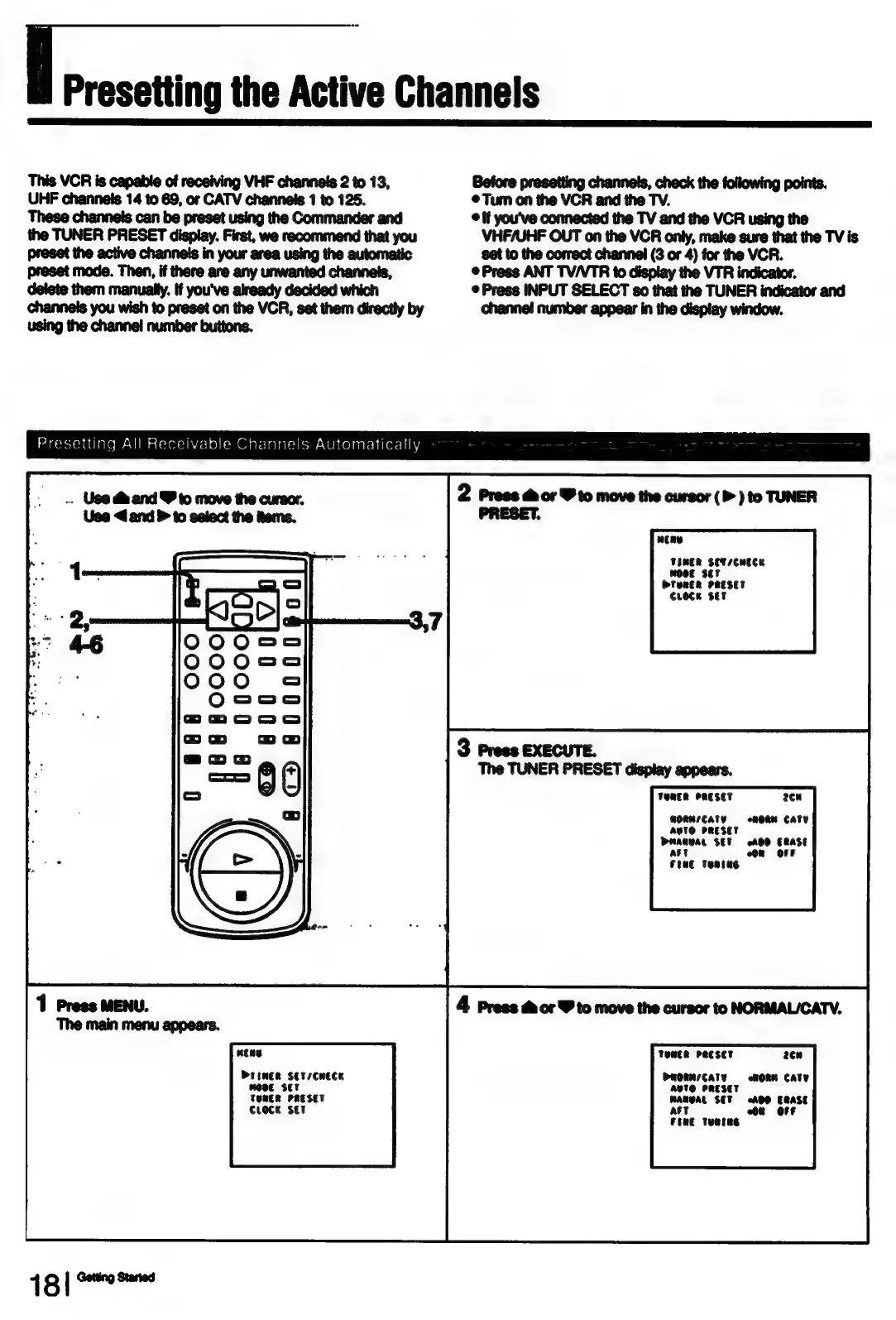
Presetting
All
Receivable
Channels
Automatically
..
Use
dm
and
Y
to
move
the
cursor.
Use
<
and
to
select
the
tems.
DrineR
SETsCHECK
Mose
set
TONER
PRESET
Croce
SET
16
[r=
Before
presetting
channels,
check
the
following
points.
Tum
on
the
VCR
and
the
TV.
©
If
you've
connected
the
TV
and
the
VCR
using
the
VHF/UHF
OUT
on
the
VCR
only,
make
sure
that
the
TV
is
set
to
the
correct
channel
(3
or
4)
for
the
VCR.
©
Press
ANT
TV/VTR
to
display
the VTR
indicator.
©
Press
INPUT
SELECT
so
that
the
TUNER
indicator
and
channel
number
appear
in
the
display
window.
2
Press
dor
Y
to
move
the
cursor
(P
)
to
TUNER
PRESET.
neay
TOMER
SET
/CHECK
WOsE
SET
OTERER
PRESET
Croce
set
3
Press
EXECUTE.
The
TUNER
PRESET
display
appears.
TERER
PRESET
2cu
BORRsICATY
AVTO
PRESET
Dmanvar
SET
AOD
ERASE
+6
omeRne
CATY
att
Fie
Tentag
4
Press
&
or
Y
to
move
the
cursor
to
NORMALICATV.
TONER
PRESET
2¢n
PRORN/CATY
«HORN
CaTY
Aete
PRESET
WARBAL
SET
ADO
ERASE
Al
on
Off
FERE
TunsNs

Table of Contents

Related product manuals