EasyManua.ls Logo

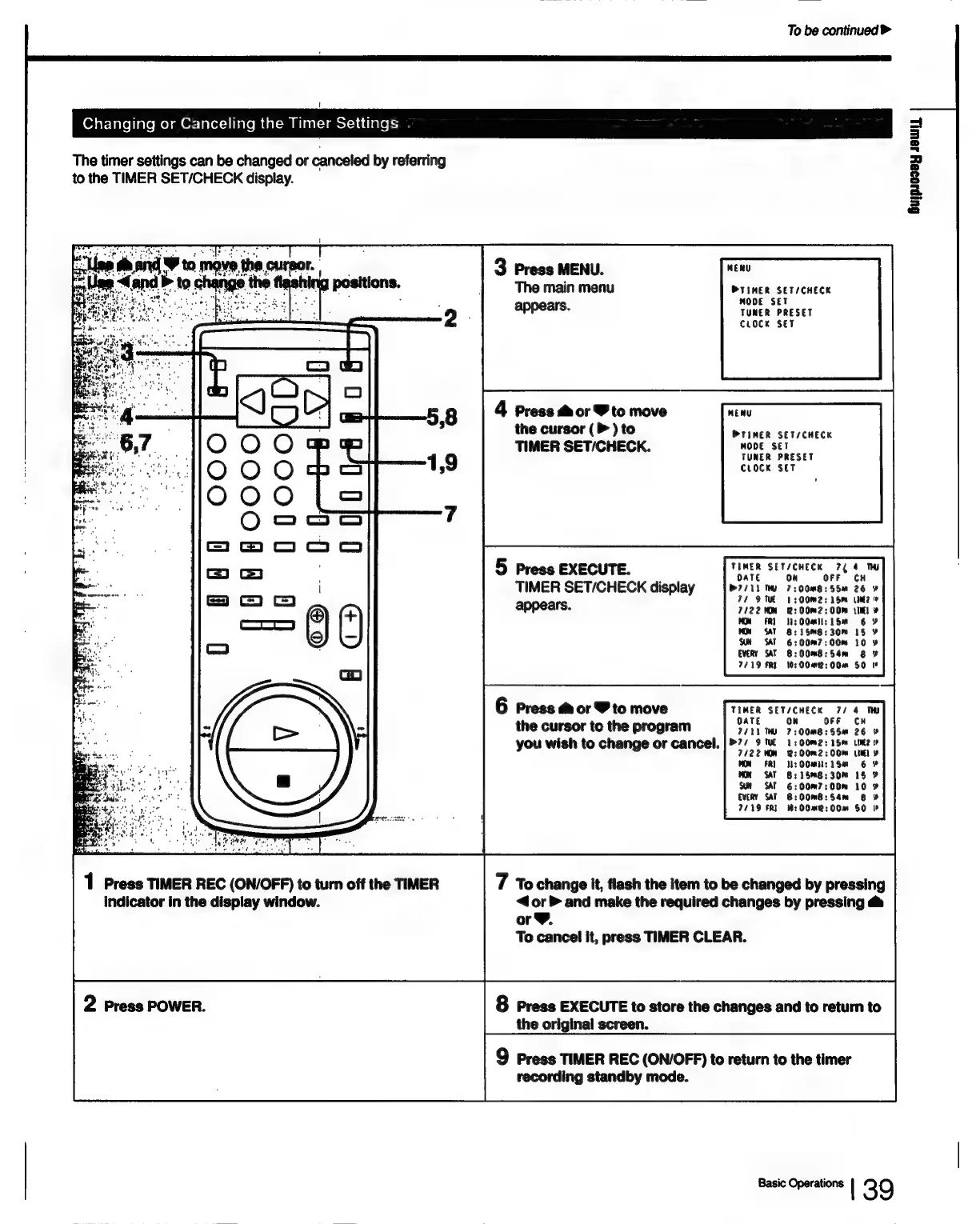
Sony SLV-686HF - Changing or Canceling the Timer Settings

Sony SLV-686HF
67 pages
Print Icon
To Next Page IconTo Next Page
To Previous Page IconTo Previous Page
Loading...
To
be
continued
>
Oy
atstate|iale
mela
Or:
]a(e:)|inle
mm
(al=am
Mlattci@eotcad
Clete
rs
The
timer
settings
can
be
changed
or
canceled
by
referring
to
the
TIMER
SET/CHECK
display.
Gujpaosey
Jew)
“lee
D
sd
move
t
the
cursor.
3
Press
MENU.
MERU
4
ana
to
he
the
fi
shin
np
ems
|
The
main
menu
PTINER
SET/CHECK
2
he
f :
Set
NODE
appears.
TUNER
PRESET
CLOCK
SET
4
Press
&
or
Y
to
move
MERU
the
cursor
(P
)
to
Primer
SETVCHECK
TIMER
SET/CHECK.
MODE
rusk
PRESET
CLOCK
SET
TIMER
SET/CHECK
72
4
TH
5
Press
EXECUTE.
EB
SEUCHECE
74
OaTe
TIMER
SET/CHECK
display
7:00m8:55u
26
9
130OMm2:
15mm
Un?
appears.
2:
00m2:
0m
tie)
¥
Ns
Om:
1S
8:
15m8:
30m
6:
00m?
:
00m
8:
00m8:
54m
7719
FRE
10:00me:
00m
6
Press
@&
or
BY
to
move
TIMER
SET/CHECK
7/
OATE
On
OFF
the
cursor
to
the
program
PALL
TM
7:00M8:
55m
you
wish
to
change
or
cancel.
|>7/
9
we
1:
00m2:
15m
7/22
40M
2:
00m2:00m
WON
FRI
Ms
OOM:
1S
WON
SAT
8:
158;
30m
Sut
SAT
6:
00m7:00m
EvERY
SAT
8:00mB:S4m
7739
FRI
4:
00m@:
00m
$0
i
PEP
be
we
Ne
Seg
et
.
Sate
eee
Sn
ie
GREER
en
ee
age
1
Press
TIMER
REC
(ON/OFF)
to
turn
off
the
TIMER
7
To
change
it,
flash
the
item
to
be
changed
by
pressing
indicator
in
the
display
window.
<or>
and
make
the
required
changes
by
pressing
@&
or®,
To
cancel
it,
press
TIMER
CLEAR.
2
Press
POWER.
8
Press
EXECUTE
to
store
the
changes
and
to
return
to
the
original
screen.
9
Press
TIMER
REC
(ON/OFF)
to
return
to
the
timer
recording
standby
mode.
Basic
Operations
|
39

Table of Contents