EasyManua.ls Logo

Sony SLV-686HF - Recording MTS Broadcasts

Sony SLV-686HF
67 pages
Print Icon
To Next Page IconTo Next Page
To Previous Page IconTo Previous Page
Loading...
Recording
TV
Programs
la(crere]
cel
lalemiufelnderelar:lelal-smm
mM
aeslolUlare
Mes
MBs)
M
siger-loleri5
C3)
To
record
a
stereo
broadcast
When
a
stereo
broadcast
program
is
received,
the
STEREO
indicator
appears
in
the
display
window.
The
stereo
program
is
automatically
recorded
in
stereo.
If
a
stereo
program
is
noisy,
set
AUTO
STEREO
to
OFF
in
the
MODE
SET
menu.
The
sound
is
heard
in
monaural
but
the
nosie
is
reduced.
Use
@&
and
Y
to
move
the
cursor.
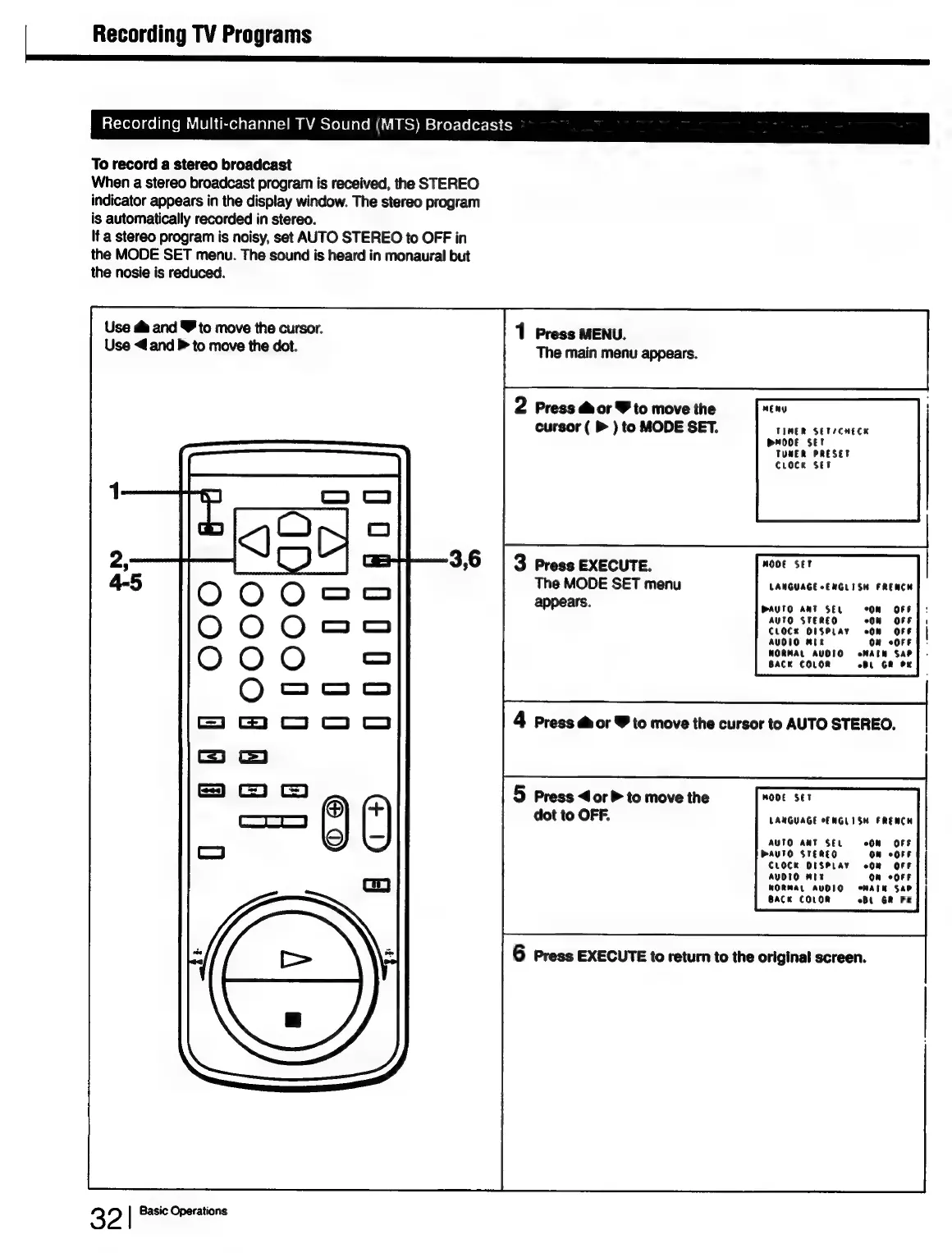
1
Press
MENU.
Use
<4
and
P
to
move
the
dot.
The
main
menu
appears.
2
Press
dor
Y
to
move
the
mEny
cursor
(
>
)
to
MODE
SET.
TIMER
SETICHECK
MODE
SET
TUNER
PRESET
Croce
Set
3
Press
EXECUTE.
mOoE
Set
The
MODE
SET
menu
LANGUAGE CENGLISH
FRENCH
appears.
DAUTO
ANT
SEL
On
«OFF
AUTO
STEREO
CLOCx
O1SPLAY
AUOIO
Mik
WORMAL
AVOIO
eoMATN
SAP
BACK
COLOR
Bt
GR
OK
U0
U0d00
007000
OO
4
Press
dor
V
to
move
the
cursor
to
AUTO
STEREO.
H
O
O
O
O
C=
c)
5
Press
<or>
to
move
the
MODE
SET
dot
to
OFF.
LANGUAGE
CF
NGLISH
FRENCH
AUTO
AMT
SEL
On
OFF
H
Hy
(OS)
C1
+)
PAUTO
STEREO
On
oorr
CLOCK
DISPLAY
cOm OFF
AUDIO
mix
om
corr
|
|
WORMAL
AUDIO
oMAIM
SAP
BACK
COLOR
61
GR
OK
A
6
Press
EXECUTE
to
return
to
the
original
screen.
)
32
|
Basic
Operations

Table of Contents

Related product manuals