EasyManua.ls Logo

Sony SLV-686HF - Basic Operations | 33

Sony SLV-686HF
67 pages
Print Icon
To Next Page IconTo Next Page
To Previous Page IconTo Previous Page
Loading...
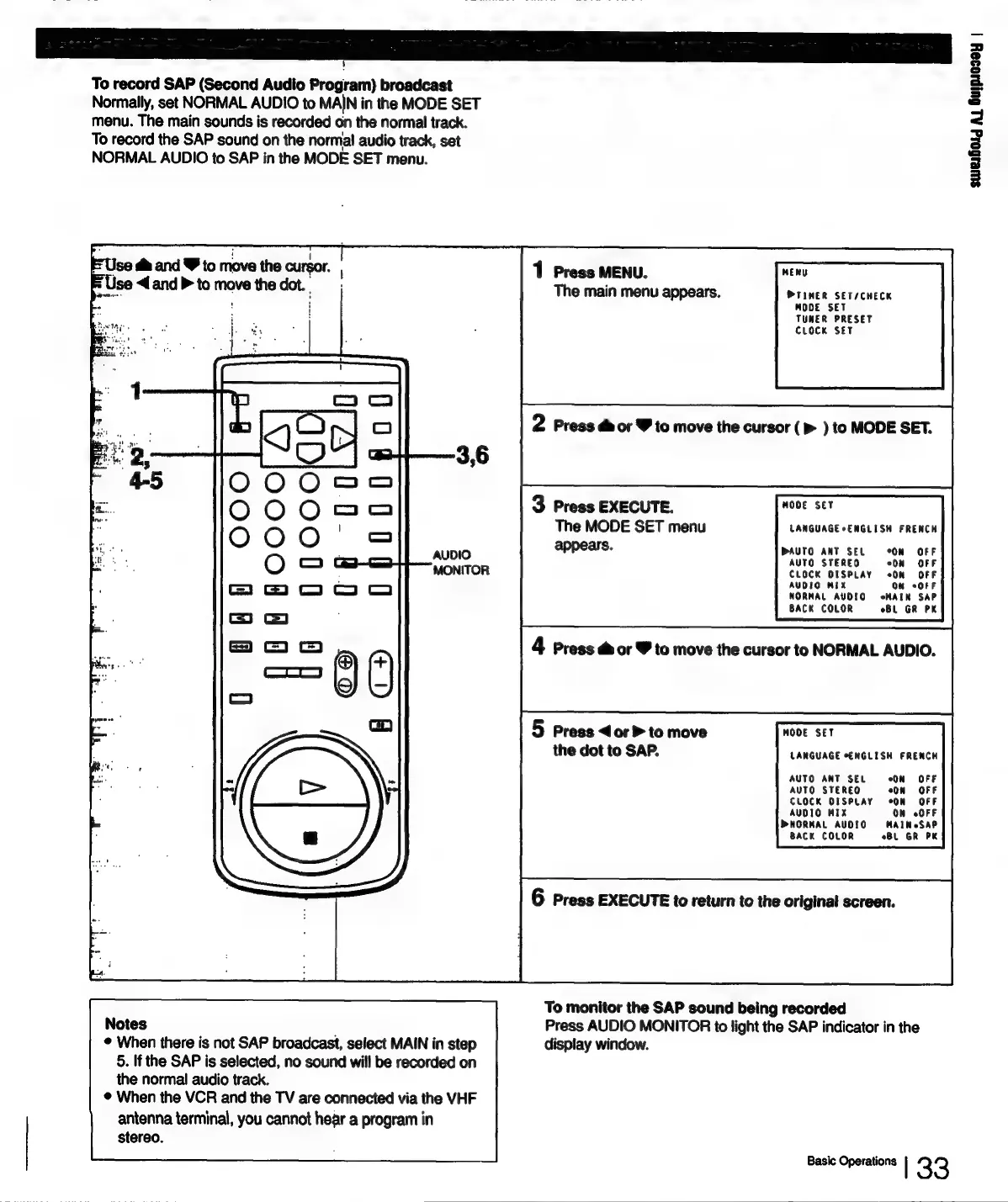
To
record
SAP
(Second
Audio
Program)
broadcast
Normally,
set
NORMAL
AUDIO
to
MAIN
in
the
MODE
SET
menu.
The
main
sounds
is
recorded
on
the
normal
track.
To
record
the
SAP
sound
on
the
normal
audio
track,
set
NORMAL
AUDIO
to
SAP
in
the
MODE
SET
menu.
se
dm
and
W
to
move
the
cursor.
Press
MENU.
MENU
=
Use
4.and
>
to
move
the
dot.
»
if
The
main
menu
appears.
PTIMER
SET/CHECK
MODE
SET
TUNER
PRESET
CLOCK
SET
2
Press
@
or
Y
to
move
the
cursor
(p>
)
to
MODE
SET.
3
Press
EXECUTE.
MODE
SET
The
MODE
SET
menu
LANGUAGE
sENGLISH
FRENCH
appears.
DAUTO
ANT
SEL
°ON
OFF
AUTO
STEREO
CLOCK
DISPLAY
AUDIO
MIX
i”
NORMAL
AUDIO.
HAIN
SAP
BACK
COLOR
BL
GR
PK
4
Press
@
or
Y
to
move
the
cursor
to
NORMAL
AUDIO.
5
Press
<or
>
to
move
MODE
SET
the
dot
to
SAP.
LANGUAGE
ENGLISH
FRENCH
AUTO
ANT
SEL
ON
OFF
AUTO
STEREO
On
«OFF
CLOCK
DISPLAY
*ON
OFF
AUDIO
MIX
ON
OFF
PNORMAL
AUDIO
MAIM
SAP
BACK
COLOR
oBL
GR
PK
6
Press
EXECUTE
to
return
to
the
original
screen.
To
monitor
the
SAP
sound
being
recorded
Notes
Press
AUDIO
MONITOR
to
light
the
SAP
indicator
in
the
©
When
there
is
not
SAP
broadcast,
select
MAIN
in
step
display
window.
5.
If
the
SAP
is
selected,
no
sound
will
be
recorded
on
the
normal
audio
track.
®
When
the
VCR
and
the
TV
are
connected
via
the
VHF
antenna
terminal,
you
cannot
hear
a
program
in
stereo.
Basic
Operations
|
33
swesfoig
Al
Gujpaosey
|

Table of Contents

Related product manuals