EasyManua.ls Logo

Sony SLV-686HF - Setting Time and Date Clock

Sony SLV-686HF
67 pages
Print Icon
To Next Page IconTo Next Page
To Previous Page IconTo Previous Page
Loading...
E!
E:
Setting
the
Time
and
Date
Clock
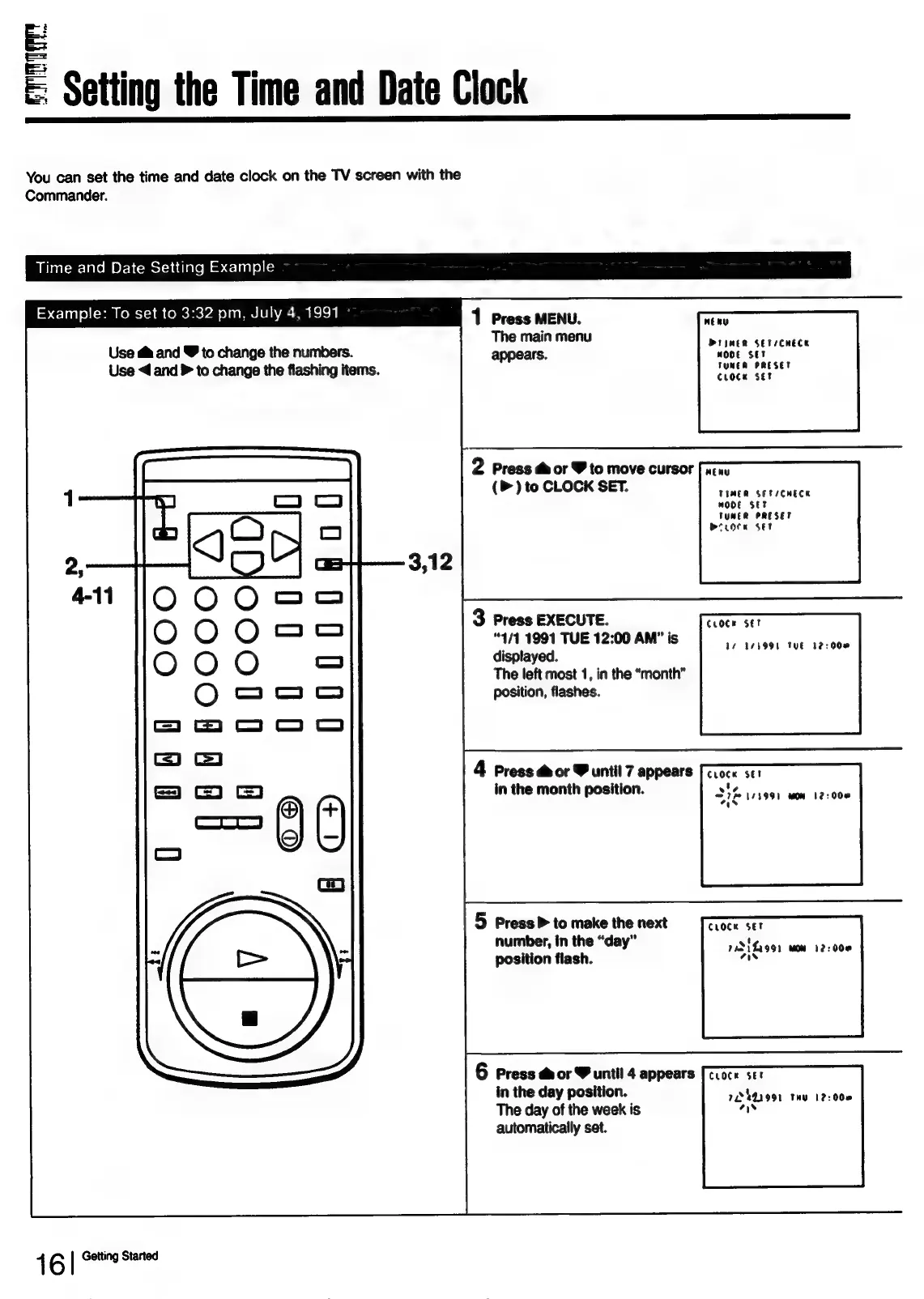
You
can
set
the
time
and
date
clock
on
the
TV
screen
with
the
Commander.
Time
and
Date
Setting
Example
Example:
To
set
to
3:32
pm,
July
4,
1991
1
Press
MENU
tie
The
main
menu
Use
@&
and
8
to
change
the
numbers.
appears.
ea
TUNER
PRESET
Use
<
and
>
to
change
the
flashing
items.
CLocK
set
2
Press
@&
or
Y
to
move
cursor
neny
(P)
to
CLOCK
SET.
TIMER
SET/CHECK
MOOE
SET
TUMER
PRESET
mecote
set
3
Press
EXECUTE.
TET
“4/1
1991
TUE
12:00
AM”
is
ie
displayed.
14
173998
THE
12:00
The
left
most
1,
in
the
“month”
position,
flashes.
4
Press
&
or
Y
until
7
appears
[croce
ser
t
in
the
month
position.
3
a
1/3991
Won
122008
5
Press
>
to
make
the
next
CLOCK
SET
number,
in
the
“day”
position
flash.
e
74311299)
MOM
12:000
aw
6
Press
&
or
V
until
4
appears
[ccoce
ser
in
the
day
position.
The
day
of
the
week
is
automatically
set.
72441991
THY
122008
7%
1
6
|
Getting
Started

Table of Contents

Related product manuals