EasyManua.ls Logo

Sony SLV-686HF - Checking Timer Settings

Sony SLV-686HF
67 pages
Print Icon
To Next Page IconTo Next Page
To Previous Page IconTo Previous Page
Loading...
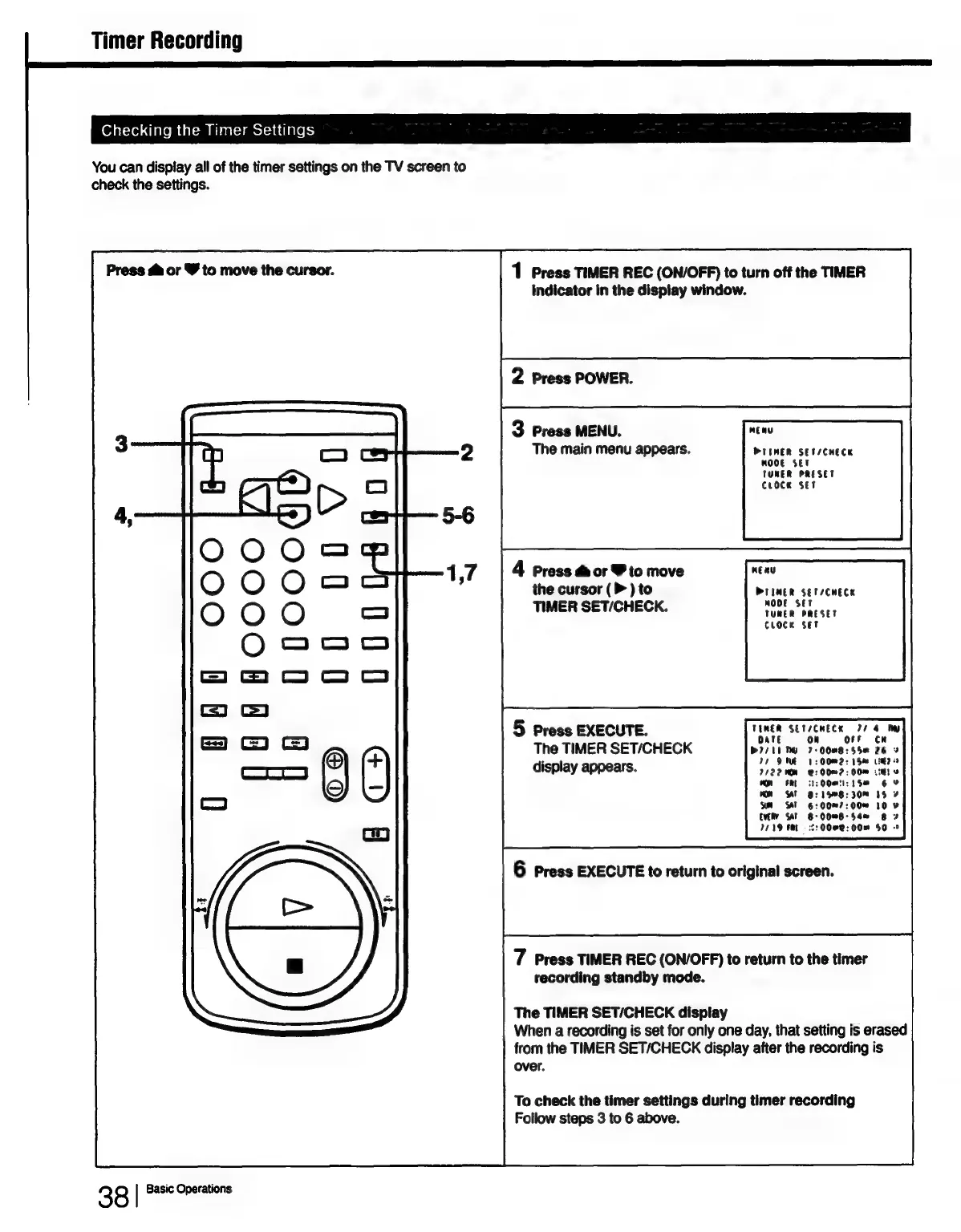
Timer
Recording
Checking
the
Timer
Settings
You
can
dispiay
all
of
the
timer
settings
on
the
TV
screen
to
check
the
settings.
Press
di
or
Y
to
move
the
cursor.
OO
OO
OO
O
ee
ao
U
iE
38
|
Basic
Operations
1
Press
TIMER
REC
(ON/OFF)
to
turn
off
the
TIMER
indicator
in
the
display
window.
2
Press
POWER.
3
Press
MENU.
The
main
menu
appears.
4
Press
&
or
Y
to
move
the
cursor
(>
)
to
TIMER
SET/CHECK.
5
Press
EXECUTE.
The
TIMER
SET/CHECK
display
appears.
PTIMER
SET/CHECK
mMOOE
SET
TUNER
PRESET
Croce
Set
PrIMER
SEN/CHECK
MODE
SET
TUNER
PRESET
CLocK
set
TEMER
SET/CHECK
24
4
Py
Date
on
orf
CH
PI71E
DY
7-00m8:55e
26
»
27
DME
1:
00M2:
15m
Lee?
2
7122
00M
2:00?
:
00m
Lig)»
On
FRE
Oe:
1S
6
Wn
SAT
8:
158:30M
15
2
WH
ST
6:00"7:00~
10
¥
EVERY
SAT
6-0088-S$4e
8
2
7719
FM
=
:2:00082:
00"
$0
-*
6
Press
EXECUTE
to
return
to
original
screen.
7
Press
TIMER
REC
(ON/OFF)
to
return
to
the
timer
recording
standby
mode.
The
TIMER
SET/CHECK
display
When
a
recording
is
set
for
only
one
day,
that
setting
is
erased
from
the
TIMER
SET/CHECK
display
after
the
recording
is
over.
To
check
the
timer
settings
during
timer
recording
Follow
steps
3
to
6
above.

Table of Contents