EasyManua.ls Logo

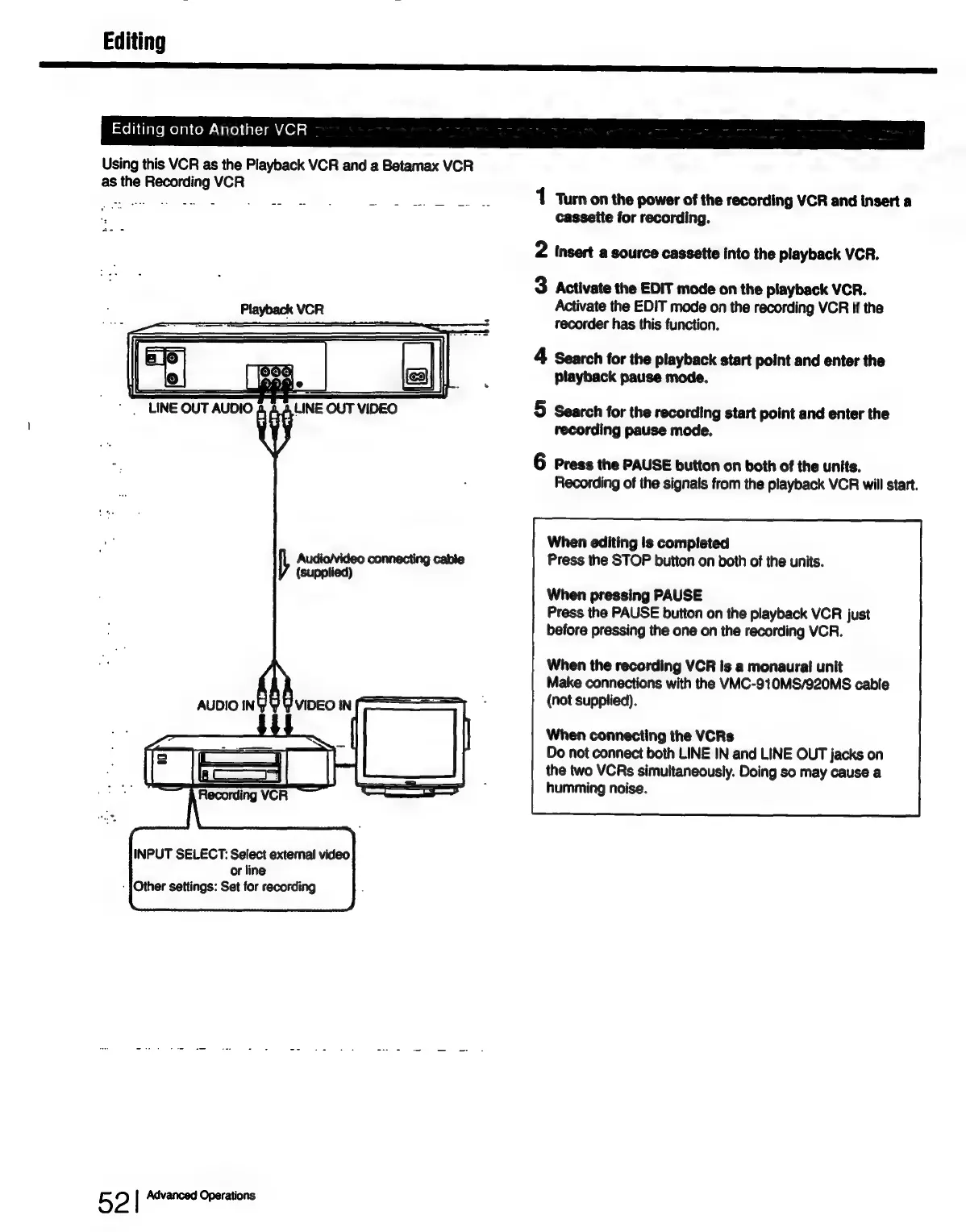
Sony SLV-686HF - Editing onto Another VCR

Sony SLV-686HF
67 pages
Print Icon
To Next Page IconTo Next Page
To Previous Page IconTo Previous Page
Loading...
Editing
an
NE
sxolh
Glare
melanvom-
Vale)
n(-1an
401s]
Using
this
VCR
as
the
Playback
VCR
and
a
Betamax
VCR
as
the
Recording
VCR
Sy
ed
wee
es
eats
Gn
Ot
pay
fet
a
1
Turn
on
the
power
of
the
recording
VCR
and
insert
a
nin
cassette
for
recording.
2
insert
a
source
cassette
into
the
playback
VCR.
3
Activate
the
EDIT
mode
on
the
playback
VCR.
Playback
VCR
Activate
the
EDIT
mode
on
the
recording
VCR
if
the
recorder
has
this
function.
4
Search
for
the
playback
start
point
and
enter
the
playback
pause
mode.
‘LINE
OUT
AUDIO
LINE
OUT
VIDEO
5
Search
for
the
recording
start
point
and
enter
the
recording
pause
mode.
6
Press
the
PAUSE
button
on
both
of
the
units.
Recording
of
the
signals
from
the
playback
VCR
will
start.
When
editing
is
completed
Audio/video
connecting
cable
Press
the
STOP
button
on
both
of
the
units.
(supplied)
When
pressing
PAUSE
Press
the
PAUSE
button
on
the
playback
VCR
just
before
pressing
the
one
on
the
recording
VCR.
When
the
recording
VCR
is
a
monaural
unit
Make
connections
with
the
VMC-910MS/920MS
cable
(not
supplied).
When
connecting
the
VCRs
Do
not
connect
both
LINE
IN
and
LINE
OUT
jacks
on
the
two
VCRs
simultaneously.
Doing
so
may
cause
a
humming
noise.
INPUT
SELECT:
Select
external
video
or
line
-
{Other
settings:
Set
for
recording
5
2
|
Advanced
Operations

Table of Contents

Related product manuals