EasyManua.ls Logo

Sony SLV-686HF - Page 55

Sony SLV-686HF
67 pages
Print Icon
To Next Page IconTo Next Page
To Previous Page IconTo Previous Page
Loading...
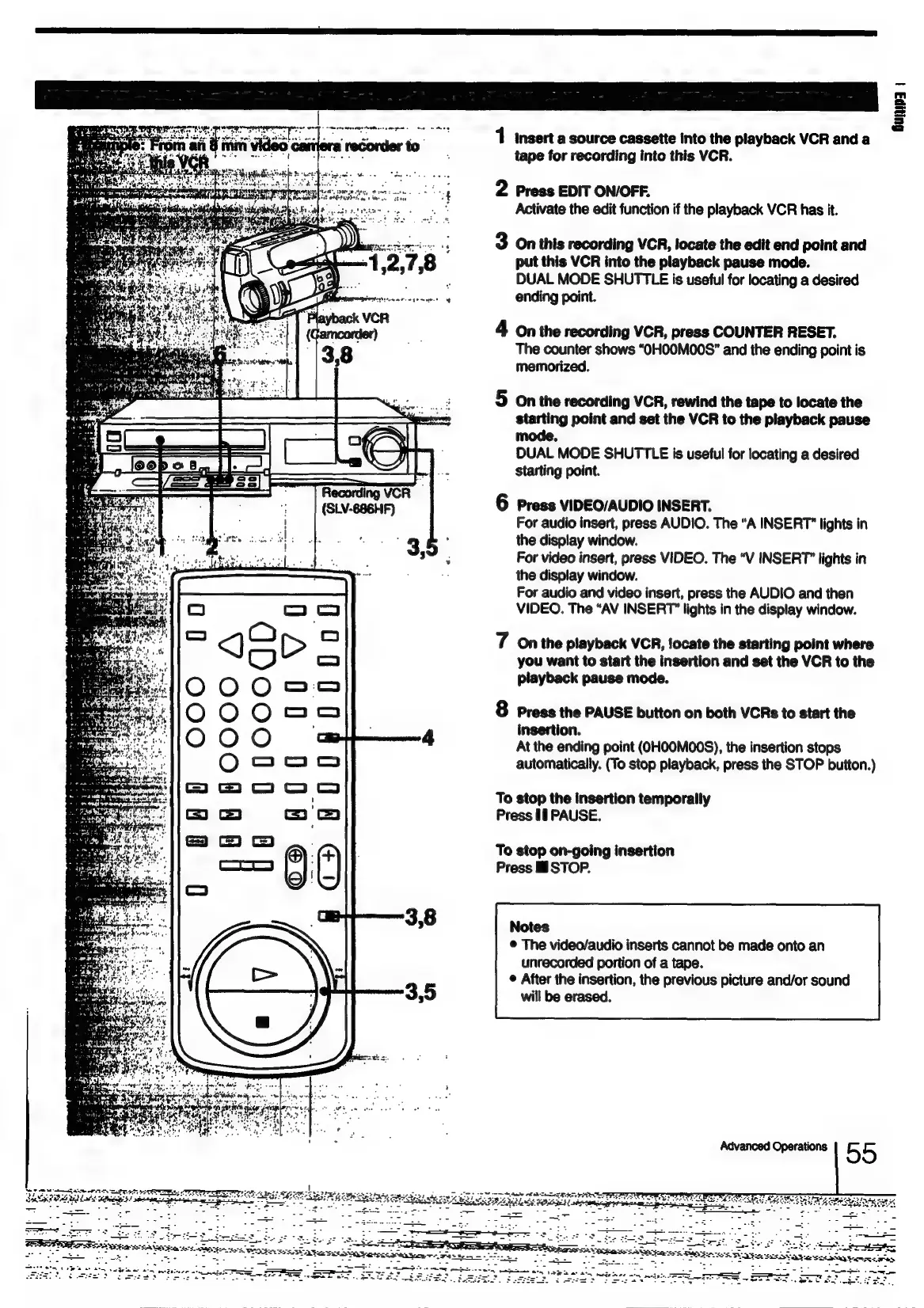
1
insert
a
source
cassette
into
the
playback
VCR
anda
tape
for
recording
into
this
VCR
im
.
-
art
.
2
Press
EDIT
ON/OFF.
Activate
the
edit
function
if
the
playback
VCR
has
it.
3
On
this
recording
VCR,
locate
the
edit
end
point
and
put
this
VCR
into
the
playback
pause
mode.
DUAL
MODE
SHUTTLE
is
useful
for
locating
a
desired
ending
point.
4
On
the
recording
VCR,
press
COUNTER
RESET.
The
counter
shows
“OHOOM00S"
and
the
ending
point
is
memorized.
5
On
the
recording
VCR,
rewind
the
tape
to
locate
the
starting
point
and
set
the
VCR
to
the
playback
pause
mode.
DUAL
MODE
SHUTTLE
is
useful
for
locating
a
desired
starting
point.
6
Press
VIDEO/AUDIO
INSERT.
For
audio
insert,
press
AUDIO.
The
“A
INSERT"
lights
in
the
display
window.
For
video
insert,
press
VIDEO.
The
“V
INSERT”
lights
in
the
display
window.
For
audio
and
video
insert,
press
the
AUDIO
and
then
VIDEO.
The
“AV
INSERT”
lights
in
the
display
window.
7
Onthe
playback
VCR,
Jocate
the
starting
point
where
you
want
to
start
the
insertion
and
set
the
VCR
to
the
playback
pause
mode.
&
Press
the
PAUSE
button
on
both
VCRs
to
start
the
insertion.
At
the
ending
point
(OHOOMOONS),
the
insertion
stops
automatically.
(To
stop
playback,
press
the
STOP
button.)
To
stop
the
insertion
temporally
Press
If
PAUSE.
To
stop
on-going
insertion
Press
i
STOP.
Notes
©
The
video/audio
inserts
cannot
be
made
onto
an
unrecorded
portion
of
a
tape.
¢
After
the
insertion,
the
previous
picture
and/or
sound
will
be
erased.
ios
Te
SESS
Se
SF
fois
ONL
ie
PE
awe
eS

Table of Contents

Related product manuals