EasyManua.ls Logo

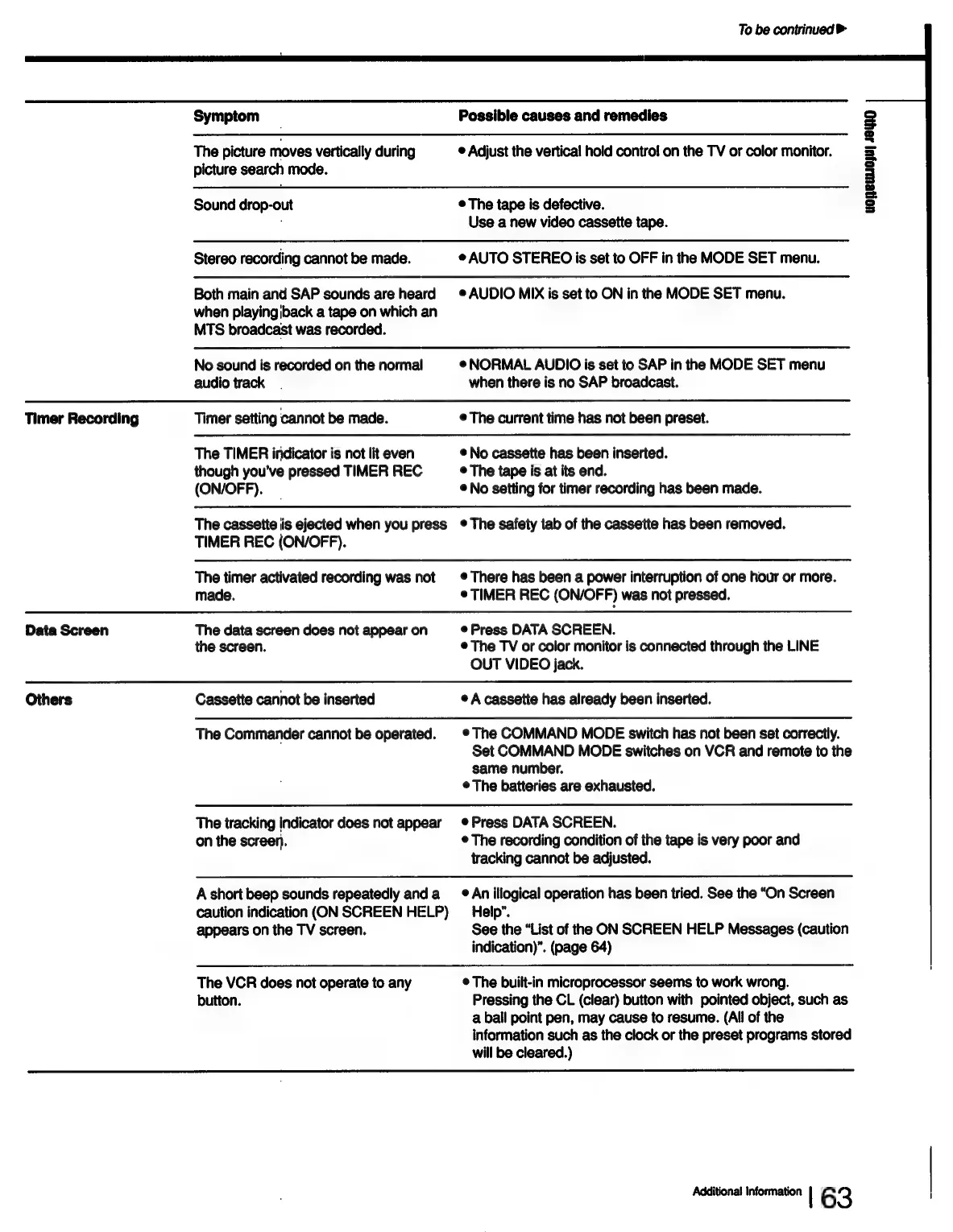
Sony SLV-686HF - Troubleshooting; Playback Picture and Sound Issues; Recording and Timer Setting Problems; Data Screen and Commander Issues

Sony SLV-686HF
67 pages
Print Icon
To Next Page IconTo Next Page
To Previous Page IconTo Previous Page
Loading...
To
be
contrinued
>
Symptom
The
picture
moves
vertically
during
picture
search
mode.
Sound
drop-out
Stereo
recording
cannot
be
made.
Both
main
and
SAP
sounds
are
heard
when
playingiback
a tape
on
which
an
MTS
broadcast
was
recorded.
No
sound
is
recorded
on
the
normal
audio
track
Timer
Recording
Timer
setting
cannot
be
made.
Possible
causes
and
remedies
©
Adjust
the
vertical
hold
control
on
the
TV
or
color
monitor.
HONSULIO;U]
48D
©
The
tape
is
defective.
Use
a
new
video
cassette
tape.
¢
AUTO
STEREO
is
set
to
OFF
in
the
MODE
SET
menu.
©
AUDIO
MIX
is
set
to
ON
in
the
MODE
SET
menu.
®NORMAL
AUDIO
is
set
to
SAP
in
the
MODE
SET
menu
when
there
is
no
SAP
broadcast.
©
The
current
time
has
not
been
preset.
The
TIMER
indicator
is
not
lit
even
though
you've
pressed
TIMER
REC
(ON/OFF).
The
cassette
is
ejected
when
you
press
TIMER
REC
(ON/OFF).
The
timer
activated
recording
was
not
made.
®
No
cassette
has
been
inserted.
©
The
tape
is
at
its
end.
®
No
setting
for
timer
recording
has
been
made.
¢
The
safety
tab
of
the
cassette
has
been
removed.
©
There
has
been
a
power
interruption
of
one
hour
or
more.
*
TIMER
REC
(ON/OFF)
was
not
pressed.
Data
Screen
The
data
screen
does
not
appear
on
the
screen.
Others
Cassette
cannot
be
inserted
©
Press
DATA
SCREEN.
©
The
TV
or
color
monitor
is
connected
through
the
LINE
OUT
VIDEO
jack.
©
A
cassette
has
already
been
inserted.
The
Commander
cannot
be
operated.
The
tracking
indicator
does
not
appear
on
the
screen.
A
short
beep
sounds
repeatedly
and
a
caution
indication
(ON
SCREEN
HELP)
appears
on
the
TV
screen.
The
VCR
does
not
operate
to
any
button.
©The
COMMAND
MODE
switch
has
not
been
set
correctly.
Set
COMMAND
MODE
switches
on
VCR
and
remote
to
the
same
number.
¢
The
batteries
are
exhausted.
¢
Press
DATA
SCREEN.
©
The
recording
condition
of
the
tape
is
very
poor
and
tracking
cannot
be
adjusted.
®
An
illogical
operation
has
been
tried.
See
the
“On
Screen
Help”.
See
the
“List
of
the
ON
SCREEN
HELP
Messages
(caution
indication)”.
(page
64)
¢
The
built-in
microprocessor
seems
to
work
wrong.
Pressing
the
CL
(clear)
button
with
pointed
object,
such
as
a
ball
point
pen,
may
cause
to
resume.
(All
of
the
information
such
as
the
clock
or
the
preset
programs
stored
will
be
cleared.)
Additional
Information
|
6
3
i

Table of Contents

Related product manuals