Sound & notification
Ð
Sound & notification
Sound & notification
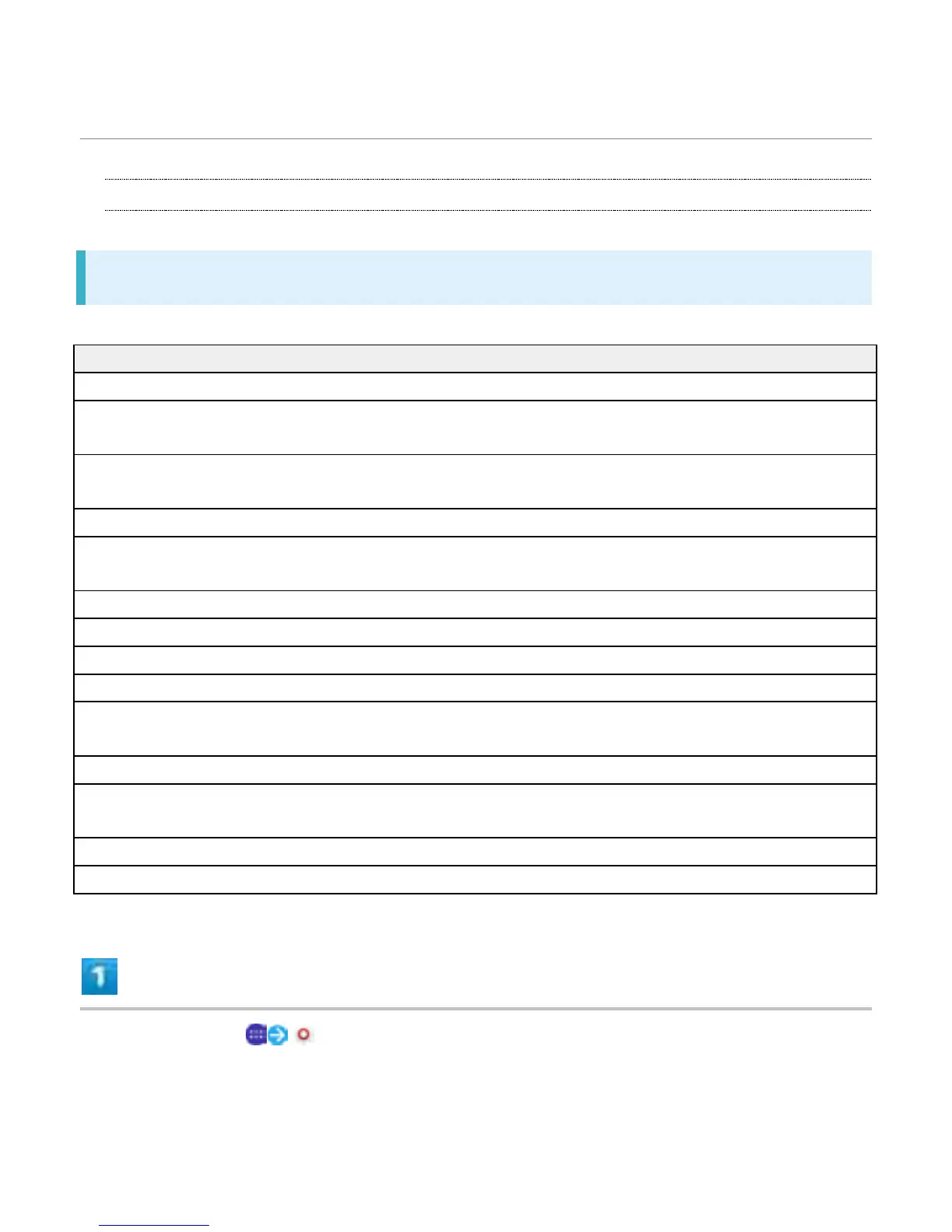
Set ringtone, touch sounds, etc. Settings can be made for the following items.
Item Description
Audio settings Make settings for sound.
Accessory settings Set sound quality etc. when connecting
accessories.
Media volume/Alarm volume/Ring volume Adjust Media volume, Alarm volume, Ring
volume, and Notification sound.
Also vibrate for calls Enable vibration for ringtone.
Interruptions Make settings for sound when calls and
notifications arrive.
Phone ringtone Set phone ringtone.
Increasing ringtone Set whether to increase ringtone.
Notification sound Set notification sound.
Startup sound Enable tone for activation.
Other sounds Dialpad tones/Screen locking sounds/Touch
sounds/Vibrate on touch.
Notification light Enable Notification Lamp for missed calls, etc.
When device is locked Enable to show notification contents in lock
screen.
App notifications Set notification setting for each application.
Notification access Enable application for reading notifications.
In Home Screen, (Settings)
26



 To Next Page