Installation and Reference Manual
Configuring PBX functionality
Installation and Reference Manual v3.2/0410/6 173
2
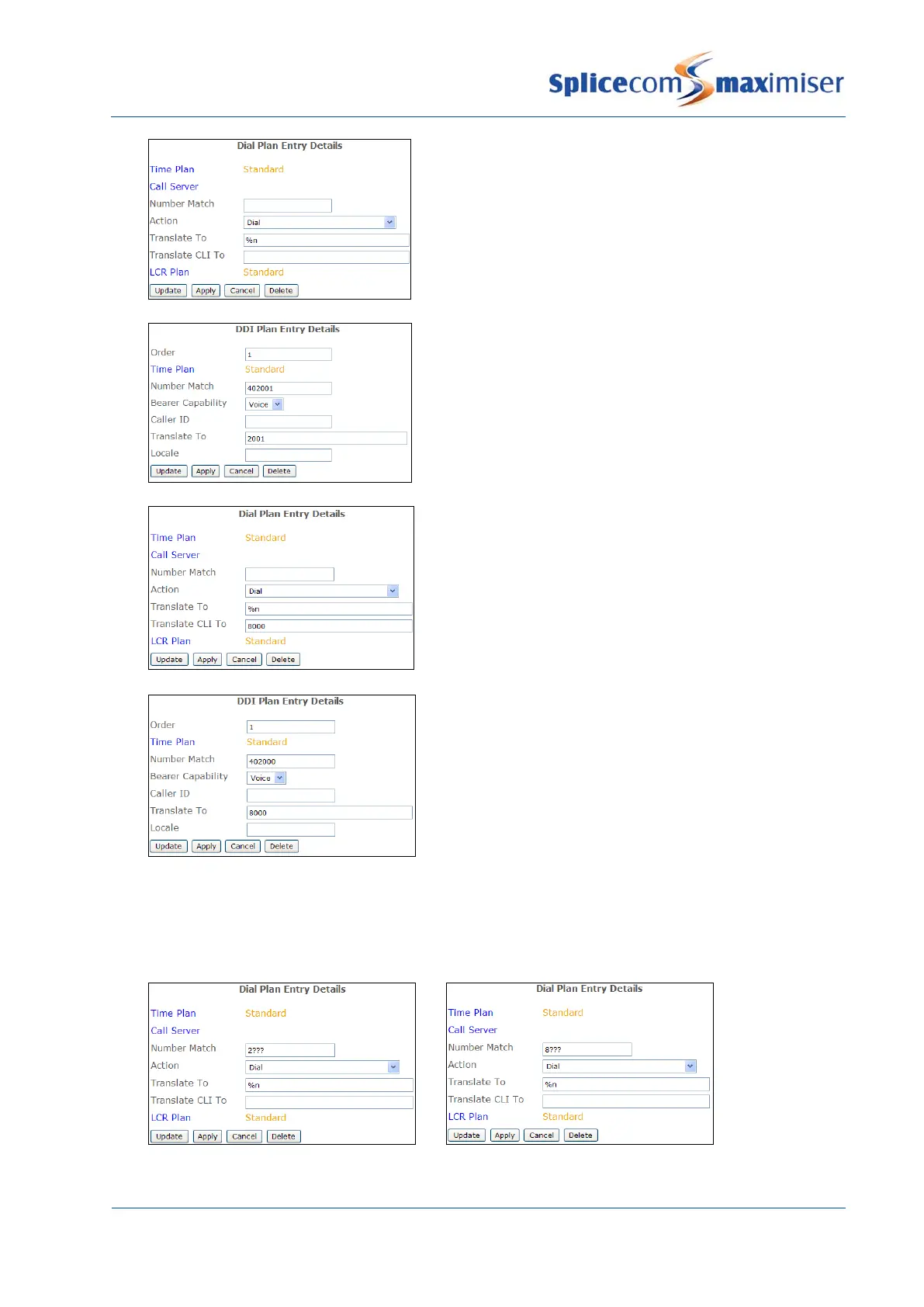
A User on extension 2001 dials an external number,
which is matched by the default Dial Plan entry. The
Translate CLI To field is blank so no outgoing CLI has
been specified. The LCR Plan determines the Trunk
that this call will use. The DDI Plan assigned to this
Trunk contains an entry for the User, ie the Translate
To field contains the User’s extension number 2001.
The outgoing CLI for this call will be 402001.
3
A User on extension 2001 dials an external number,
which is matched by the default Dial Plan entry. This
Dial Plan entry has been configured to send out the
DDI for the Main Department as the outgoing CLI.
The LCR Plan determines the Trunk that this call will
use. The DDI Plan assigned to this Trunk contains an
entry for the Main Department, ie the Translate To
field contains the Department’s extension number.
The outgoing CLI for this call will be 402000.
When configuring this facility it is recommended that Dial Plan entries similar to the following
examples are created for all ranges of extension numbers used on the system to ensure that
internal calls display the extension number calling rather the number entered in the Translate CLI
To field in the above Dial Plan entry eg 8000.



 To Next Page