Installation and Reference Manual
Working with Voicemail
Installation and Reference Manual v3.2/0410/6 223
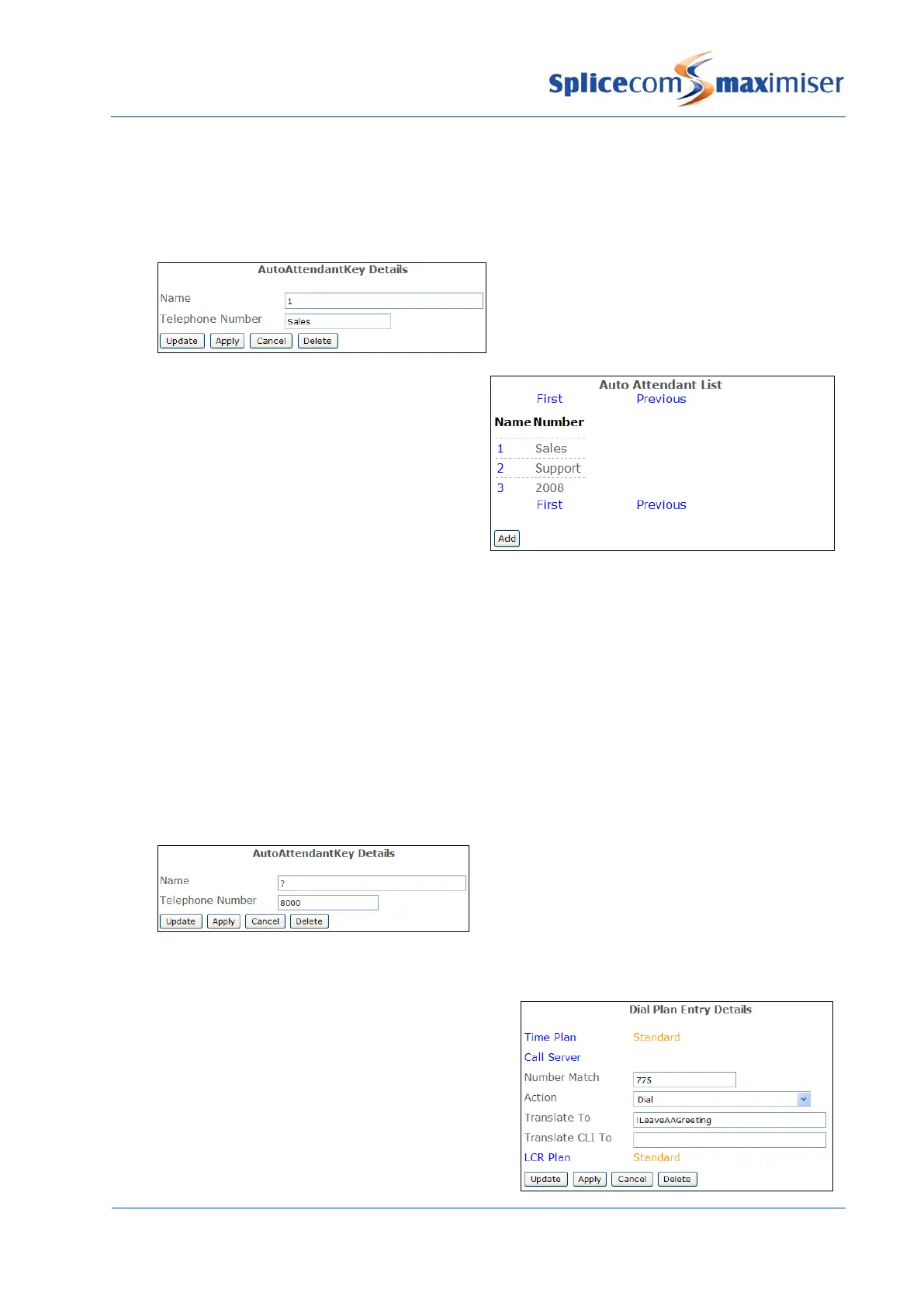
3 In the Name field enter the digit to be dialled by the caller to make the required selection. This
field can contain numbers 0-9, asterisk (*) and hash (#).
4 In the Telephone Number field enter the extension number, User or Department name to which
the caller will be transferred.
5 Select Update
6
Repeat steps 2 to 6 to enter all options to be
available to the caller.
The Auto Attendant can contain an option that will wait 3 seconds for the caller to make a choice. If a
choice is not made the call will be automatically transferred to a specified number. This can be
configured as follows:
1 In Manager select Auto Attendant
2 Select the Add button
3 In the Name field enter a question mark (?)
4 In the Telephone Number field enter the extension number, User or Department name to which
the caller will be transferred.
5 Select Update or Apply when ready.
Record a Greeting Message
To record a greeting to announce the options available
to a caller a Dial Plan entry should be created with
!LeaveAAGreeting entered in the Translate To field,
similar to this example:



 To Next Page