199/317
7 - Debugger and PROM Programmer Tutorial for ST72251
7.3.3.5 Using breakpoints
Our timing loop is very long. It is impractical to step through it. There is an easier way to do it:
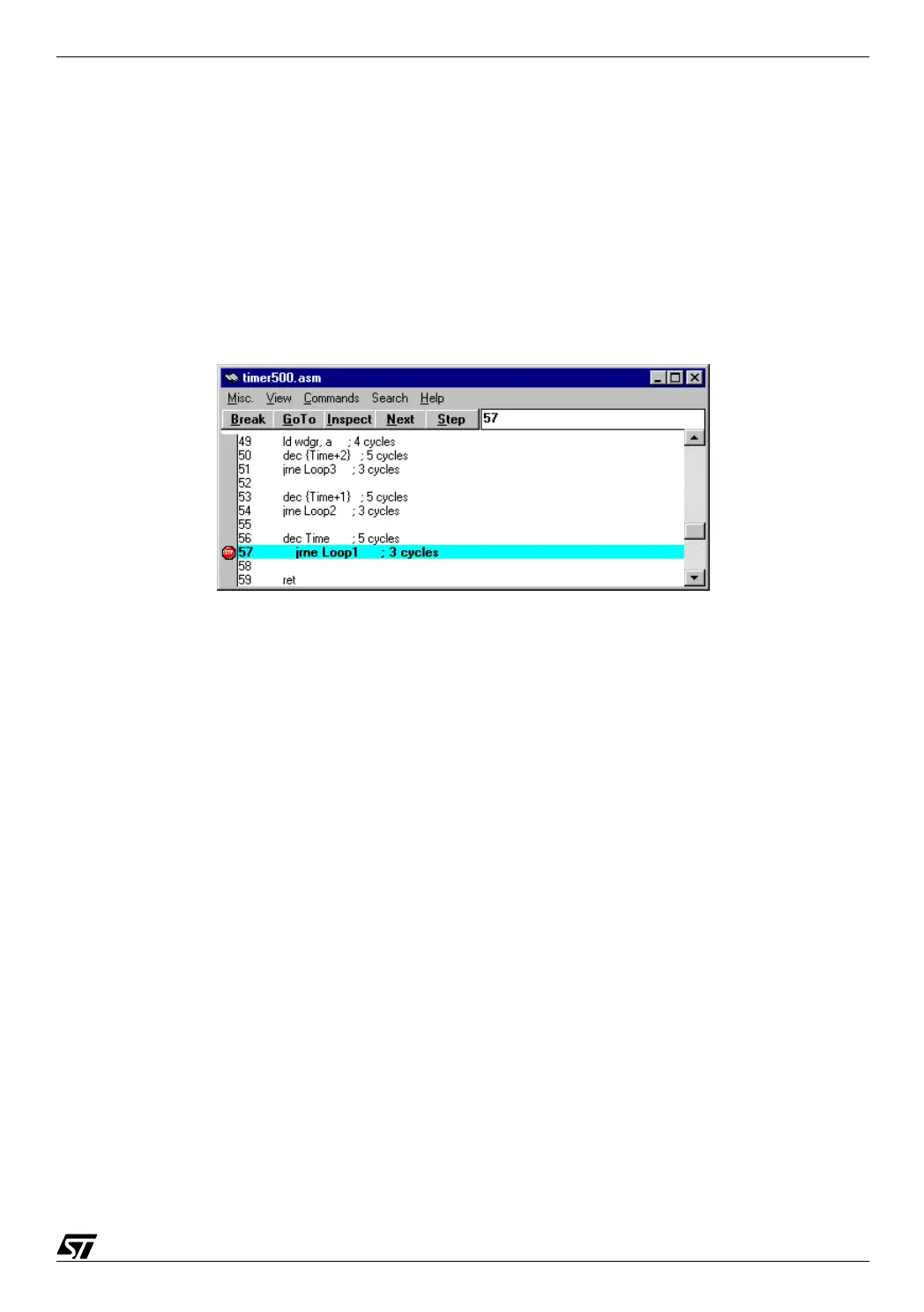
put a breakpoint. For example, we want to watch what happens to the outer loop. Put the
cursor on line 57, where the conditional jump that closes the outer loop stands. Press the
Break button: this line is now highlighted in bold, with a stop sign in the margin:
07-emu11.bmp
Now press Continue on the toolbox, or press F5. The execution point is now on that line, as in-
dicated by it being underlined. We can watch the values of the three counter bytes. Only the
first one is non-zero, since we can only arrive here if each inner loop has its counter at zero.
Let us press F5 (or Continue) again and again: we see the value of the first byte of the counter
decreasing from 9 down to 0. Each time we pressed Continue, we went through one round of
the outer loop. Since the initial value was 10, after ten presses on Continue we reach zero.
The inner loops themselves have done many more rounds. Now we can, for example, press
Step repeatedly and watch the program exiting from the subroutine to the main program.
Several breakpoints may be set at various places in the program. To recollect them all, select
the Window/Soft Breakpoints option in the toolbox. The following window then appears, indi-
cating where the breakpoints are and whether they are enabled. From this box you can delete
a breakpoint, disable it or re-enable it. A disabled breakpoint is displayed with the source line
in bold, but the stop sign in the margin is gray instead of red. The execution will not stop at a
disabled breakpoint, but it is ready to be quickly re-enabled. This allows you to prepare all the
breakpoints before starting the execution, then enable and disable only those that are useful
at certain times.



 To Next Page