Stonex S900
+
GNSS Receiver – User Manual 34
4.1.3 Initialization
After the activation of the sensor, go to Survey mode.
If the sensor is not ready to work yet, Stonex Cube-a will show you which operations are necessary to perform
its initialization, if “Show sensor calibration hints (animations) on screen” is enabled in Configure → System
Settings → Sensor Options page.
There is a necessary pre-requisite to use the IMU: the status of the GNSS solution must be Fixed.
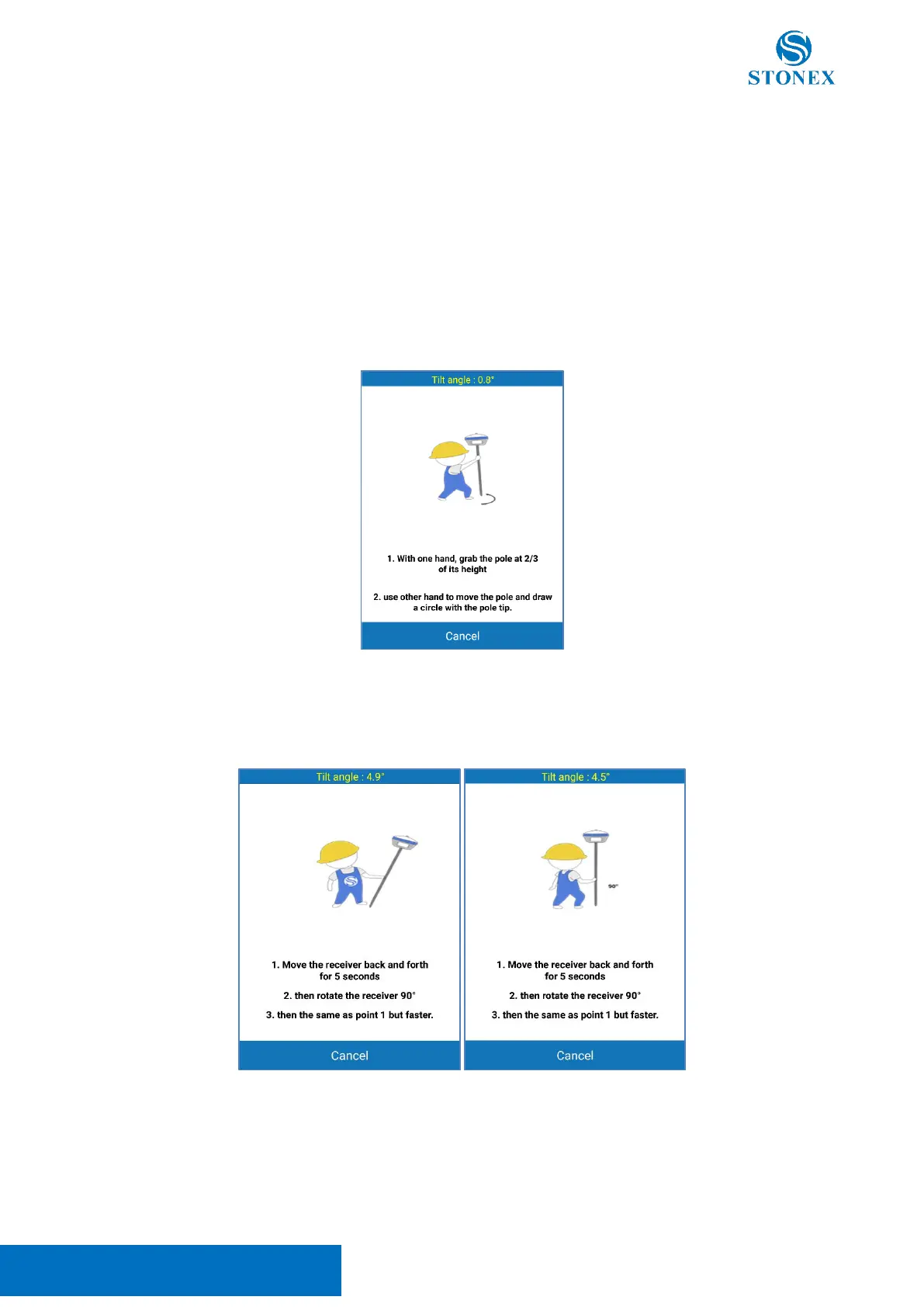
Then, if the sensor needs to be initialized, two different popup screens could show up.
The first screen contains the instruction for the magnetic initialization. Move the pole tip to draw a circle on
the ground.
The second screen shows how to aid the sensor to adjust the calibration parameters based on the local GNSS
position and accuracy.
Move the receiver back and forth for a few seconds in a direction. Then rotate the receiver by 90 degrees and
repeat the movements, in the same direction as before, as shown in the picture below.
If the screen does not disappear, try changing the position to get lower RMS values and then repeat the two
steps.
These screens could appear during the survey: this means that the IMU accuracy has degraded and it’s
necessary to adjust it.



 To Next Page