Stonex S900
+
GNSS Receiver – User Manual 5
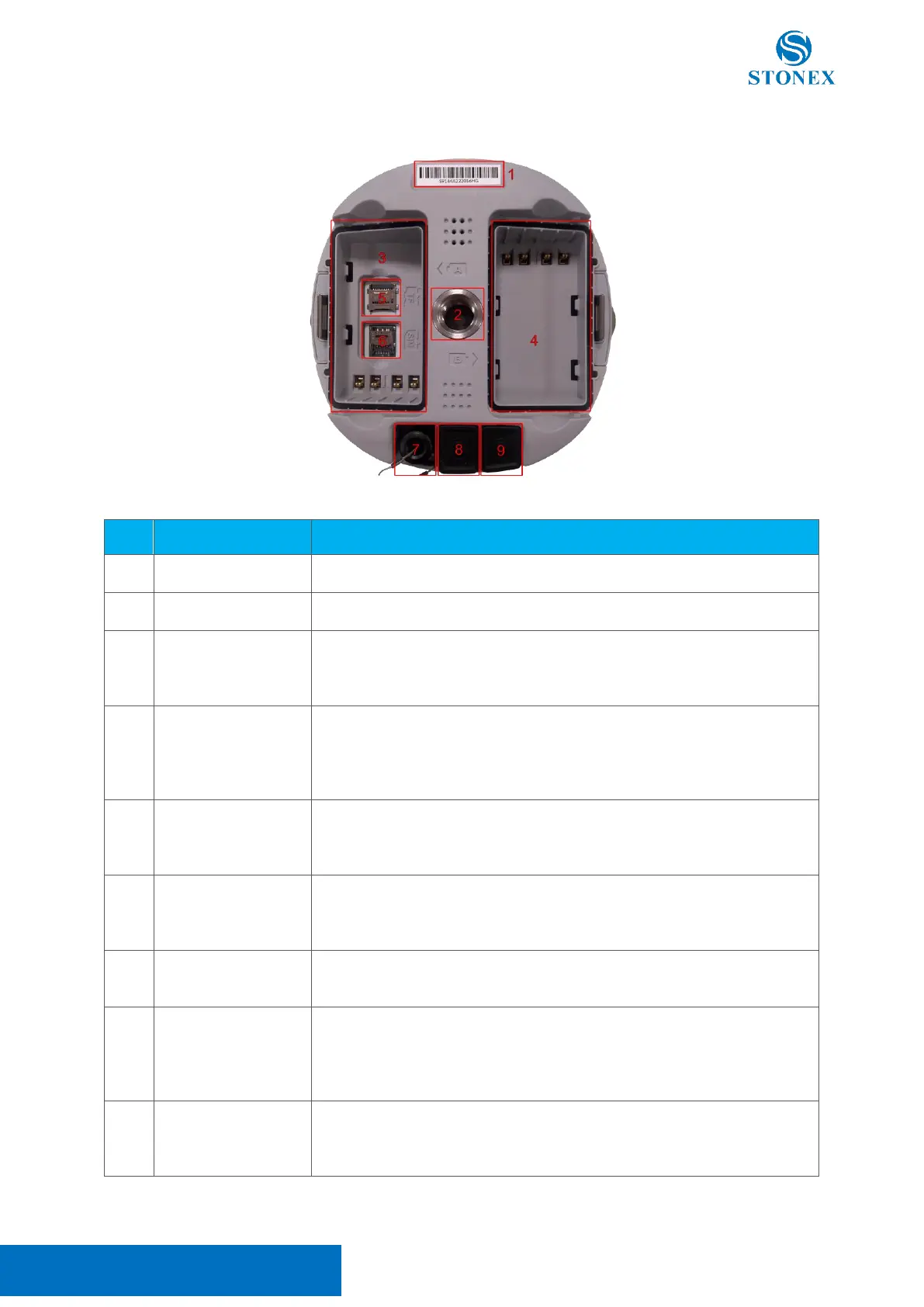
2.2 Bottom view
Serial number of the device
Screw connector for support
Battery locks in by sliding toward the metal connector so that it would
not fall if the cover were opened while the receiver is mounted on a pole.
The cover is removed by pressing the lateral button and can be locked.
Battery locks in by sliding toward the metal connector so that it would
not fall if the cover were opened while the receiver is mounted on a
pole. The cover is removed by pressing the lateral button and can be
locked.
MicroSD card can be used to expand the memory up to 32Gb, the card
is locked in by sliding the metal cover. The plastic cover is held by
pressure.
Slot for Nano SIM Card, the card must not have a PIN code, insert the
card while the device is off. The card is locked in by sliding the metal
cover. The plastic cover is held by pressure.
TNC connector for
UHF antenna
Screw connector for UHF module external antenna. The plastic cover is
held by pressure.
Can be used to connect an external power source, batteries are not
needed. Batteries in the device will not be charged up.
Can also be used for differential correction serial transmission to/from
external devices such as UHF.
Can be used to access the device’s internal memory if connected to a
PC using the USB connector of the provided cable.
Can also be used for NMEA message serial transmission.



 To Next Page